What is Batch Aggregation?
Batch aggregation refers to the process of using automated tools or platforms to quickly and uniformly transfer tokens (or crypto assets) dispersed across multiple blockchain wallet accounts to a designated primary account. Its primary purpose is to improve fund management efficiency, reduce the hassle of manual transfers, and minimize transaction fees (GAS) incurred from multiple transactions.
Core Features
Multi-Account Management: Supports handling token aggregation from multiple wallets simultaneously, ideal for users managing a large number of accounts.
Automated Operations: Executes transfers in bulk via tools, reducing time and the risk of manual errors.
Cost Reduction: Optimizes GAS fee expenditures by consolidating transactions.
Supports Multiple Tokens: Works with SPL tokens (including Token2022 standard) on Solana, ERC-20 tokens on Ethereum, and more.
Typical Use Cases
Projects: Aggregate tokens from multiple wallets into a primary account for liquidity provision, fund allocation, or operations.
Traders/Institutions: Consolidate scattered assets for easier fund management and investment decisions.
Individual Users: Gather fragmented tokens into a single wallet for convenient tracking and usage.
Why Aggregate?
The main purpose of batch token aggregation is to optimize fund management and improve operational efficiency. Below are the specific reasons and advantages:
Simplified Fund Management
Centralized Assets: Consolidating tokens scattered across multiple wallets into a primary account makes tracking and managing assets easier, reducing confusion or oversight.
Ease of Use: Centralized funds are more convenient for investing, trading, payments, or providing liquidity.
Lower Transaction Costs
Reduced GAS Fees: Batch aggregation processes transfers from multiple accounts in a single operation, significantly lowering GAS fees compared to manual transfers.
Resource Optimization: For example, on Solana, using GTokenTool’s "Execute All" mode allows the first wallet to cover all GAS fees, further reducing costs.
Improved Efficiency
Time-Saving: Manual transfers across multiple accounts are time-consuming and error-prone, while batch aggregation tools (like GTokenTool) automate the process, greatly improving efficiency.
Scalability: Ideal for projects or users managing multiple wallets (e.g., airdrop hunters, NFT holders) to quickly organize assets.
Supporting Project Operations
Fund Consolidation: Projects need to aggregate tokens into a primary account for liquidity pools, marketing campaigns, development funds, or other operational needs.
Airdrops & Distributions: Simplifies managing airdropped tokens or testnet assets.
Risk Reduction
Minimized Oversight Risk: Scattered wallets may be forgotten due to neglect, whereas aggregating into a primary account simplifies backup and monitoring.
Enhanced Security: Centralizing assets into a more secure wallet (e.g., hardware wallet) reduces the risk of small wallets being compromised.
Adapting to Specific Scenarios
Trading Optimization: Traders aggregate assets for large-scale operations on decentralized (DEX) or centralized exchanges (CEX).
On-Chain Activities: Certain DeFi protocols or staking activities may require consolidating tokens into a single account.
Functional Overview
Batch Aggregation: Through the GTokenTool platform, users can aggregate tokens (default SOL or specified SPL tokens) from multiple Solana wallets into a primary account.
Advantages:
Eliminates the hassle of manual transfers.
Reduces GAS fees from multiple transactions.
Enhances fund management efficiency, suitable for projects, traders, or institutional users.
Supports Token2022: Compatible with Solana’s latest token standard, applicable to various SPL tokens.
Other Chains: ETH, BSC, TON – https://robotv2.gtokentool.com.
Operational Steps
Based on the provided reference, follow these steps:
Access the Aggregation Page:
Click "Select Wallet" to connect your Solana wallet (e.g., Phantom or Solflare).
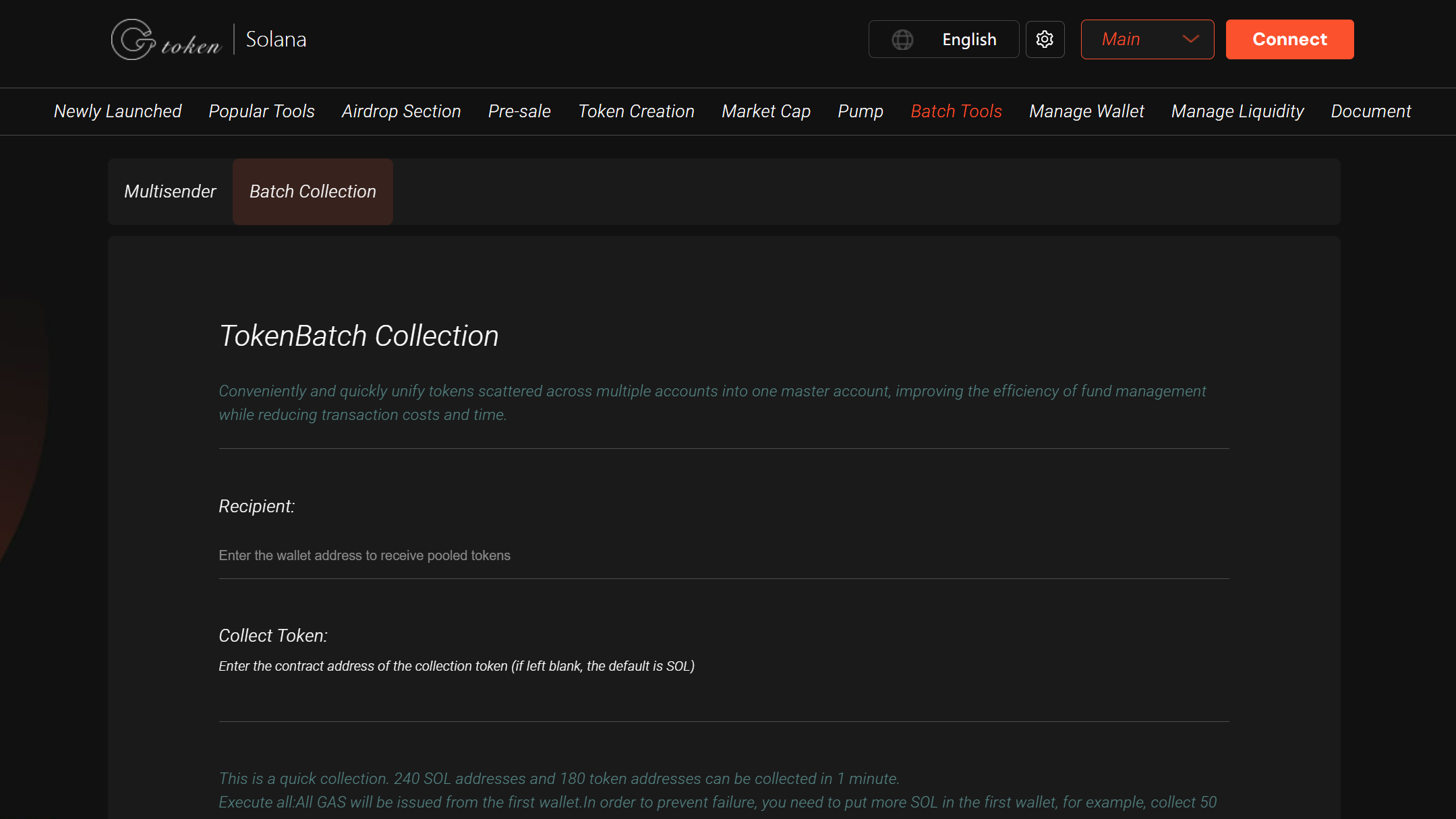
Batch Aggregation Setup:
Receiving Address: Enter the primary wallet address for aggregated tokens.
Token to Aggregate: Input the token address (leave blank for default SOL aggregation).
Import Wallets: Add wallets via private key input or file upload.
Check Wallet Info:
After importing, the platform displays each wallet’s address, SOL balance, and token amount.
Refresh wallets if balances appear incorrect.
Select Aggregation Mode:
Send All: Aggregates all specified tokens from wallets to the primary account.
Fixed Amount: Sets a fixed token amount (e.g., 10 tokens) per wallet.
Retain Balance: Specifies a reserved token amount per wallet, with the remainder aggregated.
Execute Aggregation:
Execute All: The first wallet covers all GAS fees—ensure it has sufficient SOL (recommend extra to prevent failures).
Execute Individually: Each wallet pays its own GAS fee—ensure each has ≥ 0.001 SOL.
Confirm Transactions:
Verify details, click "Execute," and approve the transaction via wallet pop-up.
Track status on Solscan (Solana blockchain explorer).
Key Notes
SOL Balance Requirement: Each transfer requires minimal GAS (~0.000005 SOL/tx). Ensure wallets have enough SOL, or they’ll be skipped.
Blockchain Stability: Solana network congestion may cause failures—retry or switch nodes if needed.
Private Key Security: GTokenTool claims keys aren’t stored, but always exercise caution.
Supported Assets: Only SPL tokens (including Token2022); non-SPL assets are unsupported.
Support: Join GTokenTool’s Telegram: https://t.me/GToken_EN.
Applicable Scenarios
Projects: Aggregate tokens from multiple wallets for liquidity/operations.
Traders/Institutions: Organize scattered assets for optimal allocation.
Individual Users: Consolidate multi-wallet assets into one primary account.