Understand Freeze Authority:
Freeze authority is a permission in Solana’s SPL Token program that allows a designated address to freeze token accounts, preventing transfers.
Revoking it sets the freeze authority to null, permanently disabling this feature for the token.
Prerequisites:
Solana-Compatible Wallet: Use a wallet like Phantom or Solflare with the current freeze authority’s private key.
SOL for Fees: A small amount of SOL (~0.01 SOL) is needed for transaction fees.
Token Mint Address: The address of the token you want to manage.
Access to a Tool or CLI: Tools like GTokenTool or Solana’s CLI (spl-token) can be used.
Using GTokenTool (Web-Based Method):
Select the option to disable or revoke freeze authority.
Confirm the token mint address and ensure you have the current freeze authority.
Approve the transaction in your wallet. This sends an instruction to set the freeze authority to null.
Go to the "Permission Management" section in the token management tool.
Locate the "Freeze Authority" option for your token.
Navigate to GTokenTool: Visit the token management page at https://sol.gtokentool.com/en/Token/management.
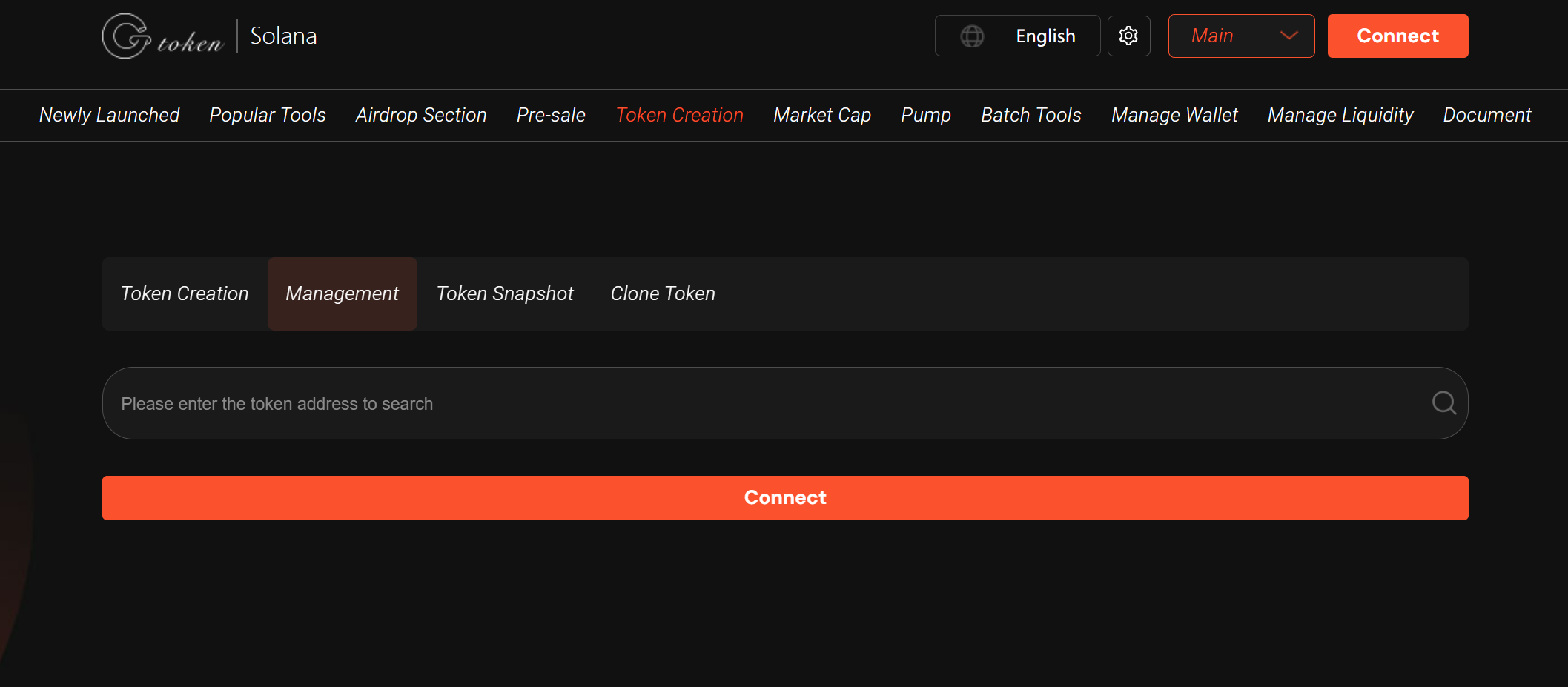
Connect Wallet: Click "Connect Wallet" and select your wallet (e.g., Phantom).
Access Permission Management:
Revoke Freeze Authority:
Verify Completion: Check the token’s details on a block explorer like Solscan to confirm the freeze authority is revoked (it should show as "Not Set" or equivalent).
Note: If you encounter issues (e.g., a prompt persists), it may be due to network caching. Try switching networks or refreshing the page.
Using Solana CLI (Manual Method):
Replace <TOKEN_MINT_ADDRESS> with your token’s mint address.
This command sets the freeze authority to null.
Install Solana CLI: Follow the official installation guide to set up the CLI on your system (Windows/macOS/Linux).
Set Up Wallet: Ensure your wallet’s keypair (with freeze authority) is configured in the CLI.
Run the Revoke Command:
bashspl-token authorize <TOKEN_MINT_ADDRESS> freeze --disable
Sign the Transaction: Use your wallet’s private key to sign and submit the transaction.
Verify: Use Solscan or another explorer to confirm the freeze authority is revoked.
Security Considerations:
Verify Authority: Ensure you control the freeze authority before attempting to revoke it. Only the current freeze authority can perform this action.
Immutable Action: Revoking freeze authority is permanent. Once revoked, no one can re-enable it.
Secure Your Wallet: Protect your private keys and avoid phishing sites. Use reputable tools like GTokenTool or official Solana CLI.
Legal Compliance: Check if revoking freeze authority aligns with your project’s regulatory requirements, as some jurisdictions may require freeze capabilities.
Troubleshooting:
Network Issues: Solana network congestion can cause delays. Retry or check network status.
Tool Errors: If GTokenTool fails, ensure your wallet is connected properly or try clearing the cache.
CLI Errors: Double-check the mint address and ensure your CLI is updated to the latest version.
Post-Revocation:
Update your community about the change to build trust, as revoking freeze authority signals decentralization.
Monitor token activity on Solscan to ensure no unexpected issues arise.
GTokenTool Features: GTokenTool simplifies the process with a visual interface, supporting multiple chains (Solana, TON, BSC) and tasks like token creation, airdrops, and permission management. It’s ideal for non-technical users.
Community Support: For questions, join GTokenTool’s official Telegram group at https://t.me/GToken_EN.