Introduction
If you're new to crypto, you've probably noticed something odd: a token launches out of nowhere, trading volume suddenly explodes, and the price shoots straight up like it's the next big thing. Behind the scenes, there's often a key tool driving that action — a market cap management bot.
A market cap management bot is an algorithm-based automated trading system built specifically for crypto token projects. It executes preset strategies to control price action, manage trading volume, and run precise market operations — making the token's market performance align with the project's goals. In simple terms, think of it as a "smart trading assistant" that handles buys and sells automatically, 24/7, so you don't have to.
GTokenTool is a powerful, all-in-one token creation and quantitative trading platform designed for decentralized exchanges (DEXs). It supports four core modes — pump, dump, volume boosting, and grid trading — and works across major chains like Solana, Ethereum, BSC, Arbitrum, Base, and more. Whether you're a project founder who just launched a token or a new trader trying to understand how market management works, mastering this tool puts you in a much stronger position.
This guide starts from absolute zero. We'll break down what a market cap management bot actually is, what GTokenTool can do, and how to set everything up step by step — in plain English. You'll also find comparison tables to quickly understand the different modes, plus answers to the most common questions beginners ask.
1. What Exactly Is a Market Cap Management Bot?
Core Definition
A market cap management bot is an automated program that uses algorithms to handle tasks like buying and selling, injecting liquidity, and stabilizing prices. Its purpose is to optimize a token's market presence and tradability. You can think of it as an "autopilot trading assistant" — in the past, manipulating a token's price meant manually staring at candlestick charts and frantically switching between wallets, which was slow and error-prone. A bot lets you import dozens or even hundreds of wallets at once and have them execute your strategy automatically, no manual intervention needed.
How It Differs from Manual Trading
Manual trading requires a person glued to the screen, placing orders by hand whenever the price moves. It's slow, inefficient, and easily influenced by emotions. A market cap management bot offers:
-
24/7 operation – Bots don't sleep. They execute your strategy around the clock.
-
Millisecond response times – Connecting via API or directly on-chain, they react almost instantly to price changes.
-
Bulk wallet operations – Control tens or hundreds of wallet addresses simultaneously, mimicking organic retail trading and preventing a single address from being flagged as the "whale in control."
-
Strict strategy execution – No fear, no greed. The bot follows your parameters exactly.
Who Uses These Bots?
Market cap management bots are primarily used by:
-
Token project teams – To manage their token's market cap, liquidity, and trading depth.
-
Market makers – To efficiently provide market-making services for multiple tokens.
-
Traders – Looking to automate their operations and boost efficiency far beyond what's possible manually.
2. How Market Cap Management Bots Work (Simple Breakdown)
Market cap bots generally fall into two categories:
Traditional finance bots are basically advanced data aggregators. They operate within strict regulatory frameworks, providing charts and quantitative models to assist human decisions but rarely executing trades directly.
Crypto market cap bots are completely different. They execute buy and sell orders directly on-chain or via exchange APIs, actively shaping market performance through high-frequency trading and bulk wallet management.
Using GTokenTool as an example, the core workflow is:
-
Connect your wallet → Link up using MetaMask or Phantom.
-
Select token and pool → Input the token's contract address to pull up the DEX trading pool info.
-
Import operating wallets → Import or batch-generate multiple wallet addresses that will work together.
-
Choose a mode and set parameters → Pick from Pump, Dump, Volume Boost, or Grid Trading. Set buy amounts, time intervals, target price, etc.
-
Launch the bot → The bot executes trades automatically according to your settings, with live logs displayed.
3. GTokenTool's Four Core Modes Explained
GTokenTool offers four automated trading modes, each designed for a different objective:
Mode 1: Pump Mode – Rapidly Push the Price Up
By continuously buying the token, this mode drives the market price higher. The goal is a quick price surge to attract attention and FOMO buyers. You set a target price (above the current market price), choose the buy amount or quantity, and set the interval between trades (usually 8–15 seconds). The bot then uses multiple wallets to buy in batches, pushing the price up until the target is reached, then automatically stops.
Mode 2: Dump Mode – Sell Off Quickly, Drive the Price Down
This mode distributes sell orders across multiple wallets to push the price down, ideal for exiting a position or shaking out weak hands before accumulating more. The smart algorithm spreads out the sell orders to mimic natural market behavior, avoiding obvious manipulation flags.
Mode 3: Volume Boost Mode – Create the Appearance of High Activity
Rapidly cycles through buy and sell orders without driving significant price movement. The goal is purely to increase trading volume. All trades are real, on-chain transactions, 100% verifiable. This is critical for newly launched tokens, as DEX rankings and visibility often depend heavily on volume metrics.
Mode 4: Grid Trading Mode (Buy Low, Sell High) – Capture Range-Bound Profits
Executes repeated buy-low, sell-high cycles within a set price range, generating consistent profits from volatility. This is ideal for market making. Once the grid parameters are configured, the bot runs 24/7, capturing every swing.
4. GTokenTool Bot Configuration Tutorial (Step-by-Step)
Here's the full setup guide, using BSC as an example.
Step 1: Access the Platform and Connect Your Wallet
Open your browser (Chrome + MetaMask recommended) and go to the GTokenTool quantitative bot page. Click "Connect Wallet" in the top right and select MetaMask. After connecting, the page will prompt a one-time "unlock fee."
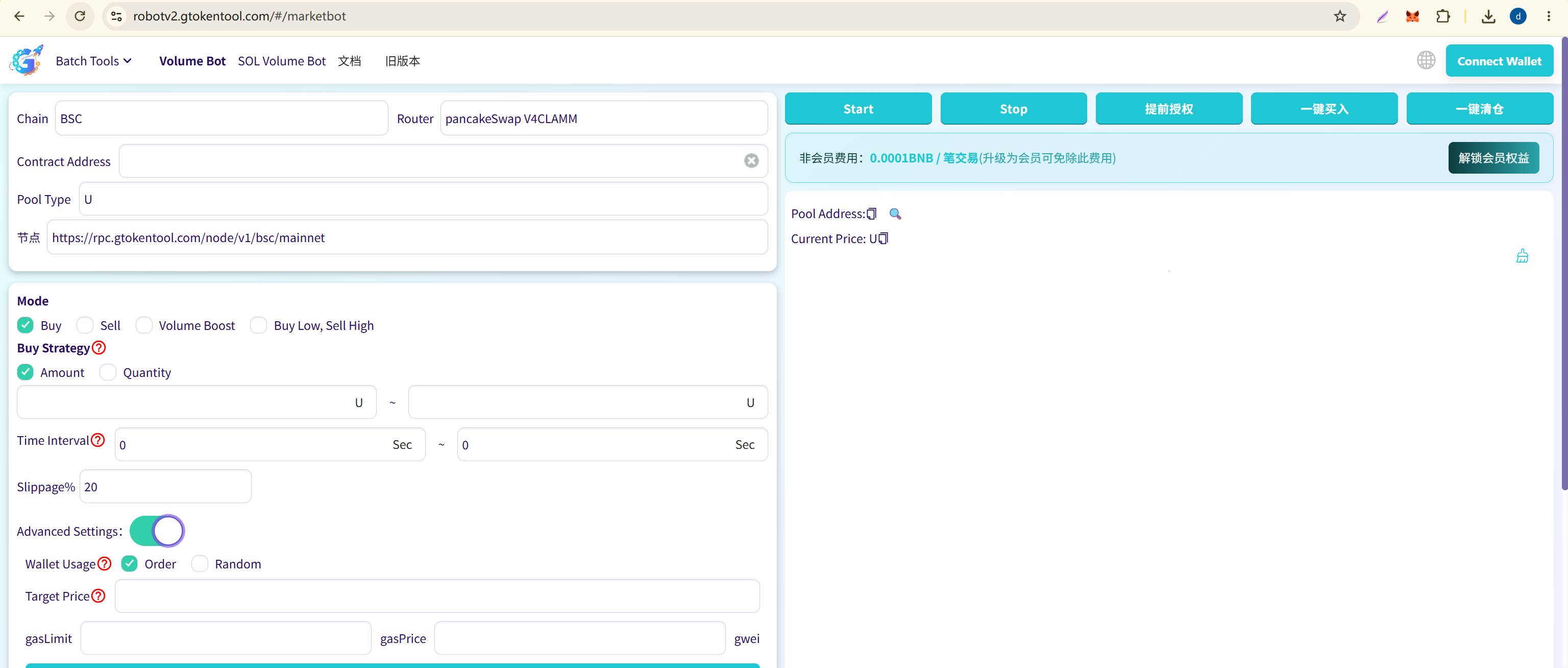
⚠️ Important: Before connecting, make sure your wallet network is set to the chain you intend to trade on (e.g., BSC Mainnet). Using the wrong network can lead to permanent loss of funds.
Step 2: Search and Confirm the Trading Pool
In the middle of the page, select the exchange (e.g., PancakeSwap V3) and enter the contract address of your token. For V3 pools, you must also select the correct fee tier (0.01%, 0.05%, 0.25%, 1%, etc.). Click "Search Pool." The system will pull up the pool info — current price, liquidity, token symbol, etc. Confirm that the pool info is correct before proceeding.
⚠️ This step is crucial: If you get the pool wrong, every subsequent trade will fail.
Step 3: Import Trading Wallets (The Core of Bulk Operations)
GTokenTool's power lies in its ability to import dozens or even hundreds of wallets at once. Click "Import Wallets" and paste the private keys, one per line. We recommend keeping it under 100 wallets at a time to avoid browser lag. Once imported, the table will display each wallet's balance.
If you don't have that many wallets, use the "Generate Wallets" feature to create them in bulk for free. Important: After generation, immediately click "Export Private Keys" and save the file. If you lose them, they're gone forever.
Step 4: Select a Trading Mode and Configure Parameters (Most Critical Step)
This is the heart of the whole setup. Let's use Pump Mode as an example:
| Parameter | Description | Recommended Setting |
|---|---|---|
| Mode Selection | Choose one of four modes | Select "Pump" |
| Buy Calculation | By amount or by quantity | Choose "By Amount" |
| Buy Amount | The range for each buy order | e.g., 0.01–0.05 BNB |
| Interval | Seconds between each buy | 8–15 seconds |
| Slippage | Maximum acceptable price deviation | 10%–99% |
| Target Price | Stop automatically when reached (optional) | Set above current price |
| Wallet Usage | Sequential or random | Random looks more organic |
After setting these, if "Simultaneous Wallet Trading" is enabled, click "Approve" first, then click "Start Buying."
Step 5: Monitor the Bot in Real Time
Once launched, the page will display a live trade log — showing each transaction's status, execution price, gas used, and more. You can pause, adjust settings, or stop the bot at any time.
The whole process, from connecting your wallet to launching the bot, typically takes 5–10 minutes. There's zero coding required — it's completely plug-and-play.
5. Newbie Pre-Flight Checklist
Before you start, make sure you have:
-
✅ A browser with MetaMask or Phantom installed.
-
✅ Enough native tokens (BNB, ETH, SOL, etc.) in your wallet to cover gas fees.
-
✅ Your wallet network switched to the target blockchain.
-
✅ The token's contract address ready.
-
✅ A plan to test with a tiny amount of money first before scaling up.
-
✅ Backups of all operating wallet private keys before importing them.
Data Comparison Tables
Table 1: GTokenTool Four Core Modes Comparison
| Feature | Pump Mode | Dump Mode | Volume Boost Mode | Grid Trading Mode |
|---|---|---|---|---|
| Core Action | Continuous buying to drive price up | Distributed selling to push price down | Rapid back-and-forth buys and sells | Repeated buy low, sell high in a range |
| Main Goal | Generate hype, attract attention | Exit positions, shake out weak hands | Create activity illusion, boost rankings | Consistent arbitrage, capture spreads |
| Price Impact | Upward | Downward | Minimal | Bounces within a defined range |
| Ideal Scenario | New token launch, riding positive news | Taking profit at tops, accumulation prep | Activating a new token, maintaining visibility | Sideways markets, ongoing market making |
| Capital Requirement | Higher | Lower | Lower | Medium |
Table 2: Market Cap Bot vs. Manual Trading
| Feature | Market Cap Management Bot | Manual Trading |
|---|---|---|
| Execution Speed | Milliseconds | Seconds to minutes |
| Uptime | 24/7 non-stop | Limited by human endurance |
| Wallets Managed | Up to hundreds simultaneously | Typically 1–3 |
| Emotional Influence | Zero emotion, pure execution | Easily swayed by fear/greed |
| Precision | Down to the second and smallest unit | Prone to human error |
| Cost | Tool fee + gas fees | Only gas, but high time cost |
| Learning Curve | Low (no-code, 5–10 min to start) | Low, but enormous efficiency gap |
Table 3: Supported Chains on GTokenTool
| Blockchain | Supported DEXs | Recommended Wallet | Gas Fee Level | Speed |
|---|---|---|---|---|
| Solana | Raydium V2/V3, Jupiter | Phantom | Very Low (<$0.01) | Fast (<1s) |
| BSC | PancakeSwap V2/V3/FOUR | MetaMask | Low (<$0.10) | Fast (~3s) |
| Ethereum | Uniswap V2/V3 | MetaMask | High (5–50+) | Medium (~15s) |
| Arbitrum | Uniswap V2/V3 | MetaMask | Low (<$0.10) | Fast (~2s) |
| Base | Uniswap V2/V3 | MetaMask | Low (<$0.10) | Fast (~2s) |
| Polygon | QuickSwap, Uniswap V2/V3 | MetaMask | Very Low (<$0.01) | Fast (~2s) |
Frequently Asked Questions (FAQ)
Q1: I'm a total beginner who has never made an on-chain trade. Can I still use GTokenTool?
A: Absolutely. GTokenTool's biggest selling point is its no-code, clean interface. All you need to do is: install a wallet browser extension → fund it with gas tokens → connect to the platform → input your parameters → hit start. The whole process from wallet connection to launch usually takes 5–10 minutes. Still, we strongly recommend new users test with an extremely small amount (like 0.01 BNB) first to get comfortable with the flow before committing real capital.
Q2: Is GTokenTool safe? Does the platform store my private keys?
A: All operations happen on the frontend, in your browser. GTokenTool does not store your private keys. The trading logic executes locally, and private keys are never uploaded to a server. That said, security is never absolute. Our recommendations: ① Use a dedicated operating wallet, never your main wallet. ② Back up private keys before importing. ③ Consider moving funds out after your session.
Q3: Which of the four modes is best for a beginner to start with?
A: Start with Volume Boost Mode. Three reasons: ① It's the lowest risk — you're not targeting price movement, so the chance of major losses is small. ② It's simple — just set the buy/sell amounts and intervals. ③ The results are immediately visible, as your trading volume ticks up fast. Once you're comfortable, move on to Pump and Dump modes. Save Grid Trading as a more advanced technique.
Q4: Why do some trades fail when the bot is running?
A: Failed trades usually boil down to: ① Insufficient balance — check that you have enough of both the gas token and the token you're trading. ② Transaction expired — network congestion or slow nodes; try switching RPC endpoints or increasing the gas fee. ③ Skipping steps — like not verifying the pool before trading. ④ Slippage set too low — newly launched tokens can be wildly volatile; set slippage higher (we recommend 20%+ for new tokens).
Q5: Are the volume boost trades "fake trades"?
A: No. Every trade executed by GTokenTool is a real, on-chain transaction that is 100% verifiable. Anyone can look them up on a block explorer. It's essentially "real trades, automated execution" — not fabricated records.
Q6: What if I don't have a bunch of wallet addresses?
A: GTokenTool has a built-in "Generate Wallets" feature that creates new addresses in bulk for free. You can also manually create multiple MetaMask wallets and export their private keys to import. Just remember to download and save the private key file immediately after generation — the platform doesn't keep a copy. For beginners, test with 5–10 wallets first, then scale up as you gain confidence.
Summary
A market cap management bot is a powerful automated trading tool that uses algorithms to replace manual execution, enabling 24/7 quantitative trading. GTokenTool stands out as a leading platform by offering zero-code operation, multi-chain support, and four distinct trading modes, dramatically lowering the barrier to crypto market cap management.
For beginners, the key takeaways for using GTokenTool are:
-
Understand before you operate – Grasp the mechanics and ideal use cases for each of the four modes. Pick the one that fits your current goal.
-
Start tiny – Always test with the absolute minimum amount first. Once everything checks out, you can gradually scale up.
-
Safety first – Use dedicated operating wallets, back up private keys religiously, and never put all your eggs in one basket.
-
Monitor actively – Even though the bot runs automatically, check the logs regularly. If something looks off, pause and adjust.
The essence of a market cap management bot is as an "efficiency multiplier" — it frees you from tedious manual work but can't make the right decisions for you. As one experienced user put it: "Good market cap management is a lubricant, not a harvesting tool. Its highest form is when the market doesn't even feel its presence, yet constantly enjoys the liquidity and price stability it provides."
Whether you're a project founder who just minted a token or a newcomer wanting to learn quantitative trading, understanding and mastering market cap management bots is a crucial step toward going further in the crypto world.