Prepare Your Wallet:
Ensure you have a Solana wallet (e.g., Phantom or Solflare) with at least 0.5 SOL to cover transaction fees.
Connect your wallet to GTokenTool via the interface at sol.gtokentool.com.
Access the Market ID Creation Page:
Navigate to the token list page on GTokenTool: https://sol.gtokentool.com/liquidityManagement/createMarket.
Select the SPL token for which you want to create a market ID.
Click “Create Market” or “Create OpenBook ID” to enter the Market ID creation interface.
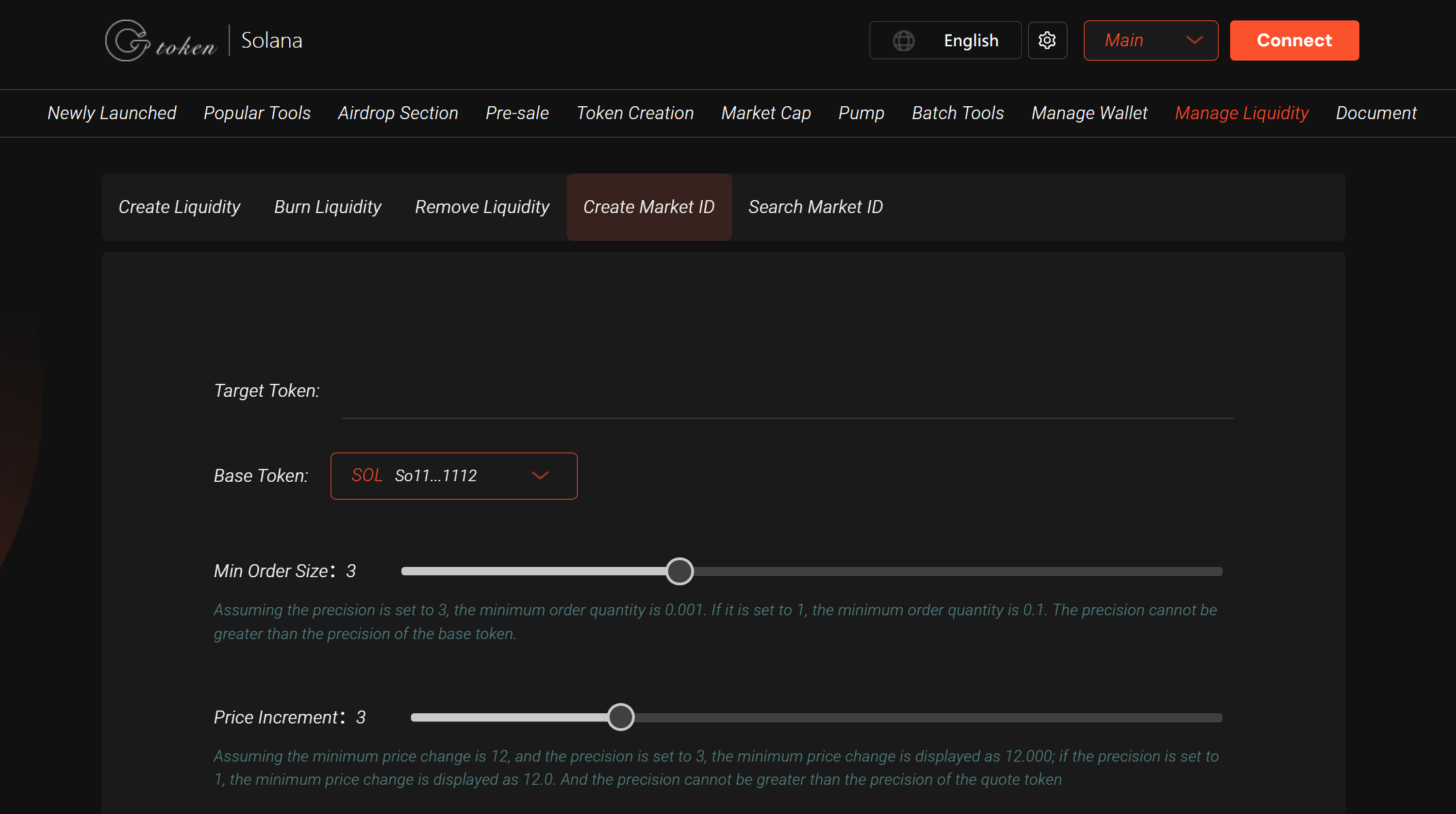
Configure Market Parameters:
Token Pair: Choose the trading pair (e.g., your SPL token paired with SOL or USDC).
Minimum Order Size: Set the precision for the minimum transaction volume (e.g., entering “2” sets the minimum to 0.01; “4” sets it to 0.0001).
Price Increment: Define the decimal places for the minimum price change in the order book.
Default parameters can often be left as is unless you have specific requirements.
Create the Market ID:
First, to create a token account.
Second, to finalize the Market ID creation. Do not close the page between confirmations.
Click “Create” to initiate the process.
Your wallet will prompt for two confirmations:
The process typically takes a few seconds, after which you’ll receive a unique OpenBook Market ID.
Verify and Save the Market ID:
Check your wallet’s transaction history for the payment hash.
Search the hash on a Solana blockchain explorer like Solscan to retrieve the Market ID.
Copy the Market ID immediately after creation. If you forget to save it, you can:
Alternatively, use GTokenTool’s Market ID query tool https://sol.gtokentool.com/en/liquidityManagement/searchId by entering your token’s contract address to retrieve the ID.
Next Steps:
Use the Market ID to create a liquidity pool on a DEX like Raydium.
Add liquidity promptly to enable trading and attract users.
Monitor market activity using tools like Solscan or DexScreener.
Ensure your token’s metadata (name, symbol, logo) is accurate before creating the Market ID.
For support, join GTokenTool’s Telegram group: https://t.me/GToken_EN.
If the transaction fails, ensure “Versioned Transactions” are disabled in your wallet settings (e.g., on Raydium) and verify you have sufficient SOL.