I. Introduction to opBNB
1. What is opBNB?
opBNB is BNB Chain's Layer 2 scaling solution built on Optimism's OP Stack, designed to provide a high-throughput, low-cost transaction environment for the BNB Chain ecosystem. As an Ethereum-compatible blockchain, opBNB inherits the advantages of BNB Chain while significantly improving transaction processing capacity through Optimistic Rollup technology.
2. Development Timeline of opBNB
June 2023: opBNB testnet launch
September 2023: opBNB mainnet officially launched
Early 2024: Daily transactions surpassed 5 million
Mid-2024: Ecosystem projects exceeded 1,000
3. opBNB Pricing and Economic Model
opBNB itself is not a token but a Layer 2 network that uses BNB as its native token. Users need BNB to pay for gas fees, but compared to the BNB Chain mainnet, opBNB transaction fees are significantly lower (approximately $0.001 per transaction).
4. Key Events in opBNB
Integration with major wallets (MetaMask, Trust Wallet, etc.)
Cross-chain deployment of multiple DeFi projects (PancakeSwap, Alpaca Finance, etc.)
Partnerships with infrastructure providers like Chainlink and The Graph
II. Preparations Before Creating an opBNB Token
1. Required Materials
BNB tokens: For paying gas fees to deploy contracts (recommend at least 0.1 BNB)
Wallet: A wallet that supports the opBNB network (e.g., MetaMask)
RPC Configuration: Set up your wallet to connect to the opBNB network
Code Editor: Such as VS Code
Node.js Environment: For compiling and deploying smart contracts
2. Configuring the opBNB Network (Using MetaMask as an Example)
Open MetaMask and click the network selection dropdown
Select "Add Network"
Enter the following information:
Network Name: opBNB Mainnet
New RPC URL: https://opbnb-mainnet-rpc.bnbchain.org
Chain ID: 204
Currency Symbol: BNB
Block Explorer URL: https://mainnet.opbnbscan.com
3. Brief Overview of Token Creation Process
Design the token economic model
Write the smart contract code
Compile and test the contract
Deploy the contract to the opBNB network
Verify the contract code
Add liquidity and begin marketing
III. Detailed Methods for Creating Tokens on opBNB
Method 1: Using Remix IDE to Deploy a Standard Token Contract
Step 1: Access Remix IDE
Open your browser and go to https://remix.ethereum.org
Step 2: Create a New File
Under the "contracts" folder, create a new file, e.g., "MyToken.sol"
Step 3: Write the ERC-20 Contract Code
// SPDX-License-Identifier: MIT
pragma solidity ^0.8.0;

import "@openzeppelin/contracts/token/ERC20/ERC20.sol";

contract MyToken is ERC20 {
    constructor(uint256 initialSupply) ERC20("MyToken", "MTK") {
        _mint(msg.sender, initialSupply * 10 ** decimals());
    }
}
Step 4: Compile the Contract
Switch to the "Solidity Compiler" tab
Select the compiler version (recommend 0.8.0+)
Click "Compile MyToken.sol"
Step 5: Deploy the Contract
Switch to the "Deploy & Run Transactions" tab
Select "Injected Provider - MetaMask" as the environment
Ensure MetaMask is connected to the opBNB network
Enter the initial supply in the constructor parameters (e.g., 1000000)
Click "Deploy"
Confirm the transaction in MetaMask
Step 6: Verify the Contract
Obtain the deployed contract address
Verify the contract on the opBNB explorer (https://mainnet.opbnbscan.com)
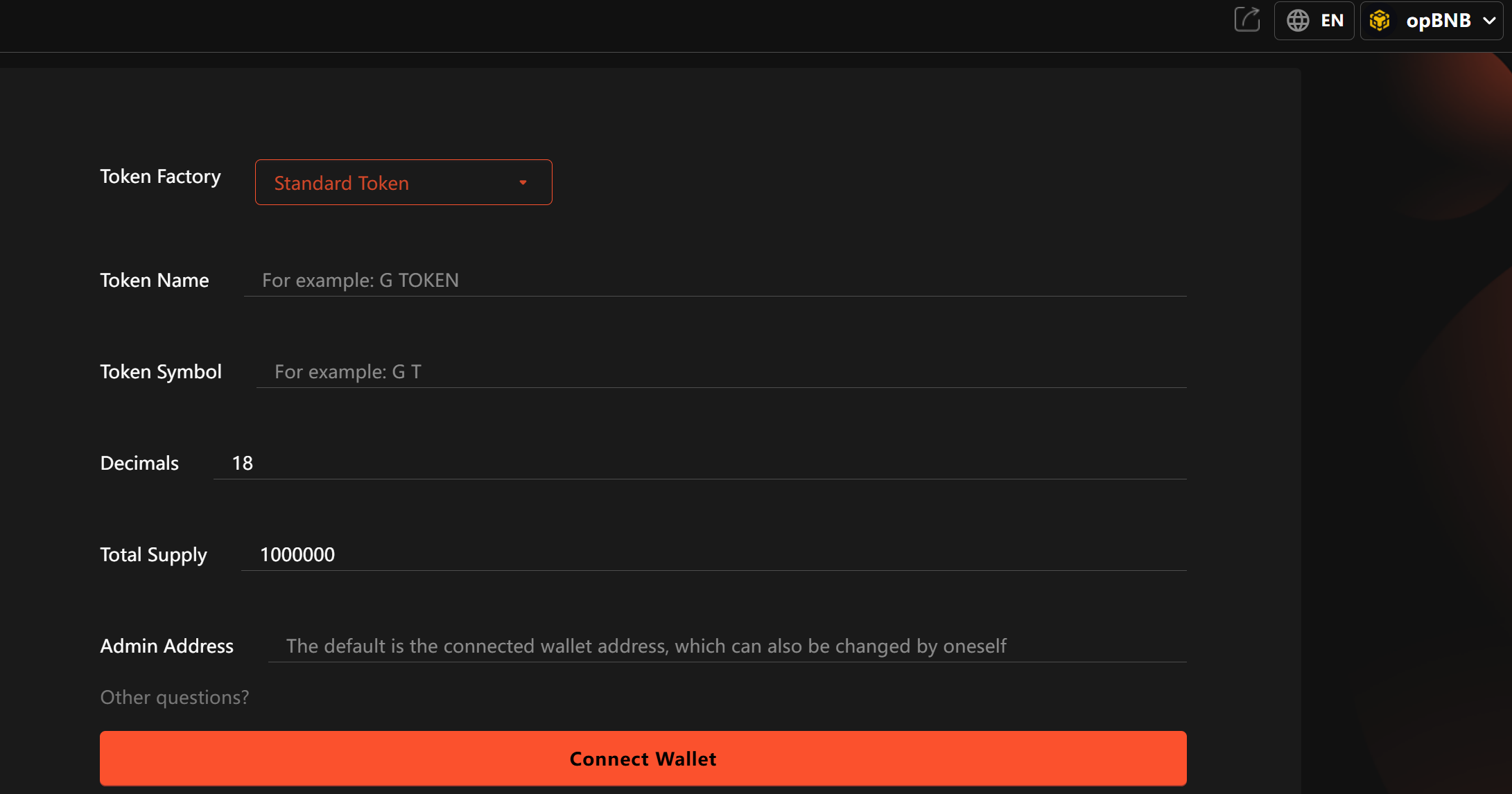
Method 2: Using BSC Token Factory to Create a Token
Step 1: Access Token Factory
Go to https://www.bnbchain.org/en/tokenfactory
Step 2: Connect Your Wallet
Click "Connect Wallet" and select the opBNB network
Step 3: Enter Token Information
Token Name: MyToken
Token Symbol: MTK
Initial Supply: 1000000
Decimals: 18
Optional Features: Mintable, pausable, etc.
Step 4: Deploy the Token
Confirm the information is correct
Click "Create Token"
Confirm the transaction in your wallet
Step 5: Manage the Token
After deployment, you can manage the token (mint, pause, etc.) on the same page
Method 3: Using Hardhat to Deploy a Custom Token
Step 1: Initialize the Project
mkdir my-token-project
cd my-token-project
npm init -y
npm install --save-dev hardhat
npx hardhat
Step 2: Install Dependencies
npm install @openzeppelin/contracts dotenv @nomicfoundation/hardhat-toolbox
Step 3: Configure Environment Variables
Create a .env file:
OPBNB_RPC_URL=https://opbnb-mainnet-rpc.bnbchain.org
PRIVATE_KEY=your_private_key
Step 4: Configure hardhat.config.js
require("@nomicfoundation/hardhat-toolbox");
require("dotenv").config();

module.exports = {
  solidity: "0.8.20",
  networks: {
    opBNB: {
      url: process.env.OPBNB_RPC_URL,
      accounts: [process.env.PRIVATE_KEY],
    },
  },
};
Step 5: Write the Deployment Script
Create scripts/deploy.js:
const hre = require("hardhat");

async function main() {
  const initialSupply = hre.ethers.parseEther("1000000");
  const MyToken = await hre.ethers.getContractFactory("MyToken");
  const myToken = await MyToken.deploy(initialSupply);

  await myToken.waitForDeployment();

  console.log(`MyToken deployed to: ${await myToken.getAddress()}`);
}

main().catch((error) => {
  console.error(error);
  process.exitCode = 1;
});
Step 6: Deploy the Contract
npx hardhat run scripts/deploy.js --network opBNB
Method 4: Using Third-Party Platforms to Create Tokens
Option 1: Pinksale
Select "Create Token"
Choose the "opBNB" network
Enter token parameters
Pay fees and deploy
IV. Important Considerations When Creating Tokens
1. Security Considerations
Private Key Protection: Never share or upload private keys to platforms like GitHub
Contract Audits: Consider professional audits for important projects
Access Control: Set owner permissions appropriately, consider multi-sig wallets
Code Reuse: Use verified OpenZeppelin contracts
2. Economic Model Design
Reasonable initial supply and decimal places
Consider token distribution (team, marketing, liquidity, etc.)
Design sustainable token economics (inflation/deflation mechanisms)
3. Legal Compliance
Determine token nature (utility or security)
Consider KYC/AML requirements
Understand regulatory requirements in target markets
V. Frequently Asked Questions
Q1: How much does it cost to create a token on opBNB?
A: Depending on contract complexity, typically between 0.001-0.01 BNB.
Q2: Why is my token transaction failing?
A: Possible reasons include:
Insufficient balance for gas fees
Transaction restrictions in the token contract (e.g., maximum holdings)
Transaction slippage set too low
Q3: How do I add liquidity to my token?
A: You can create trading pairs and add liquidity through DEXs on opBNB (e.g., PancakeSwap).
Q4: How to market my token after creation?
A: Consider:
Social media promotion
Listing applications on CoinMarketCap/CoinGecko
Partnerships with opBNB ecosystem projects
Q5: How does creating tokens on opBNB differ from other chains?
A: Main differences include:
Using BNB instead of ETH for gas
Need to configure opBNB network RPC
Significant advantages in transaction speed and cost
VI. Conclusion
Whether you're a beginner or an experienced developer, opBNB offers token creation approaches suitable for various skill levels. When creating tokens, always prioritize security and design a reasonable token economic model.
As the opBNB ecosystem continues to grow, token creation is just the first step in project development. Subsequent steps like providing liquidity, community building, and ongoing development are equally important. We hope this guide helps you successfully start your token journey on opBNB!