Looking for the fastest and most secure Solana bulk transfer tool? GTokenTool is designed for Sol ecosystem developers and projects, supporting SPL tokens and the Token2022 protocol. It can process up to 380 addresses in a single signature, and 1000 addresses require only 3 signatures. No need to store private keys; execution is local on the front end, making your airdrop missions both efficient and secure.
Core Features Highlights
Compared to tools on the market that can only send tokens to a few dozen addresses at a time, GTokenTool achieves a technological breakthrough: a single signature transfer can reach up to 380 addresses. Large-scale airdrops no longer require tedious continuous signatures, significantly reducing operation time.
Intelligent address management (supports CSV/Excel)
One-click deduplication: Automatically identifies and removes duplicate receiving addresses to avoid asset waste.
Multiple import options: Supports manual pasting, random generation, or batch import of addresses and amounts via uploading CSV/Excel files.
Balance Preview: Automatically calculates the total amount of tokens, SOL rental fee (ATA account opening fee), and remaining balance before sending, ensuring precise and transparent budget control.
Fully compatible with the Token protocol, it not only supports the standard SPL token, but also deeply adapts to the latest Token2022 standard (such as tokens with built-in transaction taxes and fees), making it the most feature-rich Solana bulk transfer solution currently available.
Ultimate security guarantee (non-managed mode)
Private key not left a trace: All transfer logic is completed in the browser front end, and the platform never accesses or stores your private key.
Privacy protection: Supports connection to mainstream wallets (such as Phantom), and recommends using it with a new wallet to ensure absolute asset security.
Seamless cross-platform operation perfectly supports PC browsers and mobile wallet browsers, allowing you to start airdrop missions anytime, anywhere.
Applicable Scenarios
Project airdrop: Rapidly distribute governance tokens or token rewards to thousands of early participants.
Blockchain game/guild payout: Regularly distribute SOL or earnings to multiple gold farming accounts in batches via Excel import function.
Community Incentive Program: Distribute varying amounts of token rewards to members with different levels of activity.
Testnet debugging: Supports the Devnet (testnet) environment, making it convenient for developers to practice the process before the official airdrop.
Preparation
Before you begin, please ensure that you have prepared the following:
Equipment: A computer with internet access or a smartphone.
Wallet: Solana wallet (such as Phantom wallet) is installed.
Assets: Your wallet must contain sufficient tokens to be transferred, as well as a small amount of SOL to pay network gas fees .
Detailed operating procedures
Step 1: Connection and Configuration
Visit the GTokenTool bulk transfer page, connect your Solana wallet in the upper right corner, and select Main (mainnet) or Dev (testnet) as needed.
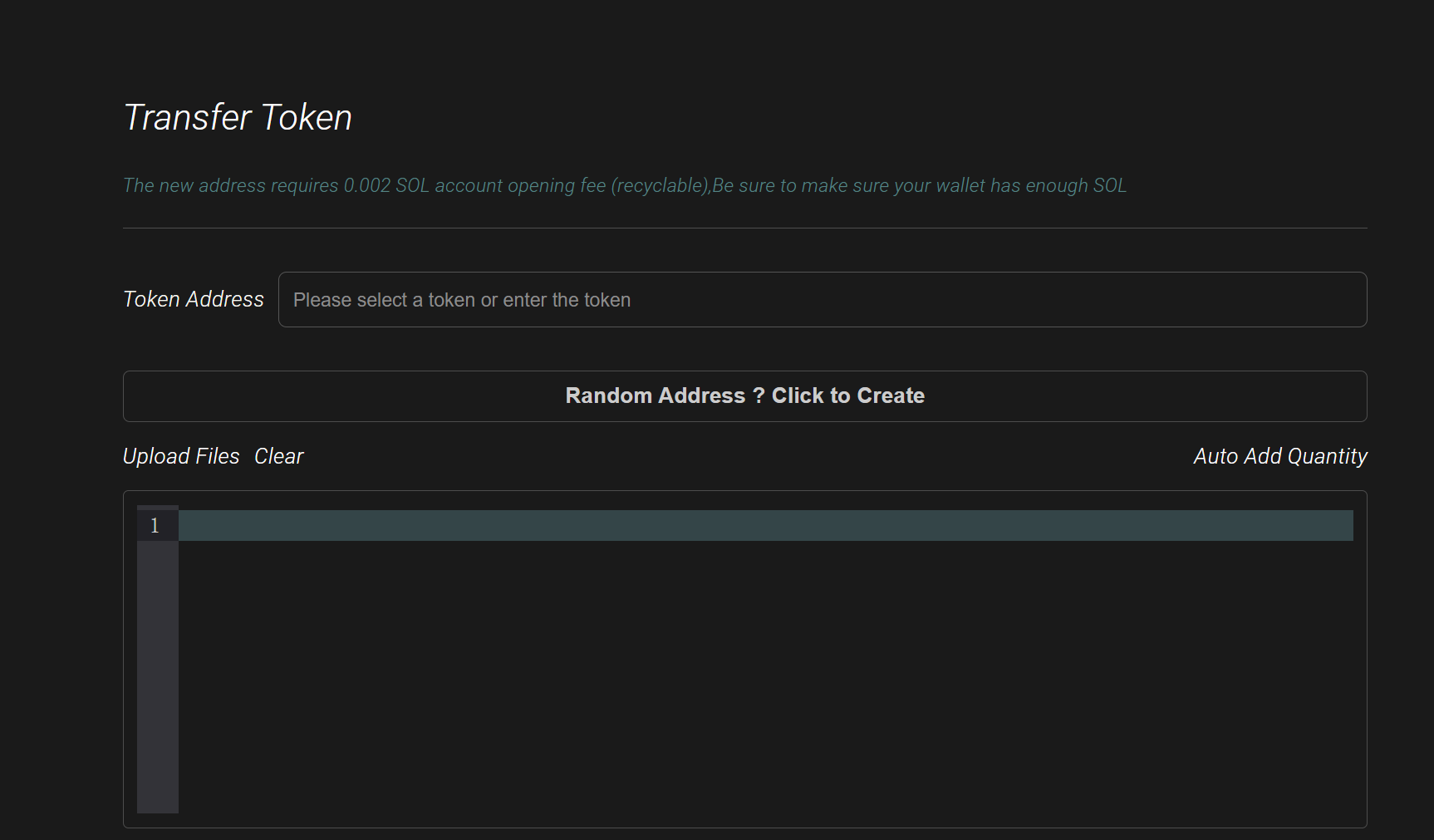
Step 2: Select the target token
Enter or select the tokens you want to send in bulk in the "Token Address" field. The system will automatically recognize and display your current token balance.
Step 3: Import the receiving address
You can choose one of the following three methods to import the address:
Manual input: Paste the address into the box, one address per line.
File Upload: Click "Upload File" to import a list of addresses in Excel or CSV format.
Generate random address: Click "Random address? Click Create" for testing or special needs.
Step 4: Set the transfer amount
Clicking "Auto Add Quantity" allows you to set a uniform sending amount for all addresses, or you can specify different amounts for each address in the imported file. The system will preview the total number of tokens needed in real time.
Step 5: Confirm and send
After verifying that the number of addresses and the total number of tokens are correct, click "Send Transaction". In the pop-up wallet window, click "Confirm" and wait for the page to display "All transfers successful!" to complete the task.
Core Functions
Efficient bulk sending: Supports bulk token sending on the Solana chain, with a maximum of 380 addresses processed in a single signature, and only 3 signatures are required to process 1000 addresses.
Multi-currency support: In addition to regular tokens, it is also compatible with SPL Token 2022 fee-type tokens.
Flexible amount allocation: Users can set a uniform transfer amount for all addresses, or set different transfer amounts for each address.
Ease of use and automation
Diverse address import options: Supports manual address input (separated by commas), generating a random address by clicking "Random Address", or batch importing via uploading an Excel/CSV file.
Intelligent processing: It has an automatic deduplication function, which can identify and remove duplicate receiving addresses.
Real-time preview: Before sending a transaction, the system will automatically calculate and display the required total amount of tokens, wallet balance, and number of deduplicated addresses.
Safety and performance
Security Guarantee: Private keys are not stored on the platform; all operations are performed on the front end. Users can also choose to use a new wallet to ensure security.
Cross-platform compatibility: The tool supports operation via browser on both computers and mobile devices.
Real-time feedback: Clear status prompts will be provided after the transaction is completed (such as "All transfers successful!"), and refresh suggestions will be provided when encountering node network problems.
Comparison table of Solana chain bulk transfer tools
| Comparison Dimensions | GTokenTool (this tool) | Industry-standard tools (such as Smithii/SlerfTools) | Manual transfer in a regular wallet |
| Single signature limit | Up to 380 addresses | Typically 20-100 addresses | One address at a time |
| Operational efficiency | Extremely high (only 3 signatures required for 1000 addresses) | Medium level (requires multiple signatures) | Extremely low |
| Token2022 Support | Full support (including fee-based tokens) | Partial support | Depends on wallet compatibility |
| Address import method | Variety (manual/CSV/Excel/randomly generated) | Typically, only manual or CSV configuration is supported. | Manual pasting only |
| Address deduplication function | Automatically identify and remove duplicates | Some have | none |
| Amount Allocation Scheme | Flexible (uniform amount or customizable by address) | Typically supports | Each one needs to be entered manually. |
| Security | Executed in the front end, without storing the private key. | Most are executed by the front end. | Safety |
| Usage threshold | Zero technical background required | lower | none |
Why choose GTokenTool?
Fastest way to handle large-scale airdrops: On the Solana chain, the number of addresses that can be processed in a single signature directly determines your workload. GTokenTool's 380 signatures per transaction is among the best in the industry.
Adapted to the latest token standards: With the increasing adoption of Token2022 standards (such as tokens with transaction taxes), GTokenTool's deep optimization of the protocol ensures that transfers will not fail due to protocol incompatibility.
Transparent and controllable costs: The system displays the total number of tokens and balances required in real time, and reminds you of the SOL rental fee required to open a new address (approximately 0.002 SOL, which can be recovered in the future), helping you manage your airdrop budget more accurately.
Frequently Asked Questions (FAQ)
Q: What should I do if the transfer fails?
Q: Are there any extra fees for transferring money to the new address?
A: The Solana mechanism stipulates that opening a token account (ATA) for a new address requires an account opening fee of approximately 0.002 SOL, which is recyclable in the future.
Q: Can the transfer amounts be different?
A: This is usually caused by network congestion at the Solana node. We suggest trying to switch nodes or refreshing the page to try again.
A: Yes. You can send different amounts to different addresses by uploading a CSV file (format: address, amount).
GTokenTool is a high-efficiency batch transfer and airdrop tool designed specifically for the Solana blockchain. It addresses the pain point of low efficiency in traditional transfers by simplifying the process and increasing the throughput per transaction.
Usage Recommendations
If you need to distribute tokens to a large number of users (such as community airdrops), GTokenTool's real-time balance preview, automatic account opening fee reminders, and cross-platform support (available for both computers and mobile phones) make it an extremely robust tool choice in the current Solana ecosystem.