I. Introduction to PEGO
What is PEGO?
PEGO is an emerging blockchain platform focused on providing efficient, low-cost token creation and smart contract deployment services. It features a unique consensus mechanism and architectural design aimed at addressing issues like high gas fees and low throughput faced by mainstream blockchains like Ethereum. The PEGO network enables developers to quickly create various types of tokens (such as ERC-20, ERC-721 standards) and provides a developer-friendly environment for decentralized applications (DApps).
PEGO Development Timeline
Q3 2021: PEGO concept whitepaper released, introducing the "modular blockchain" concept
Q1 2022: Testnet launched, first ecosystem projects began development
Q3 2022: Mainnet officially launched, native PEG token listed on exchanges
2023: Rapid ecosystem growth with wallets, explorers, and bridges developed
2024-Present: Became one of the hottest emerging blockchains with over 100,000 tokens created
PEGO Token Price Performance
The native PEG token is primarily used for:
Paying network transaction fees
Participating in network governance voting
Staking for rewards
Historical price trends:
Initial mainnet launch: $0.05-$0.10
2023 bull market: Peaked at $1.2
Current (2024) price range: $0.3-$0.8
Note: Cryptocurrency prices are highly volatile - conduct your own research before investing
Key PEGO Milestones
2023 Cross-Chain Protocol Launch: Enabled asset transfers with major chains like Ethereum and BNB Chain
2024 Smart Contract Upgrade: Integrated zero-knowledge proof technology for enhanced privacy
Q2 2024: Launched "One-Click Token" tool, significantly lowering the barrier to token creation
II. Preparing to Create a PEGO Token
Required Materials
PEGO Wallet: Recommended to use official PEGO Wallet or MetaMask with PEGO network support
PEG Tokens: Prepare at least 50-100 PEG for gas fees
Token Parameters:
Token name (e.g., "MyToken")
Token symbol (e.g., "MTK")
Total supply
Decimal places (typically 18)
Optional features (minting, freezing, etc.)
Technical Preparation:
Basic understanding of smart contracts (recommended but not required)
Code editor (e.g., VS Code)
Access to PEGO blockchain explorer (pegoscan.io)
III. Brief Overview of PEGO Token Creation Process
Configure PEGO network in your wallet
Ensure sufficient PEG tokens in wallet
Choose creation method (detailed below)
Enter token parameters
Deploy smart contract
Verify and test token
Add liquidity (if planning to list for trading)
IV. Methods for Creating PEGO Tokens - Detailed Tutorials
Method 1: Using GTokenTool Token Generator (Simplest)
Steps:
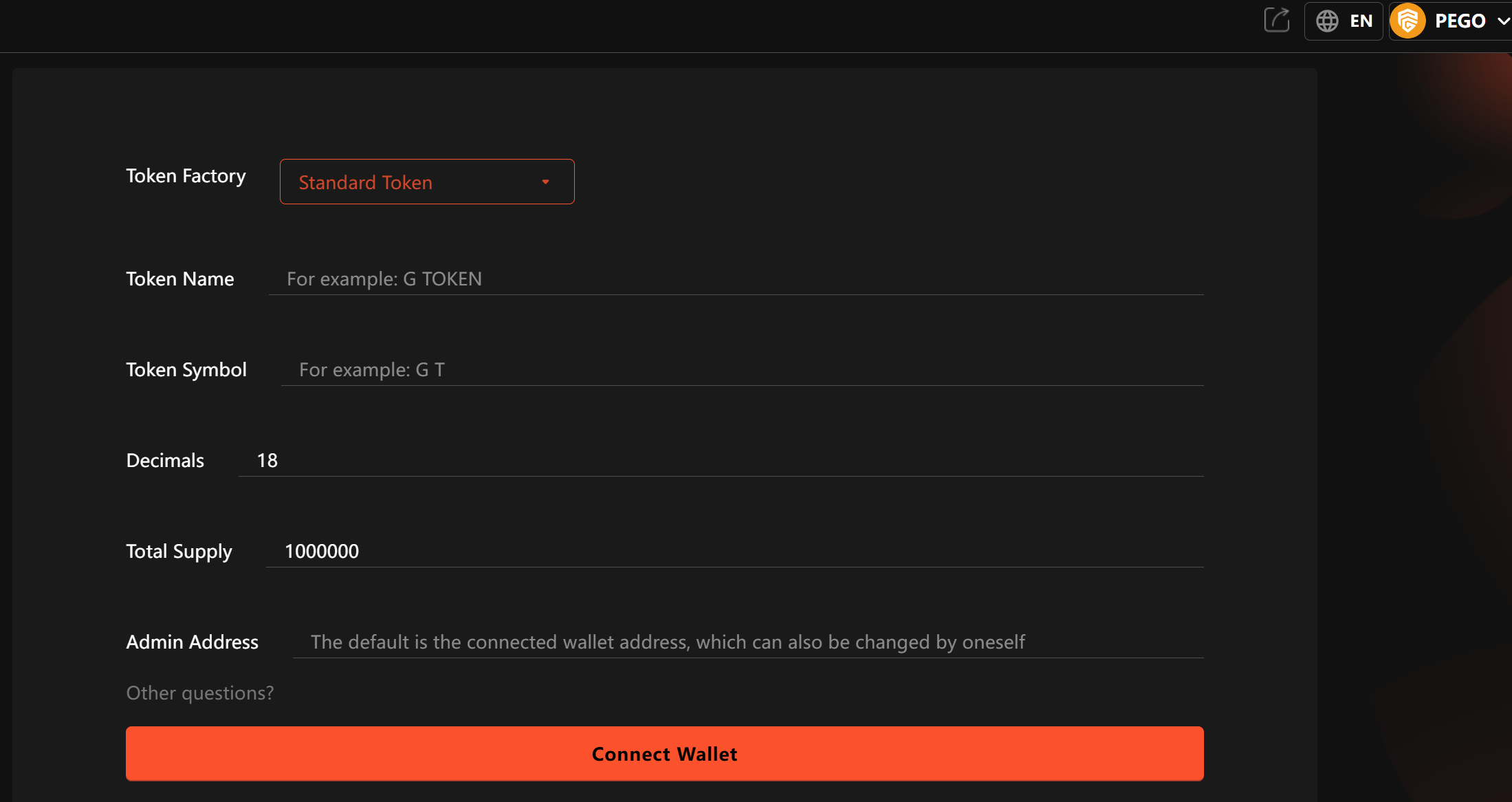
Visit GTokenTool token generator: https://www.gtokentool.com
Connect your PEGO wallet (click "Connect Wallet" top right)
Enter token details:
Token Name: (e.g., "PEGO Example Token")
Token Symbol: (3-5 uppercase letters, e.g., "PET")
Total Supply: (e.g., 1000000)
Decimals: (typically 18)
Method 2: Manual Deployment Using Remix IDE (Intermediate)
Preparation:
Install MetaMask and add PEGO network
Prepare 20-50 PEG for gas fees
Access Remix IDE: https://remix.ethereum.org
Steps:
In Remix, create new file named
MyToken.solWrite or paste standard token contract code:
// SPDX-License-Identifier: MIT
pragma solidity ^0.8.0;

import "@openzeppelin/contracts/token/ERC20/ERC20.sol";

contract MyToken is ERC20 {
    constructor(uint256 initialSupply) ERC20("MyToken", "MTK") {
        _mint(msg.sender, initialSupply * (10 ** decimals()));
    }
}
Install dependencies:
Click "Solidity Compiler" tab
Select compiler version 0.8.0+
Enable "Auto compile"
Add OpenZeppelin library in "Advanced Configurations":
https://github.com/OpenZeppelin/openzeppelin-contractsCompile contract:
Click "Compile MyToken.sol"
Ensure no error messages
Deploy contract:
Click "Deploy & Run Transactions" tab
Select "Injected Provider - MetaMask" environment
Confirm MetaMask is connected to PEGO network
Enter initial supply in constructor parameters (e.g., 1000000)
Click "Deploy"
Confirm transaction in MetaMask
Verify contract:
Copy contract address after deployment
Check contract on pegoscan.io
Recommended to "Verify and Publish" source code
Custom Function Example:
// Token with transaction tax feature
contract TaxToken is ERC20 {
    address public owner;
    uint256 public taxRate = 5; // 5% tax

    constructor(uint256 initialSupply) ERC20("TaxToken", "TAX") {
        owner = msg.sender;
        _mint(owner, initialSupply * (10 ** decimals()));
    }

    function transfer(address to, uint256 amount) public override returns (bool) {
        uint256 tax = amount * taxRate / 100;
        _transfer(msg.sender, owner, tax);
        _transfer(msg.sender, to, amount - tax);
        return true;
    }

    function setTaxRate(uint256 newRate) public {
        require(msg.sender == owner, "Only owner");
        taxRate = newRate;
    }
}
Method 3: Using Hardhat/Truffle Frameworks (Advanced)
Advantages:
Complete development environment
Automated testing
More secure deployment process
Steps:
Setup project:
mkdir my-token-project
cd my-token-project
npm init -y
npm install --save-dev hardhat
npx hardhat
# Select "Create a basic sample project"
npm install @openzeppelin/contracts @nomiclabs/hardhat-ethers ethers
Create contract file:
contracts/MyAdvancedToken.sol
// SPDX-License-Identifier: MIT
pragma solidity ^0.8.0;

import "@openzeppelin/contracts/token/ERC20/extensions/ERC20Burnable.sol";
import "@openzeppelin/contracts/access/Ownable.sol";

contract MyAdvancedToken is ERC20Burnable, Ownable {
    uint256 public constant MAX_SUPPLY = 10_000_000 * 10**18;

    constructor() ERC20("AdvancedToken", "ADV") {
        _mint(msg.sender, MAX_SUPPLY);
    }

    function mint(address to, uint256 amount) public onlyOwner {
        require(totalSupply() + amount <= MAX_SUPPLY, "Exceeds max supply");
        _mint(to, amount);
    }
}
Configure Hardhat:
hardhat.config.js
require("@nomiclabs/hardhat-ethers");

module.exports = {
  solidity: "0.8.4",
  networks: {
    pego: {
      url: "https://rpc.pego.io",
      accounts: [process.env.PRIVATE_KEY],
      chainId: 123456 // PEGO mainnet ChainID
    }
  }
};
Create deployment script:
scripts/deploy.js
async function main() {
  const [deployer] = await ethers.getSigners();
  console.log("Deploying contracts with the account:", deployer.address);

  const Token = await ethers.getContractFactory("MyAdvancedToken");
  const token = await Token.deploy();

  console.log("Token address:", token.address);
}

main()
  .then(() => process.exit(0))
  .catch((error) => {
    console.error(error);
    process.exit(1);
  });
Deploy contract:
export PRIVATE_KEY=your_private_key
npx hardhat run scripts/deploy.js --network pego
Verify contract:
npx hardhat verify --network pego contract_address
V. Important Considerations for PEGO Token Creation
Security Considerations
Private Key Protection:
Never share or upload your private key
Consider hardware wallets for large deployments
Test on testnet first with small amounts
Contract Security:
Use audited standard libraries (like OpenZeppelin)
Avoid complex custom logic unless you're experienced with Solidity
Conduct thorough testing before deployment
Common Scams:
Fake token creation websites
"Support" asking for PEG upfront
Fake tools promising "multiplied" tokens
Technical Considerations
Gas Optimization:
Avoid complex computations in constructor
Set appropriate variable visibility (public/private)
Use latest stable Solidity compiler
Token Standards:
ERC-20: Fungible tokens (like PEGO)
ERC-721: NFTs
ERC-1155: Hybrid standard (for game items, etc.)
Parameter Settings:
Token symbols typically 3-5 uppercase letters
Decimals usually 18 (same as ETH)
Consider scalability when setting total supply
VI. Frequently Asked Questions
Q1: How much does it cost to create a PEGO token?
A: Costs mainly include:
Gas fees: ~10-30 PEG for simple tokens, 50-200 PEG for complex contracts
Additional fees if using third-party services ($10-$100)
Q2: How to add liquidity after token creation?
A: Main steps:
Prepare equivalent value of PEG and your token
Visit a PEGO DEX (like PegoSwap)
Select "Add Liquidity"
Set initial price and liquidity amount
Confirm transaction
Q3: Why isn't my token showing in wallet?
A: Possible reasons:
Incorrect contract address entry
Failed contract deployment
Wallet not properly connected to PEGO network
Solutions:
Confirm deployment success (check pegoscan.io)
Manually add token in wallet using contract address
Verify token symbol and decimals are correct
Q4: Can I create a token with dividend features?
A: Yes, but requires custom contract. Basic approach:
Track token holders and shares
Set up dividend pool
Distribute rewards periodically or per transaction
Recommend using audited dividend contract templates or professional audits.
Q5: Can token parameters be modified after creation?
A: Depends on contract design:
Name, symbol, decimals usually immutable
Total supply: Can increase if minting isn't locked
Other features: Must be pre-configured as modifiable
Important: Fully decentralized tokens should avoid admin privileges.
VII. Conclusion
The PEGO ecosystem is growing rapidly. Token creation is just the first step - subsequent liquidity provision, community building, and project promotion are equally important. This guide should help you successfully launch your own token on the PEGO network!