I. Introduction to Polygon
1. What is Polygon?
Polygon (formerly Matic Network) is a Layer 2 scaling solution for Ethereum, designed to address network congestion and high gas fees through sidechain technology. It uses an innovative "Commit Chain" architecture that maintains Ethereum's security while significantly improving transaction speed and reducing costs.
2. Polygon’s Development Timeline
2017: Project launch, originally named Matic Network
2019: Mainnet launch, supported by Binance and other exchanges
2021: Rebranded to Polygon, positioning itself as Ethereum's "Internet of Blockchains"
2022: Launched zkEVM solution, entering the zero-knowledge proof space
2023: Released Polygon 2.0 roadmap, building the "Value Layer"
3. MATIC Token Price History
MATIC is Polygon’s native token, used for paying transaction fees and participating in network governance. Its price history shows significant volatility:
2019 Initial Price: ~$0.0026
2021 Bull Market Peak: Reached ~$2.92 (December 2021)
2023 Price Range: Fluctuated between 1.2
4. Key Polygon Events
2021: Integrated with major DeFi and NFT projects like Aave and OpenSea
2022: Announced acquisition of Mir Protocol to enhance zero-knowledge proof technology
2023: Launched Polygon ID for blockchain identity verification
II. Preparing to Create a Token
1. Technical Requirements
MetaMask Wallet: Configured for the Polygon network
MATIC Tokens: For gas fees (recommend at least 10-20 MATIC)
Code Editor: Such as VS Code
Node.js Environment: Version 16.x or higher recommended
2. Knowledge Prerequisites
Basic understanding of Solidity
Familiarity with smart contract concepts
Knowledge of the ERC-20 token standard
3. Design Considerations
Token name and symbol
Total supply and decimal places
Token distribution plan (if applicable)
III. Brief Token Creation Process
Set up the development environment
Write the token contract
Compile the contract
Deploy the contract to the Polygon network
Verify the contract (optional)
Interact with the token
IV. Methods to Create a Token on Polygon
Method 1: Using Remix IDE
Best for: Beginners, non-coders
Step-by-Step Guide:
1.Visit Remix IDE
2.Create a new file in the left-hand file explorer, named MyToken.sol
3.Write the token contract code:
// SPDX-License-Identifier: MIT
pragma solidity ^0.8.0;

import "@openzeppelin/contracts/token/ERC20/ERC20.sol";

contract MyToken is ERC20 {
    constructor(uint256 initialSupply) ERC20("MyToken", "MTK") {
        _mint(msg.sender, initialSupply * 10 ** decimals());
    }
}
4.Go to the "Solidity Compiler" tab, select version 0.8.0 or higher, and click "Compile MyToken.sol"
5.Switch to the "Deploy & Run Transactions" tab
6.Under "Environment," select "Injected Provider - MetaMask" (ensure MetaMask is connected to Polygon)
7.From the contract dropdown, select "MyToken"
8.Enter the initial supply (e.g., 1000000)
9.Click "Deploy" and confirm the transaction in MetaMask
10.Wait for deployment to complete
Method 2: Using Hardhat
Step-by-Step Guide:
1.Initialize the project:
mkdir my-token-project
cd my-token-project
npm init -y
npm install --save-dev hardhat
npx hardhat
Select "Create a basic sample project."
2.Install dependencies:
npm install @openzeppelin/contracts @nomiclabs/hardhat-ethers @nomiclabs/hardhat-waffle dotenv
3.Create a .env file:
PRIVATE_KEY=Your_Private_Key
POLYGONSCAN_API_KEY=Your_Polygonscan_API_Key
POLYGON_URL=https://polygon-rpc.com
4.Modify hardhat.config.js:
require("@nomiclabs/hardhat-waffle");
require("dotenv").config();

module.exports = {
  solidity: "0.8.4",
  networks: {
    polygon: {
      url: process.env.POLYGON_URL,
      accounts: [process.env.PRIVATE_KEY]
    }
  }
};
5.Create MyToken.sol in the contracts folder:
// SPDX-License-Identifier: MIT
pragma solidity ^0.8.0;

import "@openzeppelin/contracts/token/ERC20/ERC20.sol";
import "@openzeppelin/contracts/access/Ownable.sol";

contract MyToken is ERC20, Ownable {
    constructor(uint256 initialSupply) ERC20("MyToken", "MTK") {
        _mint(msg.sender, initialSupply * 10 ** decimals());
    }

    function mint(address to, uint256 amount) public onlyOwner {
        _mint(to, amount);
    }
}
6.Compile the contract:
npx hardhat compile
7.Create a deployment script (scripts/deploy.js):
async function main() {
  const [deployer] = await ethers.getSigners();
  console.log("Deploying contracts with the account:", deployer.address);

  const MyToken = await ethers.getContractFactory("MyToken");
  const myToken = await MyToken.deploy(1000000); // Initial supply: 1 million

  await myToken.deployed();
  console.log("MyToken deployed to:", myToken.address);
}

main()
  .then(() => process.exit(0))
  .catch((error) => {
    console.error(error);
    process.exit(1);
  });
8.Deploy to Polygon mainnet:
npx hardhat run scripts/deploy.js --network polygon
Method 3: Using Third-Party Token Generators
Recommended Platforms:
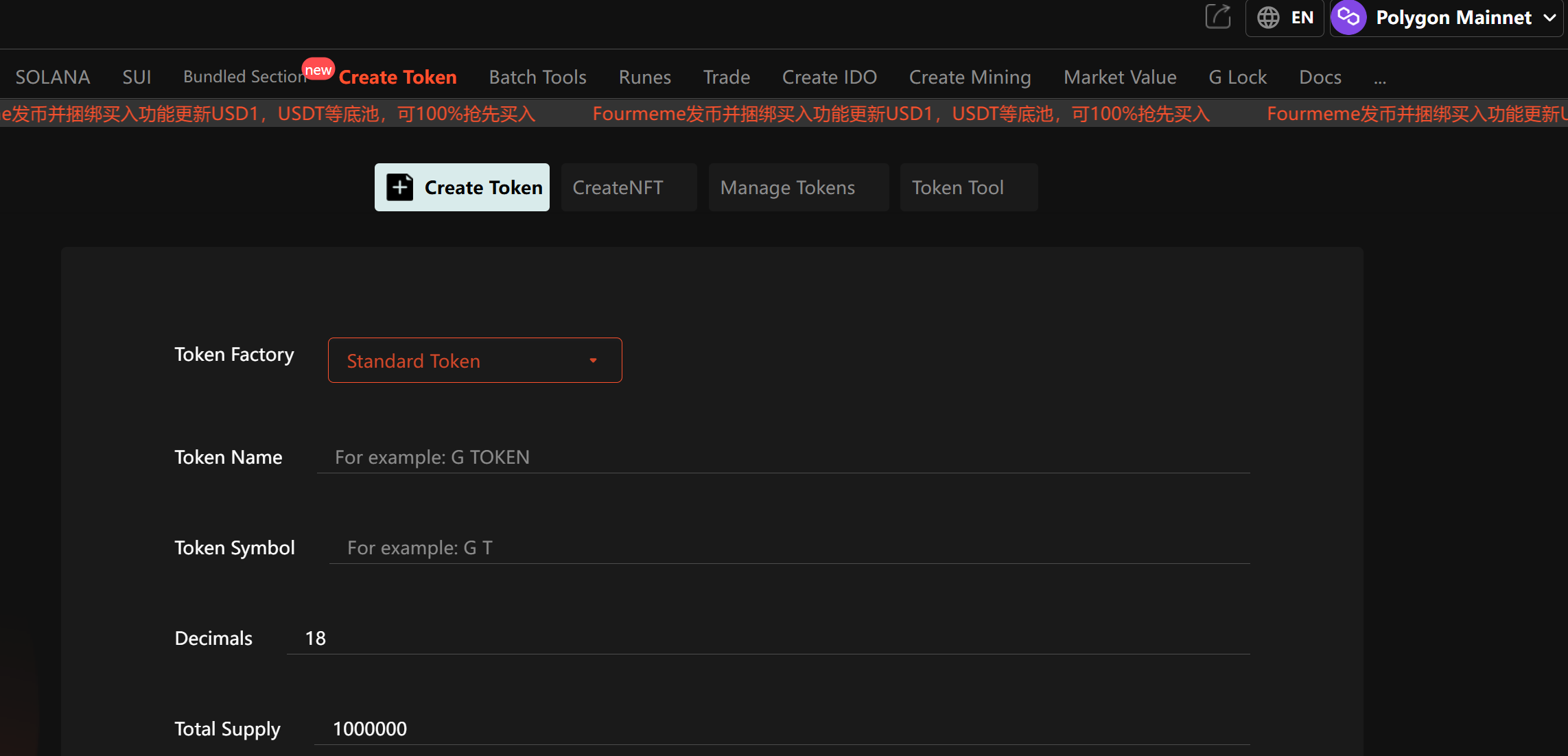
GTokenTool
Steps (Using TokenMint as an Example):
Visit GTokenTool
Connect MetaMask (switch to Polygon)
Fill in token details:
Name
Symbol
Initial supply
Decimals
V. Important Considerations
1. Security
Private Key Protection: Never share or upload your private key
Contract Audits: Consider professional audits before launch
Permission Controls: Set proper owner/mint permissions
Testnet First: Always test on Mumbai testnet
2. Legal Compliance
Understand local token regulations
Determine if your token could be classified as a security
Consider KYC/AML requirements
3. Tokenomics Design
Fair distribution
Inflation/deflation mechanisms
Utility planning
VI. Frequently Asked Questions
Q1: How much MATIC is needed to create a token?
A: A simple ERC-20 costs ~0.1-1 MATIC; complex contracts may require more.
Q2: Why is my transaction stuck as "pending"?
A: Gas fees may be too low—try increasing the gas price or using Polygon’s recommended settings.
Q3: How do I list my token on exchanges?
A: Contact exchanges directly; they typically require audits, documentation, etc.
Q4: Can I change the token name/symbol after deployment?
A: No, these are immutable once deployed.
Q5: What’s the difference between testnet and mainnet tokens?
A: Testnet tokens have no real value and are for development only.
VII. Conclusion
As Polygon’s ecosystem grows, opportunities for innovative token projects will continue to expand.