Part 1: Introduction to Arbitrum Basics
What is Arbitrum?
Arbitrum is a leading Layer 2 scaling solution for Ethereum, developed by Offchain Labs. It utilizes Optimistic Rollup technology to significantly increase transaction throughput and reduce gas fees by processing transactions off-chain and periodically submitting transaction data to the Ethereum mainnet, while maintaining Ethereum-level security.
Development History of Arbitrum
2018: Offchain Labs founded, begins developing Arbitrum technology
May 2021: Arbitrum One testnet launches
August 2021: Arbitrum One mainnet Beta released
August 2022: Arbitrum Nitro upgrade completed, dramatically improving performance
March 2023: Arbitrum airdrops ARB token and announces DAO governance
ARB Token Price and Market Performance
ARB is the governance token of the Arbitrum ecosystem, allowing holders to participate in protocol decisions. Since its launch in March 2023, ARB's price has experienced market fluctuations reflecting Layer 2 competition and broader crypto market trends.
Notable Events in Arbitrum Ecosystem
Major Protocol Adoptions: Mainstream DeFi protocols like Uniswap, Aave, and Curve have deployed on Arbitrum
Nitro Upgrade: 7x throughput increase and cost reduction after 2022 upgrade
ARB Token Airdrop: Early users received tokens in 2023
Ecosystem Fund: Established to support Arbitrum ecosystem projects
Part 2: Preparation Before Creating an Arbitrum Token
Technical Preparation
Wallet Setup:
Install MetaMask or compatible wallet
Configure Arbitrum network (mainnet and testnet)
Prepare small amount of ETH for gas fees (can be obtained from exchanges and withdrawn to Arbitrum)
Development Environment:
Node.js environment (recommend v16+)
Code editor (VS Code, etc.)
Essential libraries (ethers.js, hardhat, etc.)
Learning Resources:
Solidity fundamentals
Understanding of ERC standards (especially ERC-20)
Arbitrum documentation
Financial Preparation
ETH Requirements:
Mainnet deployment: Recommend at least 0.05 ETH
Testnet deployment: Obtain testnet ETH (via official faucets)
Other Potential Costs:
Token audit fees (if needed)
Frontend development costs (if website needed)
Marketing budget (optional)
Knowledge Preparation
Smart Contract Basics: Understand contract structure, functions, events
Token Standards: Deep understanding of ERC-20 standard and functions
Security Knowledge: Common vulnerabilities like reentrancy attacks, integer overflows
Arbitrum Characteristics: Differences between L2 and L1, like confirmation times, cross-chain mechanisms
Part 3: Brief Process for Creating an Arbitrum Token
Environment Setup: Configure development environment and wallet
Write Contract: Develop ERC-20 compliant token contract
Testing: Comprehensive testing on local and testnet environments
Deployment: Deploy contract to Arbitrum network
Verification: Verify contract source code on block explorer
Frontend Integration (optional): Develop UI to interact with contract
Liquidity Provision (optional): Create trading pairs on DEX
Part 4: Detailed Methods for Creating Arbitrum Tokens
Method 1: Direct Deployment Using Remix IDE
Step-by-Step
1.Access Remix: Open https://remix.ethereum.org
2.Create New File: New Token.sol in contracts folder
3.Write Contract: Paste standard ERC-20 contract code, e.g.:
// SPDX-License-Identifier: MIT
pragma solidity ^0.8.0;

import "@openzeppelin/contracts/token/ERC20/ERC20.sol";

contract MyToken is ERC20 {
    constructor(uint256 initialSupply) ERC20("MyToken", "MTK") {
        _mint(msg.sender, initialSupply);
    }
}
4.Compile Contract:
Switch to Solidity compiler tab
Select correct compiler version (matching pragma statement)
Click "Compile Token.sol"
5.Deployment Prep:
Switch to "Deploy & run transactions" tab
Environment select "Injected Provider - MetaMask"
Ensure MetaMask connected to Arbitrum network
6.Deploy Contract:
Enter initial supply (e.g. 1000000 plus 18 zeros for 1 million with 18 decimals)
Click "Deploy"
Confirm transaction in MetaMask
7.Verification and Use:
View deployed contract on Arbiscan
Add token to wallet
Method 2: Using Hardhat Development Framework
Detailed Steps
1.Project Initialization:
mkdir my-arbitrum-token
cd my-arbitrum-token
npm init -y
npm install --save-dev hardhat
npx hardhat
Select "Create a basic sample project"
2.Install Dependencies:
npm install @openzeppelin/contracts @nomiclabs/hardhat-ethers ethers
npm install dotenv --save
3.Configure hardhat.config.js:
require("@nomiclabs/hardhat-ethers");
require('dotenv').config();

module.exports = {
  solidity: "0.8.4",
  networks: {
    arbitrum: {
      url: process.env.ARBITRUM_RPC_URL,
      accounts: [process.env.PRIVATE_KEY]
    },
    arbitrum_testnet: {
      url: process.env.ARBITRUM_TESTNET_RPC_URL,
      accounts: [process.env.PRIVATE_KEY]
    }
  }
};
4.Create .env file:
ARBITRUM_RPC_URL=https://arb1.arbitrum.io/rpc
ARBITRUM_TESTNET_RPC_URL=https://goerli-rollup.arbitrum.io/rpc
PRIVATE_KEY=your_private_key
5.Write Contract:
Create MyToken.sol in contracts/ directory with similar content to Method 1
6.Create Deployment Script:
Create deploy.js in scripts/:
async function main() {
  const [deployer] = await ethers.getSigners();
  console.log("Deploying contracts with the account:", deployer.address);

  const MyToken = await ethers.getContractFactory("MyToken");
  const token = await MyToken.deploy(ethers.utils.parseUnits("1000000", 18));

  await token.deployed();
  console.log("Token deployed to:", token.address);
}

main()
  .then(() => process.exit(0))
  .catch((error) => {
    console.error(error);
    process.exit(1);
  });
7.Deploy to Arbitrum Testnet:
npx hardhat run scripts/deploy.js --network arbitrum_testnet
8.Verify Contract (optional):
Install plugin and configure:
npm install --save-dev @nomiclabs/hardhat-etherscan
Add to hardhat.config.js:
require("@nomiclabs/hardhat-etherscan");

module.exports = {
  // ...other config
  etherscan: {
    apiKey: {
      arbitrumOne: process.env.ARBISCAN_API_KEY,
      arbitrumTestnet: process.env.ARBISCAN_API_KEY
    }
  }
};
Then run:
npx hardhat verify --network arbitrum_testnet <contract_address> "1000000000000000000000000"
Advanced Features
1.Adding Token Permission Management:
mkdir my-arbitrum-token
cd my-arbitrum-token
npm init -y
npm install --save-dev hardhat
npx hardhat0
2.Implementing Transaction Tax:
mkdir my-arbitrum-token
cd my-arbitrum-token
npm init -y
npm install --save-dev hardhat
npx hardhat1
Method 3: Using Token Generator Tools (e.g., GTokenTool)
Detailed Steps (Pinksale Example)
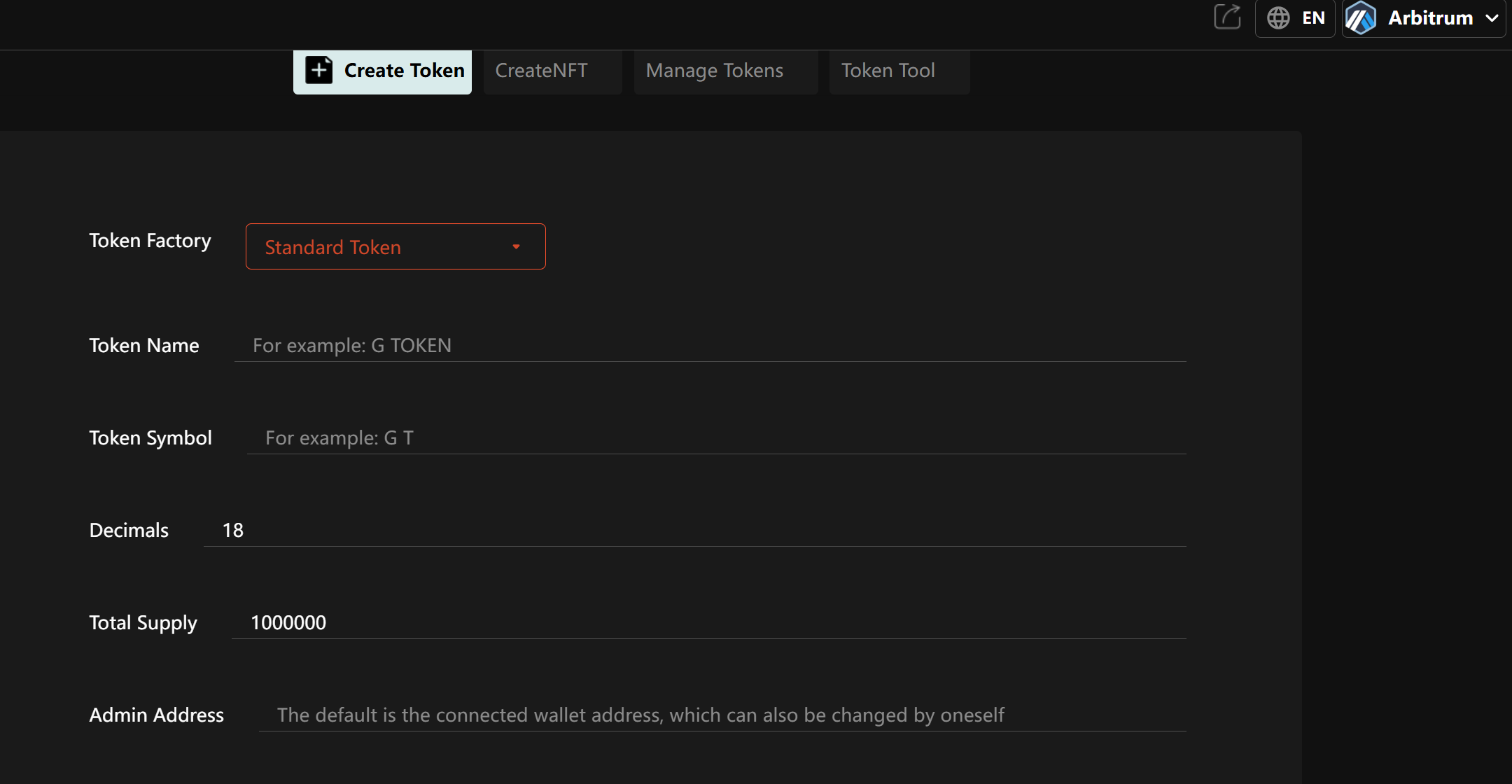
Access Platform: Open https://www.gtokentool.com
Connect Wallet: Click "Connect Wallet" and select Arbitrum network
Select Token Type: Click "Create Token" choose standard token or other type
Enter Token Parameters:
Token name
Token symbol
Total supply
Decimals
Part 5: Essential Post-Creation Steps
Contract Verification
Why Verify:
Increase transparency
Build user trust
Enable direct interaction via block explorer
Verification Steps:
Locate your contract on Arbiscan
Click "Verify and Publish"
Select matching compiler version and settings
Upload source code (or paste)
Complete verification
Adding Liquidity
Choosing DEX:
Major Arbitrum DEXs: Uniswap, SushiSwap, Camelot
Compare volume, liquidity and fees
Creating Trading Pair:
Visit selected DEX
Navigate to "Pool" or "Liquidity" section
Select "Create Pair" or "New Pool"
Enter token address and initial parameters
Initial Liquidity Considerations:
Set reasonable initial price
Consider locking liquidity (via platform or timelock)
Record liquidity proof (LP Token)
Token Distribution Strategy
Airdrops:
Create qualified address list
Use batch sending tools
Consider gas optimization
Reward Programs:
Set up liquidity mining
Create staking rewards
Design referral programs
Exchange Listings:
Apply for CEX listings
Meet exchange requirements (liquidity, community size)
Prepare listing materials
Part 6: Common Issues and Solutions
Technical Issues
Contract Deployment Failure
Possible Causes: Insufficient gas, contract errors, network issues
Solutions: Increase gas limit, check contract errors, retry
Token Not Displaying in Wallet
Possible Causes: Not added manually, token symbol conflict
Solutions: Manually add token contract address, check symbol uniqueness
Stuck Transactions
Possible Causes: Low gas price, network congestion
Solutions: Speed up or cancel and resend transaction
Security Issues
Preventing Scams
Never share private keys
Verify all contract addresses
Use hardware wallets for large amounts
Contract Vulnerability Prevention
Conduct professional audits
Use standard libraries like OpenZeppelin
Thoroughly test all edge cases
Permission Management
Use multisig wallets for admin rights
Implement timelocks for major changes
Clear separation of powers
Economic and Legal Issues
Tokenomics Design
Avoid excessive inflation
Design fair distribution
Consider long-term sustainability
Legal Compliance
Consult legal experts
Understand target market regulations
Prepare necessary disclosure documents
Tax Considerations
Record all transactions
Understand tax implications of airdrops and issuance
Prepare compliance reports
Part 7: Conclusion and Best Practices
This guide has provided comprehensive knowledge about various methods and detailed steps for creating tokens on Arbitrum. Whether you're a beginner or experienced developer, you can choose the path that suits you to launch your Arbitrum token project. Remember, technical implementation is just the first step - a token's success also depends on its utility, community support, and continuous development. Wishing you success in building on the Arbitrum ecosystem!