I. Introduction to Base Chain
What is Base Chain?
Base is an Ethereum Layer 2 (L2) solution developed by cryptocurrency exchange Coinbase, built using Optimistic Rollup technology. Designed to provide a fast, low-cost, and developer-friendly blockchain environment while maintaining Ethereum mainnet's security and compatibility.
Base Chain Development Timeline
February 2023: Base testnet officially launched
July 2023: Base mainnet opened to developers
Early 2024: Base gained mass adoption, becoming one of the fastest-growing L2 solutions
Mid-2024: Potential Base native token launch (as of May 2024, Base hasn't issued a native token)
Key Features and Advantages of Base Chain
Low Cost: Transaction fees significantly lower than Ethereum mainnet
High Speed: Fast transaction confirmations using Optimistic Rollup technology
Security: Inherits Ethereum mainnet's security
Developer-Friendly: Fully EVM-compatible with Solidity support
Ecosystem Support: Strong commercial and user backing from Coinbase
Base Chain Token Prices (as of May 2024)
Since Base hasn't issued its own native token yet, the primary token on Base chain is Ethereum (ETH), used for paying gas fees. ETH prices fluctuate significantly—check real-time market data.
II. Preparations Before Creating a Token
Required Materials
Wallet: MetaMask or other compatible wallets
ETH Funds: For paying gas fees (recommend having at least 0.05 ETH)
Token Parameters:
Token name
Token symbol
Initial supply
Decimal places
Additional features (e.g., deflationary mechanism, dividends, etc.)
Development Environment:
Code editor (VS Code, etc.)
Node.js environment
Hardhat or Truffle framework (optional)
Basic Process Overview
Set up development environment
Write token smart contract
Compile contract
Deploy contract to Base chain
Verify contract (optional)
Interact with token
III. Methods to Create Tokens on Base Chain
Method 1: Using Remix IDE for Online Deployment
Detailed Steps
1.Access Remix IDE: Go to https://remix.ethereum.org
2.Create New File: Create a new .sol file in the contracts folder
3.Write Token Contract: Use the following sample code (ERC20 standard):
// SPDX-License-Identifier: MIT
pragma solidity ^0.8.0;

import "@openzeppelin/contracts/token/ERC20/ERC20.sol";

contract MyToken is ERC20 {
    constructor(uint256 initialSupply) ERC20("MyToken", "MTK") {
        _mint(msg.sender, initialSupply * (10 ** decimals()));
    }
}
4.Install Dependencies:
Click the "Solidity Compiler" tab on the left
Select compiler version 0.8.0+
Check "Auto compile"
5.Configure Deployment Environment:
Click the "Deploy & run transactions" tab
Select "Injected Provider - MetaMask" as the environment
Ensure MetaMask is connected to Base chain
6.Deploy Contract:
Enter initial supply (e.g., 1000000)
Click "Deploy"
Confirm transaction in MetaMask
7.Interact with Contract:
Under the deployed contract section, you can call various ERC20 functions
Use "balanceOf" to check balances, "transfer" to send tokens, etc.
Method 2: Using Hardhat Framework for Deployment
Detailed Steps
1.Set Up Project:
mkdir my-token-project
cd my-token-project
npm init -y
npm install --save-dev hardhat
npx hardhat
Select "Create a basic sample project"
2.Install Dependencies:
npm install @openzeppelin/contracts @nomiclabs/hardhat-ethers ethers
3.Write Contract:
Create MyToken.sol in the contracts/ directory with content similar to Method 1
4.Configure Hardhat:
Modify hardhat.config.js:
require("@nomiclabs/hardhat-ethers");

module.exports = {
  solidity: "0.8.0",
  networks: {
    base: {
      url: "https://mainnet.base.org",
      accounts: ["YOUR_PRIVATE_KEY"], // Not recommended to hardcode—use environment variables instead
      chainId: 8453,
    },
    base_testnet: {
      url: "https://goerli.base.org",
      accounts: ["YOUR_PRIVATE_KEY"],
      chainId: 84531,
    }
  }
};
5.Write Deployment Script:
Create deploy.js in the scripts/ directory:
async function main() {
  const [deployer] = await ethers.getSigners();
  console.log("Deploying contracts with the account:", deployer.address);

  const MyToken = await ethers.getContractFactory("MyToken");
  const token = await MyToken.deploy(1000000); // Initial supply

  await token.deployed();

  console.log("Token deployed to:", token.address);
}

main()
  .then(() => process.exit(0))
  .catch((error) => {
    console.error(error);
    process.exit(1);
  });
6.Deploy Contract:
npx hardhat run scripts/deploy.js --network base
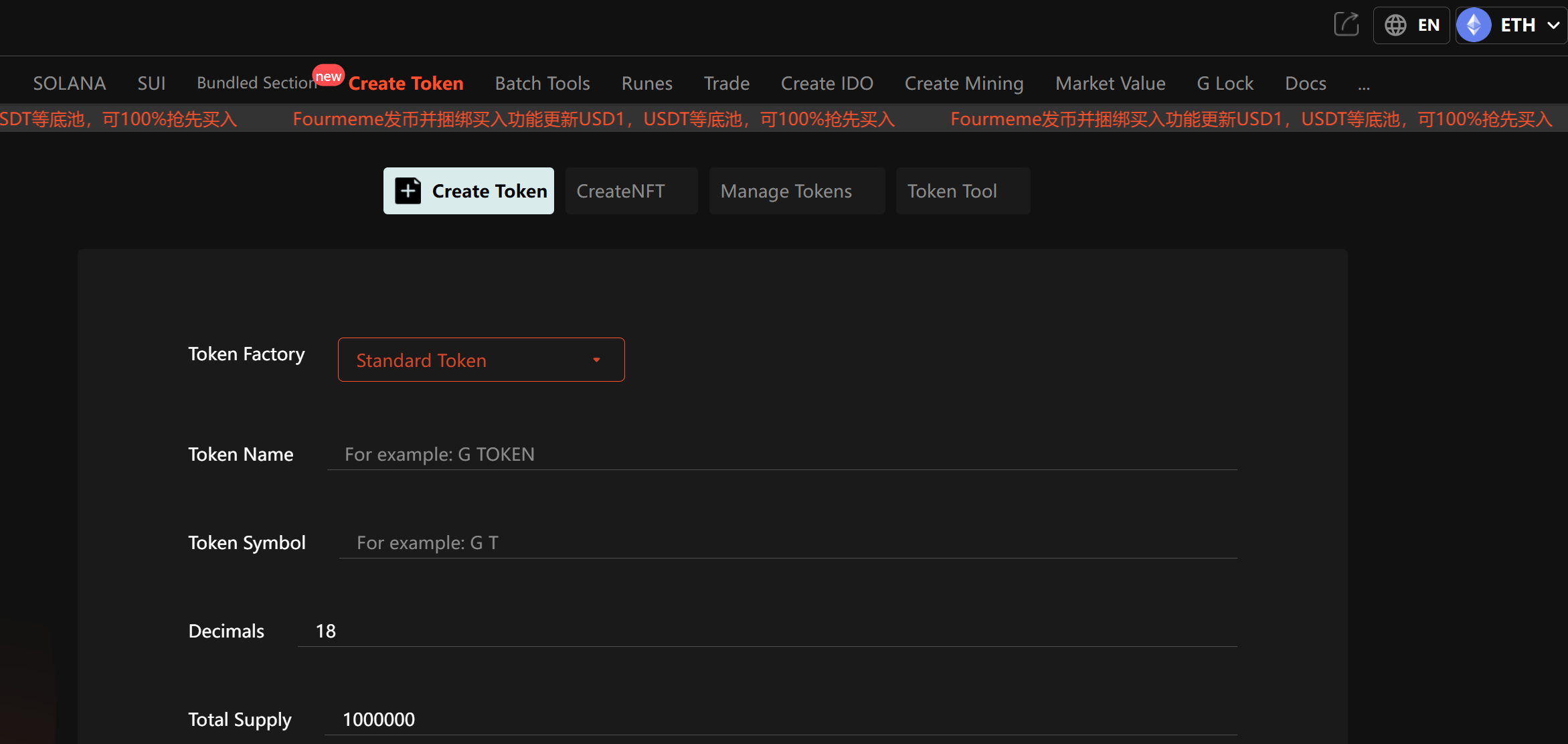
Method 3: Using Token Generator Tools (e.g., GTokenTool)
While Base doesn't have an official token generator, you can use third-party tools like:
GTokenTool: https://www.gtokentool.com
Steps to Use GTokenTool
Visit GTokenTool and connect your wallet
Choose token standard
Enter token parameters
Select Base as deployment network
Confirm and pay gas fees
Wait for deployment to complete
IV. Implementing Advanced Token Features
1. Adding Transaction Tax Functionality
// SPDX-License-Identifier: MIT
pragma solidity ^0.8.0;

import "@openzeppelin/contracts/token/ERC20/ERC20.sol";

contract TaxToken is ERC20 {
    address public treasury;
    uint256 public taxRate; // Percentage (e.g., 5 for 5%)

    constructor(uint256 initialSupply, address _treasury, uint256 _taxRate)
        ERC20("TaxToken", "TAX") {
        _mint(msg.sender, initialSupply * (10 ** decimals()));
        treasury = _treasury;
        taxRate = _taxRate;
    }

    function _transfer(address sender, address recipient, uint256 amount) internal virtual override {
        if (taxRate > 0 && recipient != address(0) && recipient != treasury) {
            uint256 tax = amount * taxRate / 100;
            uint256 netAmount = amount - tax;

            super._transfer(sender, treasury, tax);
            super._transfer(sender, recipient, netAmount);
        } else {
            super._transfer(sender, recipient, amount);
        }
    }

    function setTaxRate(uint256 newRate) external {
        require(msg.sender == treasury, "Only treasury can set tax rate");
        taxRate = newRate;
    }
}
2. Implementing Deflationary Mechanism
// SPDX-License-Identifier: MIT
pragma solidity ^0.8.0;

import "@openzeppelin/contracts/token/ERC20/ERC20.sol";

contract DeflationaryToken is ERC20 {
    uint256 public burnRate; // Percentage

    constructor(uint256 initialSupply, uint256 _burnRate)
        ERC20("DeflationaryToken", "DFT") {
        _mint(msg.sender, initialSupply * (10 ** decimals()));
        burnRate = _burnRate;
    }

    function _transfer(address sender, address recipient, uint256 amount) internal virtual override {
        if (burnRate > 0 && recipient != address(0)) {
            uint256 burnAmount = amount * burnRate / 100;
            uint256 netAmount = amount - burnAmount;

            super._transfer(sender, address(0), burnAmount); // Burn by sending to 0x0
            super._transfer(sender, recipient, netAmount);
        } else {
            super._transfer(sender, recipient, amount);
        }
    }
}
3. Adding Liquidity Locking Feature
// SPDX-License-Identifier: MIT
pragma solidity ^0.8.0;

import "@openzeppelin/contracts/token/ERC20/ERC20.sol";
import "@openzeppelin/contracts/access/Ownable.sol";

contract LockableToken is ERC20, Ownable {
    mapping(address => bool) public lockedAccounts;

    constructor(uint256 initialSupply) ERC20("LockableToken", "LTK") {
        _mint(msg.sender, initialSupply * (10 ** decimals()));
    }

    function lockAccount(address account) external onlyOwner {
        lockedAccounts[account] = true;
    }

    function unlockAccount(address account) external onlyOwner {
        lockedAccounts[account] = false;
    }

    function _beforeTokenTransfer(address from, address to, uint256 amount) internal virtual override {
        super._beforeTokenTransfer(from, to, amount);

        require(!lockedAccounts[from], "Sender account is locked");
        require(!lockedAccounts[to], "Recipient account is locked");
    }
}
V. Important Considerations
Security Considerations
Private Key Protection: Never commit private keys to repositories or share them
Contract Audits: Professionally audit complex contracts before deployment
Testnet First: Always deploy and test on Base testnet first
Access Control: Implement proper owner permissions and adjustable parameters
Standard Compliance: Follow ERC20 standards to ensure wallet/exchange compatibility
Frequently Asked Questions
Q: How much gas is needed to deploy a token?
A: Deploying a simple ERC20 token on Base typically costs about 0.0005-0.002 ETH (varies with network congestion).
Q: Why isn't my token showing in MetaMask?
A: You need to add it manually:
Click "Add Token" in MetaMask
Select "Custom Token"
Enter contract address
Token symbol and decimals should auto-populate
Q: How do I list my token on exchanges?
A: Each exchange has different listing processes, but generally requires:
Application form
Contract audit reports
Listing fees (if applicable)
Proof of project value and liquidity
Q: Can token parameters be modified after deployment?
A: Depends on contract design. Names, symbols, and total supply are usually immutable, but some parameters can be made adjustable via upgradeable contracts or admin functions.
Q: What's the difference between Base chain and Ethereum mainnet tokens?
A: Base chain tokens are Layer 2 tokens—faster and cheaper, but security depends on Base and Ethereum mainnet. Tokens can be bridged to mainnet via official bridges.
VI. Conclusion
Base Chain provides an efficient, low-cost platform for token creation, especially suited for startups and experimental tokens. This guide covered three main methods:
Remix IDE: Best for beginners to get started quickly
Hardhat Framework: Ideal for developers building complex token economies
GTokenTool: Perfect for non-technical users needing fast deployment
Regardless of method, always remember to:
Test thoroughly before mainnet deployment
Consider token economic models and utility
Ensure contract security and permission management
Comply with local regulations
The Base ecosystem is growing rapidly, and token creation is just the first step. Subsequent steps like liquidity provision, marketing, and community building are essential to creating real token value.