What is Ethereum (ETH)?
Ethereum is an open-source, decentralized blockchain platform founded by Vitalik Buterin and others in 2015. Unlike Bitcoin, Ethereum is not just a cryptocurrency (ETH) but also a platform that supports smart contracts and decentralized application (DApp) development.
Ethereum's Development Timeline
2013: Vitalik Buterin publishes the Ethereum whitepaper
2014: Ethereum holds its ICO, raising over $18 million
July 2015: Ethereum mainnet launches (Frontier version)
2016: The DAO hack leads to Ethereum's hard fork into ETH and ETC
2017: ICO boom drives ETH price to record highs
2020: Phase 1 of Ethereum 2.0 launches (Beacon Chain)
September 2022: Ethereum completes "The Merge," transitioning from PoW to PoS consensus
ETH Price History
Initial launch (2015): ~$0.30
2017 bull market: Peaked at $1,400
2018 bear market: Dropped to ~$80
2021 bull market: All-time high of $4,800
2023: Traded between 1,000−2,000
Major Ethereum Events
DAO Attack & Hard Fork (2016): Resulted in Ethereum splitting into ETH and ETC
CryptoKitties Network Congestion (2017): First major demonstration of Ethereum's scaling issues
DeFi Summer (2020): Explosive growth of decentralized finance applications
The Merge (2022): Transition from Proof-of-Work (PoW) to Proof-of-Stake (PoS)
Preparing to Create a Token
Requirements for Creating an ETH Token
Ethereum Wallet: Recommended options include MetaMask or Trust Wallet
ETH Tokens: For paying gas fees (recommend having at least 0.1 ETH)
Token Details:
Token name (e.g., "MyToken")
Token symbol (e.g., "MTK")
Total supply
Decimal places (typically 18)
Development Environment:
Code editor (VS Code, etc.)
Node.js environment
Necessary development tools and libraries
Token Creation Process Overview
Design token economics
Choose creation method (manual coding, tools, or platforms)
Write or generate token contract
Deploy contract to Ethereum network
Verify contract
Add token to wallet
Test token functionality
Methods for Creating ETH Tokens (Detailed Tutorials)
Method 1: Manually Coding an ERC-20 Contract with Solidity
1.Install Required Tools
npm install -g truffle
npm install @openzeppelin/contracts
2.Create Truffle Project
mkdir MyTokenProject
cd MyTokenProject
truffle init
3.Write Token Contract
Create MyToken.sol in the contracts directory:
// SPDX-License-Identifier: MIT
pragma solidity ^0.8.0;

import "@openzeppelin/contracts/token/ERC20/ERC20.sol";

contract MyToken is ERC20 {
    constructor(uint256 initialSupply) ERC20("MyToken", "MTK") {
        _mint(msg.sender, initialSupply * (10 ** decimals()));
    }
}
4.Configure Deployment Script
Create 2_deploy_contracts.js in the migrations directory:
const MyToken = artifacts.require("MyToken");

module.exports = function (deployer) {
  deployer.deploy(MyToken, 1000000); // Mint 1 million tokens
};
5.Deploy Contract
Configure truffle-config.js and run:
truffle migrate --network ropsten
Method 2: Using Remix Online IDE
Visit Remix IDE
Create new file
MyToken.soland paste the Solidity codeCompile contract (select Solidity compiler version)
Navigate to "Deploy" tab
Choose environment (e.g., "Injected Web3" to connect MetaMask)
Select "MyToken" contract
Enter initial supply and click "Deploy"
Confirm transaction in MetaMask
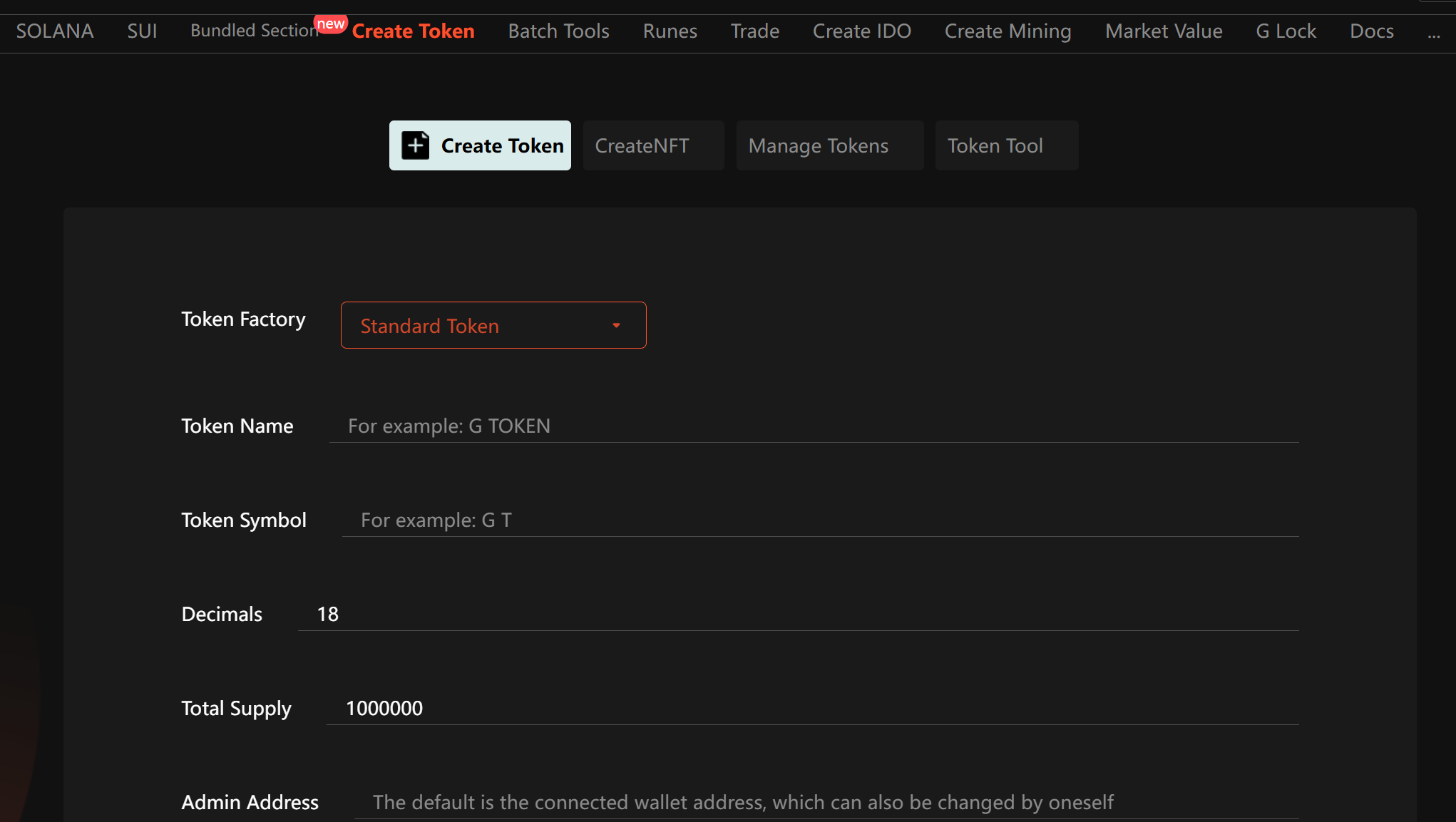
Method 3: Using Token Creation Platforms (e.g., GTokenTool)
Visit GTokenTool
Connect wallet
Go to "Create Token" section
Enter token details:
Token name
Token symbol
Decimal places
Total supply
Confirm and pay gas fees
Wait for transaction confirmation
Part 4: Important Considerations & FAQs
Key Considerations
Gas Fee Optimization: Deploy contracts during low network congestion
Contract Security: Use audited standards like OpenZeppelin
Token Standards: Choose between ERC-20, ERC-721, or ERC-1155 based on needs
Legal Compliance: Understand local regulations and consult legal experts if needed
Parameter Settings: Name, symbol, and decimals cannot be changed after deployment
Contract Verification: Verify contract code on block explorers after deployment
Frequently Asked Questions
Q: How much ETH is needed to create a token?
A: Typically 0.01-0.05 ETH in gas fees, depending on network congestion.
Q: Can I modify a deployed token contract?
A: No, Ethereum contracts are immutable. You would need to deploy a new contract.
Q: What's the difference between ERC-20, ERC-721 and ERC-1155?
A:
ERC-20: Fungible tokens (for currency-like assets)
ERC-721: Non-fungible tokens (NFTs, each token is unique)
ERC-1155: Multi-token standard (supports both fungible and non-fungible)
Q: How do I get my token listed on exchanges?
A: Contact exchanges directly - most require an application form, listing fees, and compliance with their requirements.
Q: What if my contract deployment fails?
A: Check error messages, ensure sufficient ETH for gas, validate contract code, and try increasing gas price.
Part 5: Conclusion
Creating tokens on Ethereum has become a fundamental blockchain development task, whether for fundraising, community incentives, or asset tokenization. This guide covered four primary methods:
Manual Solidity Coding: Most flexible but requires technical knowledge
Remix IDE: Beginner-friendly, no local setup needed
Creating a platform using GTokenTool tokens: the simplest, no code required, and there are many tool components to work with. 【 Recommended 】
Regardless of your chosen method, remember to:
Carefully design token economics
Ensure contract security
Allocate sufficient ETH for gas fees
Plan for long-term maintenance and community building
As the Ethereum ecosystem evolves, token creation becomes more accessible. However, building valuable token projects still requires careful planning and execution. Beginners should practice on testnets before deploying to mainnet.