1. Introduction to HECO Chain
1.1 What is HECO (Huobi ECO Chain)?
HECO (Huobi ECO Chain) is a decentralized, energy-efficient public blockchain developed by Huobi Group, officially launched in December 2020. Built on an optimized Ethereum architecture, HECO offers users a high-performance, low-cost blockchain experience. It uses the HPoS (Huobi Proof of Stake) consensus mechanism and features:
High Performance: Processes thousands of transactions per second
Low Fees: Transaction costs are significantly lower than Ethereum
Compatibility: Fully compatible with Ethereum Virtual Machine (EVM)
Cross-Chain Capabilities: Supports interoperability with major blockchains like Ethereum and Bitcoin
1.2 HECO’s Development Timeline
December 2020: HECO Mainnet launch
Q1 2021: TVL (Total Value Locked) surpasses $2 billion
Mid-2021: First stablecoin lending protocol debuts on HECO
2022: Ecosystem expands to 500+ projects
2023-Present: Enhanced cross-chain functionality and DeFi ecosystem growth
1.3 HT Token Price & Market Performance
HT (Huobi Token) is HECO’s native cryptocurrency, used for:
Paying network transaction fees
Participating in governance voting
Collateral in DeFi applications
HT Historical Price (as of 2023):
All-time high: $39.66 (May 2021)
All-time low: $3.12 (Early 2023)
Current price: Check real-time data
1.4 Key HECO Milestones
March 2021: First IDO platform launches on HECO
June 2021: Partnership with Chainlink announced
January 2022: Mainnet upgrade boosts TPS to 3,000+
2023: HECO 2.0 roadmap unveiled
2. Prerequisites for Creating a Token on HECO
2.1 Required Materials
HT Tokens: For gas fees (recommend at least 5 HT)
Wallet: HECO-compatible (e.g., MetaMask, TokenPocket)
Code Editor: Such as VS Code
Solidity Basics: Understanding smart contract development
Project Plan: Token name, symbol, total supply, distribution model
2.2 Environment Setup
Install MetaMask:
Network Name: HECO Mainnet
RPC URL:
https://http-mainnet.hecochain.comChain ID: 128
Currency Symbol: HT
Block Explorer:
https://hecoinfo.comAdd the browser extension
Create or import a wallet
Add HECO Mainnet configuration:
Get Test HT (Optional):
Use the HECO testnet faucet
Request test HT with your wallet address
Install Development Tools:
npm install -g truffle
npm install @openzeppelin/contracts
3. Simplified Token Creation Process
Choose Token Standard: HRC-20, HRC-721, etc.
Write Smart Contract: Using Solidity
Compile Contract: Via Truffle or Remix
Deploy Contract: To HECO using Remix or Truffle
Verify Contract: On HECO’s block explorer
Add Liquidity (Optional): Create trading pairs on DEXs like MDEX
4. Detailed Token Creation Methods
Method 1: Using Remix IDE to Create an HRC-20 Token
HRC-20 is HECO’s most widely used token standard, fully ERC-20 compatible.
Step-by-Step:
1.Access Remix: https://remix.ethereum.org
2.Create New File: E.g., MyToken.sol
3.Write Contract Code:
// SPDX-License-Identifier: MIT
pragma solidity ^0.8.0;

import "@openzeppelin/contracts/token/ERC20/ERC20.sol";

contract MyToken is ERC20 {
    constructor(uint256 initialSupply) ERC20("MyToken", "MTK") {
        _mint(msg.sender, initialSupply * 10 ** decimals());
    }
}
4.Compile Contract:
Navigate to the Solidity compiler tab
Select compiler version (e.g., 0.8.0)
Click "Compile MyToken.sol"
5.Deploy Contract:
Switch to "Deploy & Run Transactions"
Environment: "Injected Web3" (connected to MetaMask)
Ensure MetaMask is set to HECO
Enter initial supply (e.g., 1000000)
Click "Deploy" and confirm the transaction in MetaMask
6.Verify Contract:
Find your contract on hecoinfo.com
Click "Verify and Publish"
Submit source code and contract details
Method 2: Using Truffle to Create an HRC-721 NFT
HRC-721 is HECO’s NFT standard for unique digital assets.
Step-by-Step:
1.Initialize Project:
mkdir my-nft-project && cd my-nft-project
truffle init
npm install @openzeppelin/contracts
2.Create Contract:
In contracts/MyNFT.sol:
// SPDX-License-Identifier: MIT
pragma solidity ^0.8.0;

import "@openzeppelin/contracts/token/ERC721/ERC721.sol";
import "@openzeppelin/contracts/utils/Counters.sol";

contract MyNFT is ERC721 {
    using Counters for Counters.Counter;
    Counters.Counter private _tokenIds;

    constructor() ERC721("MyNFT", "MNFT") {}

    function mintNFT(address recipient, string memory tokenURI)
        public
        returns (uint256)
    {
        _tokenIds.increment();
        uint256 newItemId = _tokenIds.current();
        _mint(recipient, newItemId);
        _setTokenURI(newItemId, tokenURI);
        return newItemId;
    }
}
3.Configure Truffle:
In truffle-config.js:
const HDWalletProvider = require('@truffle/hdwallet-provider');
const mnemonic = 'your-mnemonic-here';

module.exports = {
  networks: {
    heco: {
      provider: () => new HDWalletProvider(mnemonic, 'https://http-mainnet.hecochain.com'),
      network_id: 128,
      gas: 5500000,
      confirmations: 2,
      timeoutBlocks: 200,
      skipDryRun: true
    }
  },
  compilers: {
    solc: {
      version: "0.8.0",
      settings: {
        optimizer: {
          enabled: true,
          runs: 200
        }
      }
    }
  }
};
4.Deploy:
truffle migrate --network heco
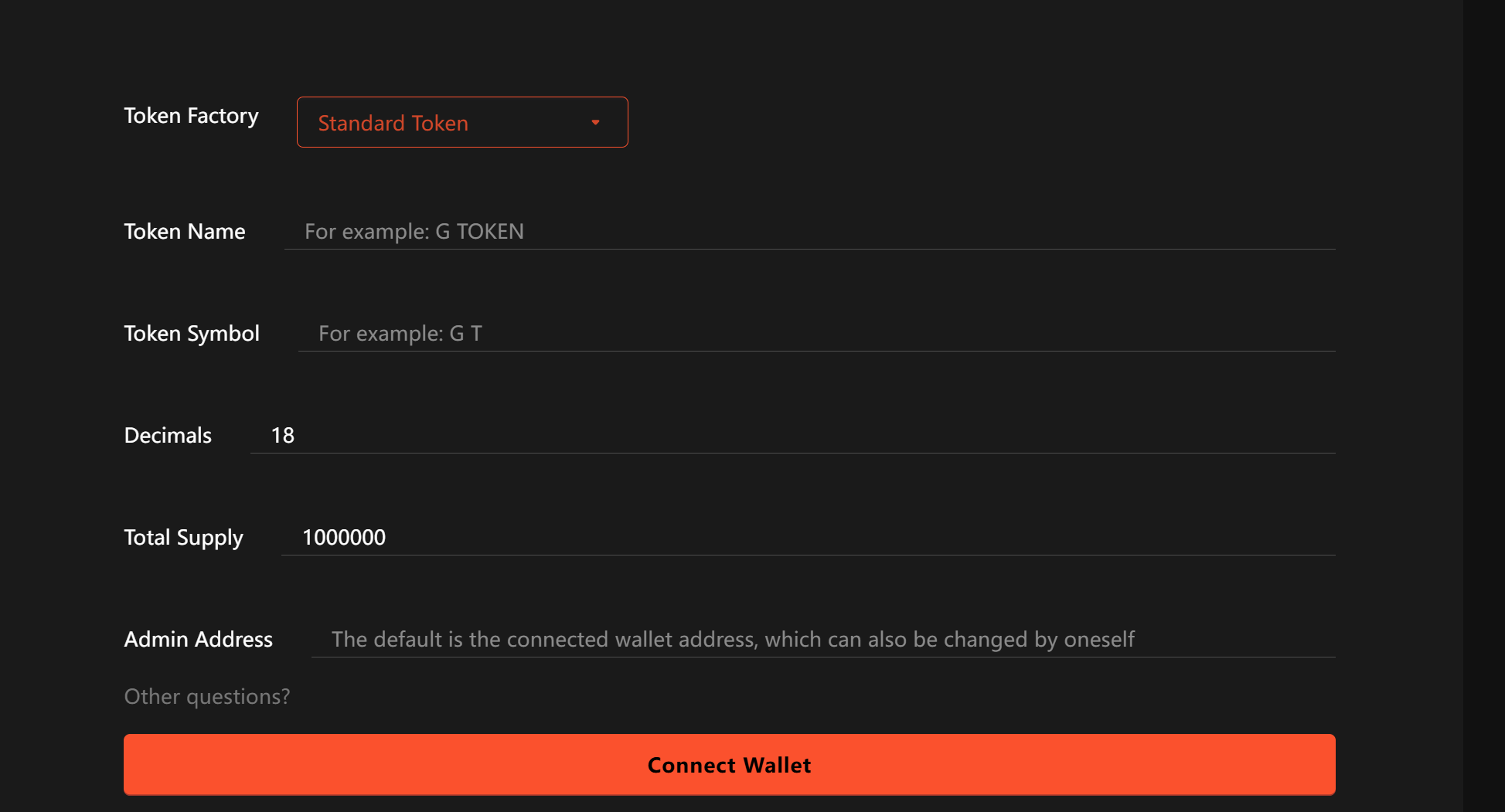
Method 3: No-Code Token Generators
For non-technical users:
Visit a GTokenTool Token Generator
Enter Token Details:
Name
Symbol
Total supply
Decimals
Advanced features (e.g., fees, burn mechanics)
Connect Wallet & pay HT fees
Confirm Transaction
Save Contract Address
5. Key Considerations
5.1 Security Best Practices
Audit Smart Contracts before deployment
Implement Access Control (e.g.,
onlyOwner)Prevent Reentrancy Attacks with CEI patterns
Use SafeMath for arithmetic operations
Include Emergency Pause functionality
5.2 Common Issues & Fixes
| Issue | Likely Cause | Solution |
|---|---|---|
| Deployment fails (Out of Gas) | Gas limit too low | Increase gas limit (≥500,000) |
| Stuck transaction | Low gas price | Raise gas price or replace tx |
| Verification fails | Compiler version mismatch | Match compiler versions |
| Transfers blocked | Missing approvals | Check approve()/transferFrom() |
5.3 Legal Compliance
Research Local Regulations: Token laws vary by jurisdiction
Define Token Type: Utility vs. security token
Disclosures: Provide clear project details (if launching publicly)
KYC/AML: Consider identity verification for compliance
6. Frequently Asked Questions
Q1: How much HT is needed to create a token?
A: Simple HRC-20 tokens cost ~0.5-2 HT; complex contracts may require 3-5 HT.
Q2: How do I make my token visible in wallets?
A: Users must manually add the token by entering its contract address, symbol, and decimals.
Q3: Can I create a token with transaction taxes?
A: Yes—implement tax logic in the contract (common for dividend tokens).
Q4: Can HECO tokens bridge to Ethereum?
A: Yes, via HECO’s official bridge or third-party solutions.
Q5: How to add liquidity post-creation?
A: Create trading pairs on HECO DEXs like MDEX or SushiSwap.
Q6: Why are my token transactions blocked?
A: The contract may have transfer restrictions or the token could be blacklisted.
7. Conclusion & Recommendations
This guide covers multiple methods for token creation on HECO. Key takeaways:
With its low costs, high speed, and robust ecosystem, HECO is an excellent choice for token creation and dApp development. Whether you're a startup or an established project, HECO offers scalable solutions.