
Below are the steps for issuing tokens on the Lets Bonk Fun platform using GTokenTool, along with instructions on how to execute simultaneous token purchases via other addresses at launch. This guide leverages GTokenTool’s one-click token issuance feature on the Solana blockchain and LetsBonk’s bundled buy mechanism.
Step 1: Issuing Tokens on LetsBonk via GTokenTool
Prerequisites:
-
Install Phantom Wallet: Ensure you have the Phantom wallet (a popular Solana wallet)
-
Prepare SOL: Have at least 0.03 SOL in your wallet to cover issuance fees (network + token creation costs).
-
VPN Recommended: Use a VPN for unrestricted access to GTokenTool’s website.
Access the LetsBonk Token Launch Page:
-
Open GTokenTool’s LetsBonk page: https://sol.gtokentool.com/zh-CN/LetsBonk.
-
Switch the language to English (top-right corner, if needed).
-
Click "Select Wallet" to connect your Phantom wallet. Verify that your wallet address appears on the page.
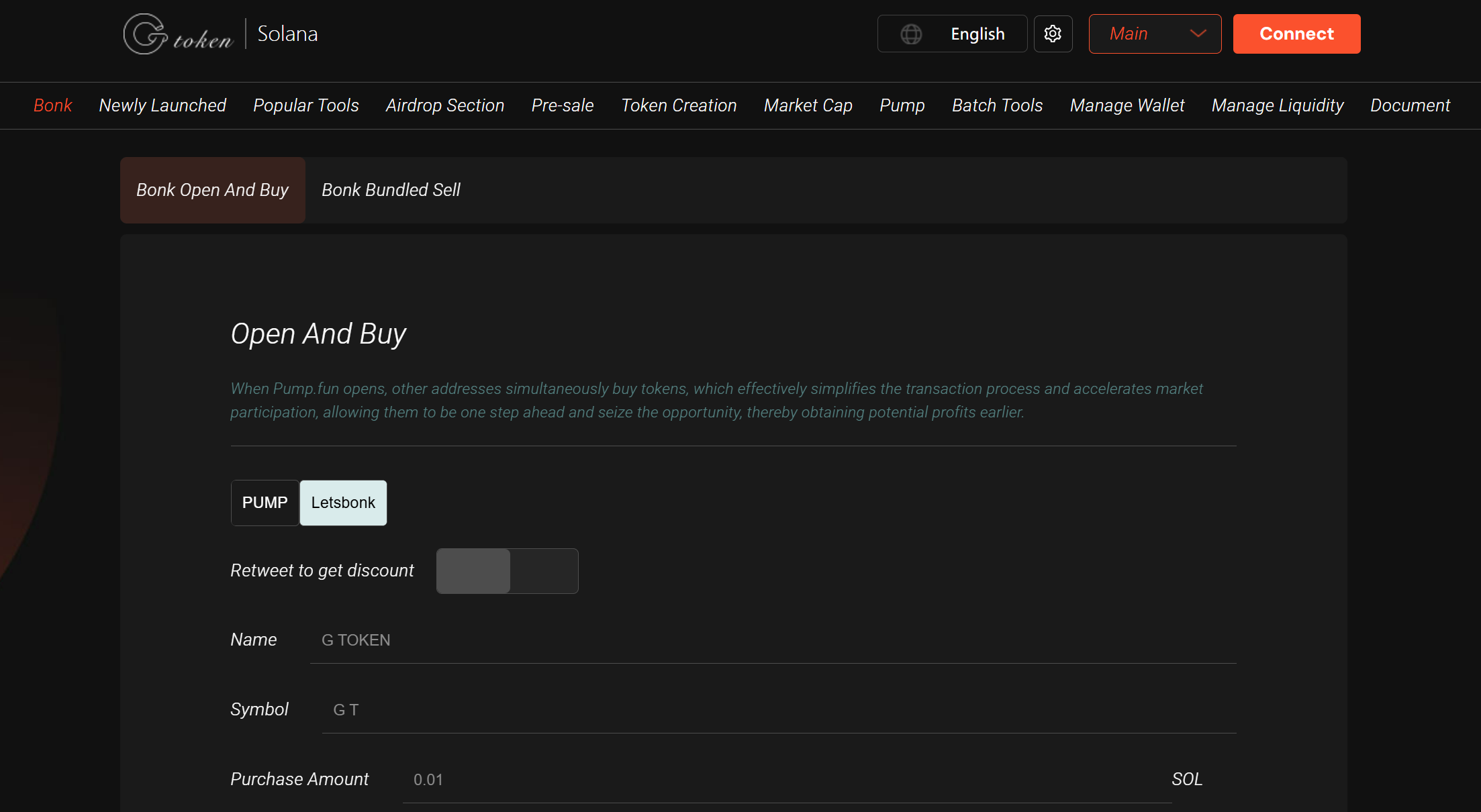
Enter Token Details:
-
Official Links: Website, Telegram, Twitter, Discord, etc.
-
Vanity Contract (Optional): Customize your token’s contract address if desired.
-
Permissions:
-
Revoke Update: Renounce metadata modification rights (boosts investor trust).
-
Revoke Freeze: Renounce freeze authority (required by some exchanges).
-
Revoke Mint: Disable future minting (ensures no additional supply, enhancing security).
-
Token Name: e.g., "G Token" (max 32 characters, supports English/Chinese).
-
Token Symbol: e.g., "GT" (max 10 characters).
-
Decimals: Default is 9 (adjust based on total supply needs).
-
Token Logo: Upload an icon (PNG/JPG/GIF, max 2MB) for wallet display.
-
Optional Info: Expand "Optional Content" for additional fields.
Submit Token Creation Request:
-
Click "Create Token" after verifying all details.
-
Phantom Wallet will prompt a transaction confirmation. Check the fee (~0.03 SOL) and sign.
-
The transaction executes on Solana’s blockchain (usually completes in seconds).
Verify Token:
-
Check the token on Solscan to confirm details (name, symbol, contract address).
-
If the token icon doesn’t appear immediately in Phantom, wait or manually add the contract address.
Step 2: Simultaneous Token Buys at Launch via Other Addresses
LetsBonk supports "Issue + Launch + Bundled Buys" in one click, streamlining market entry.
Enable Bundled Buy Mode:
-
On the LetsBonk page (https://sol.gtokentool.com/zh-CN/LetsBonk), select "PUMP (Issue + Bundled Buys)".
-
This automates token creation and configures buys from other addresses.
Prepare Buy Addresses & Funds:
-
Multiple Wallets: Generate or import additional Solana addresses (use GTokenTool’s "Batch Wallet Generator").
-
Each wallet needs a small SOL balance (~0.000005 SOL per tx for fees).
-
Fund Allocation: Prepare SOL/USDC in a primary wallet for bulk purchases. Use a CSV file to assign amounts per address.
Configure Bundled Buys:
-
Navigate to the "Bundled Buy" section on LetsBonk.
-
Upload a CSV file listing:
-
Target addresses
-
Purchase amounts per address (supports "one-to-many" or "many-to-many" modes).
-
Select the newly issued token’s contract address and allocate buy amounts.
-
Click "Execute Transactions"—Phantom will prompt batch confirmation.
Execute Transactions:
-
Transactions process in seconds on Solana.
-
Verify token balances per address on Solscan.
Key Advantages:
✅ First-Mover Edge: Bundled buys let you secure early positions at launch prices.
✅ Simplified Workflow: GTokenTool’s automation minimizes manual errors.
✅ Low-Cost Efficiency: Solana’s near-zero fees (~0.000005 SOL/tx) enable scalable bulk buys.
Additional Recommendations:
-
Create Liquidity Pools: After issuance, set up pools on Raydium or Meteora (e.g., SOL/USDC pair). Minimum liquidity suggested: 500 USDC equivalent.
-
Promote Your Token: Leverage social links (Telegram, Twitter) to attract traders.
-
Join GTokenTool’s Community: For support, join their Telegram: https://t.me/GToken_EN.
Important Notes:
⚠️ Permissions: Always revoke mint/freeze to prove legitimacy (critical for DEX listings like Raydium).
⚠️ Verify Contracts: Double-check token addresses on Solscan to avoid scams.
⚠️ Network Fees: Ensure wallets have enough SOL for transaction batches.
⚠️ Market Risks: Multi-wallet buys can boost volume but require strategic planning.
For further assistance, refer to GTokenTool’s official resources or community channels. Happy token launching! 🚀











