What is Batch Token Transfer?
Batch token transfer refers to the process of sending cryptocurrency tokens to multiple recipient addresses simultaneously through a blockchain network (such as Solana, Ethereum, etc.), typically used to efficiently handle large-scale transfer needs. Here are the key points:
Definition
Batch Transfer: Sending tokens (e.g., SPL tokens, ERC-20 tokens) to multiple wallet addresses in a single operation or program, rather than manually transferring one by one.
Purpose: Improve efficiency, reduce time costs and gas fees associated with manual operations, suitable for scenarios requiring distribution to a large number of users.
Features
Supports Multiple Addresses: Tokens can be sent to an unlimited number of addresses, usually by inputting a list of addresses or uploading a file (e.g., CSV).
Supports Multiple Token Types: Such as Solana's Token2022, Ethereum's ERC-20, etc., depending on platform support.
Automated Processing: Tools or scripts automatically split transactions to comply with blockchain limitations (e.g., Solana's per-transaction signature or data size limits).
Common Use Cases
Airdrops: Projects distribute tokens to community users to promote the project or incentivize participation.
Reward Distribution: Sending reward tokens to team members, investors, or users in bulk.
Fund Aggregation: Consolidating tokens from multiple addresses into one or more target addresses.
DeFi/NFT Projects: Distributing earnings, NFTs, or governance tokens.
Personal Use: Sending batch transfers to friends or partners.
Why Use Batch Token Transfer?
The primary purpose of batch token transfer is to efficiently and conveniently handle large-scale token distribution or management needs. Here are the main reasons and advantages:
Improves Efficiency, Saves Time
Manual transfers are time-consuming: Transferring to multiple addresses one by one requires repetitive operations, especially when the number of addresses is large (e.g., hundreds or thousands), which is time-consuming and prone to errors.
Batch transfer automation: Tools or scripts process all transfers at once, reducing manual operation time. For example, using GTokenTool allows quick sending of tokens to an unlimited number of addresses.
Reduces Transaction Costs
Optimizes gas fees: Batch transfer tools typically bundle multiple transfers into fewer transactions (e.g., 20 addresses per transaction on Solana), saving gas fees compared to individual transfers.
New address creation fees: For new addresses (e.g., Solana requires 0.002 SOL for account creation), batch operations can standardize management fees, avoiding repeated payments.
Supports Large-Scale Distribution Scenarios
Airdrops: Projects distribute tokens to community users in bulk to attract users, promote the project, or incentivize participation.
Reward Distribution: Sending reward tokens (e.g., governance tokens, profit-sharing) to teams, investors, or contributors.
NFT Projects: Distributing NFTs or related tokens to holders in bulk.
DeFi Applications: Distributing liquidity mining rewards, protocol earnings, or governance tokens.
Fund Management and Aggregation
Multi-address management: Individuals or institutions may need to consolidate tokens from multiple wallets into one address or distribute tokens across multiple addresses to diversify risk.
Batch Liquidation: Traders or projects can quickly organize assets through batch transfers, improving fund management efficiency.
Reduces Error Risks
Unified operations: Importing addresses and amounts via CSV files or batch tools reduces manual input errors (e.g., incorrect addresses or amounts).
Verification mechanisms: Many tools (e.g., GTokenTool) provide pre-transfer validation to ensure correct address formats and balances.
Adapts to Blockchain Characteristics
High throughput support: High-performance blockchains like Solana enable rapid processing of large volumes of transactions, which batch transfer tools can leverage.
Flexibility: Supports different token standards (e.g., Solana's Token2022, Ethereum's ERC-20), meeting diverse needs.
Steps for Batch Token Transfer on Solana
Access the Batch Transfer Page
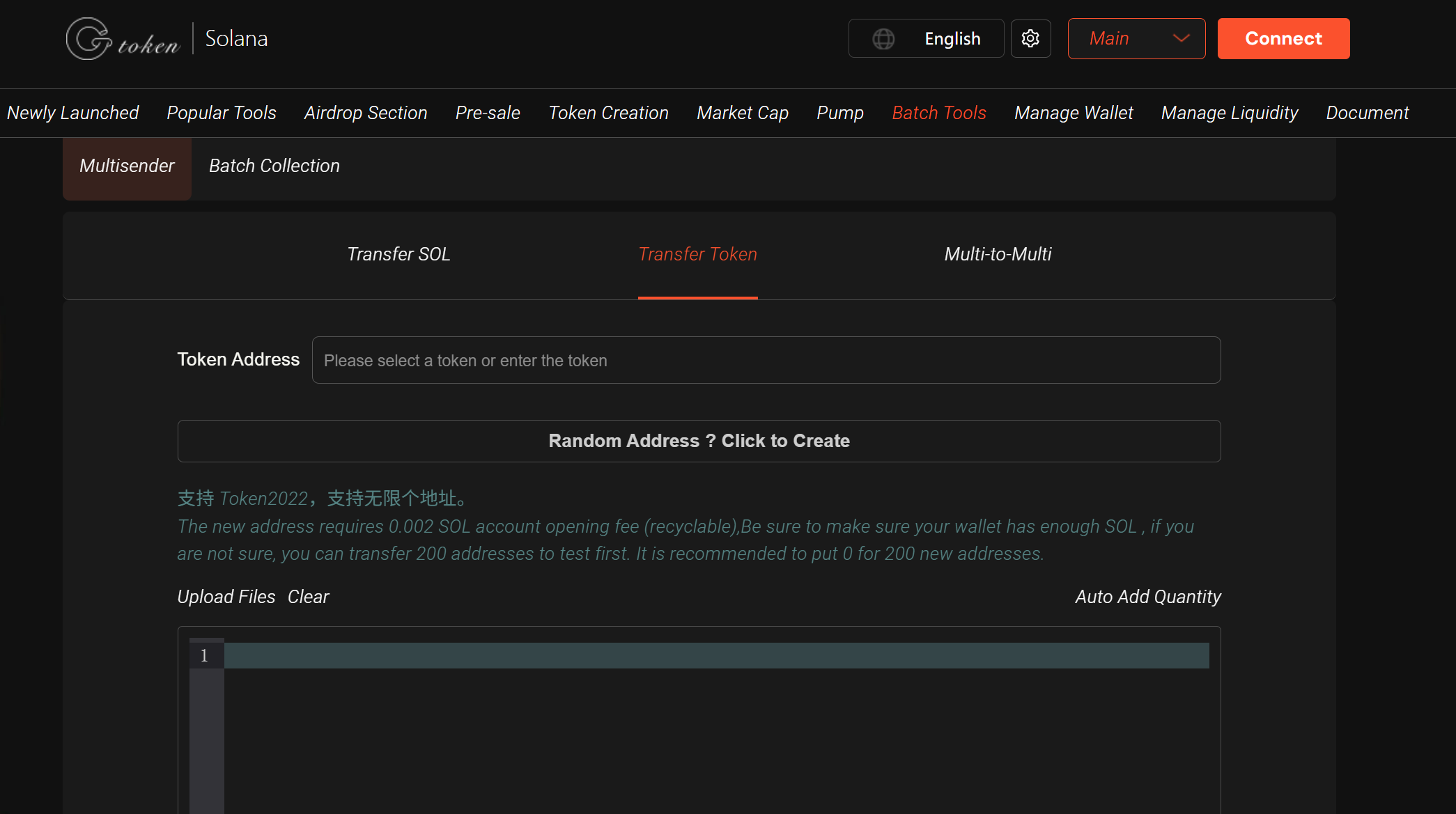
Open https://sol.gtokentool.com/batchTool/batchTransfer/Token and click "Select Wallet" in the top-right corner to connect your Solana wallet (e.g., Phantom).
Select the Token
Choose the SPL token you want to batch transfer (supports Token2022 standard). Ensure your wallet has sufficient token balance.
Import Recipient Addresses and Transfer Amounts
Example:
address1,0.01Manual Input: Enter recipient addresses and amounts in the input box, formatted as "address,amount," one per line, separated by English commas.
File Import: Upload a CSV file to import multiple addresses and amounts (no limit on the number of addresses).
After confirming the data is correct, click "Next" to review transfer details (e.g., total amount, number of addresses).
Check SOL Balance
Each transaction requires a small amount of SOL for gas fees (typically ~0.000005 SOL per signature).
New addresses require a 0.002 SOL creation fee (reclaimable by closing the account). Ensure your wallet has enough SOL (e.g., 200 addresses may require ~0.4 SOL for creation fees + gas fees).
If unsure, test with a small batch first (e.g., 200 addresses).
Execute the Transaction
After confirming the transfer details, click "Send Transaction."
Due to Solana's transaction hash length limit, the platform will process transactions in batches (e.g., 20 addresses per transaction), and your wallet will prompt for confirmation multiple times.
Once completed, you can check the transaction status on the Solana blockchain explorer.
Notes
Supports Token2022: GTokenTool supports Solana's Token2022 standard, suitable for newer tokens.
Security: Private keys are not stored on servers; all operations are executed on the front end. However, it's recommended to use a new wallet or test with small amounts to minimize risks.
Insufficient SOL Balance: If the target or sender address lacks SOL, the transaction may fail. Ensure each relevant wallet has a small amount of SOL for gas and creation fees.
Testing Recommendation: For first-time users, test with a small batch (e.g., 200 addresses) to verify the process and ensure sufficient balance.
Common Issues: If a transaction fails, it may be due to Solana network congestion or input format errors. Check address and amount formats or try again later.
Applicable Scenarios
Projects: Token airdrops, community rewards.
DeFi/NFT Platforms: Batch distribution of earnings or NFTs.
Traders/Institutions: Fund aggregation, liquidity management.
Individual Users: Multi-wallet asset organization or batch transfers to teams/friends.
For further assistance, join the GTokenTool official Telegram group: https://t.me/GToken_EN.