Introduction
In the world of cryptocurrency, Meme Tokens have become a force to be reckoned with. From Dogecoin to Shiba Inu, these tokens, built around internet culture and humor, aren't just for fun – they've also created staggering wealth. In 2025, with the widespread adoption of blockchain technology and the maturity of the DeFi ecosystem, creating your own Meme Token has become easier than ever, especially through innovative platforms like Four.meme.
Four.meme is the first platform on the Binance Smart Chain (BSC) dedicated to the fair launch of Meme Tokens. It allows users to deploy tokens quickly, with low cost and zero coding required, and supports a Bundle Buy feature, ensuring initial liquidity the moment a project launches. This "fair launch" mechanism avoids the centralization risks of traditional ICOs, allowing more everyday users to participate. According to CoinMarketCap data, Meme Token projects on the BSC chain have grown by over 300% in the past year. As a leading tool, Four.meme has helped thousands of projects go live.
This article provides a detailed, step-by-step tutorial on how to use Four.meme to create a token and perform a bundle buy. The entire process only requires a computer or phone, a crypto wallet, and a small amount of BNB, taking roughly 10-20 minutes. Whether you're a Meme enthusiast, a community KOL, or a crypto newbie, this guide will get you started.
Four.meme Platform Overview
Launched in 2024 by a group of blockchain developers, Four.meme positions itself as the "Fair Launchpad for Meme Tokens." Unlike tools in the Solana ecosystem like Pump.fun, Four.meme is optimized for the BSC chain, leveraging its low gas fees and high TPS (transactions per second) for instant deployment and trading.
Key Advantages
Fairness: No pre-sales, no team allocations. All tokens are distributed publicly and fairly at launch.
Low Barrier to Entry: Creation fees are only around 0.03 BNB. No programming knowledge needed.
Bundle Buy: Supports batch buying from multiple addresses, ensuring real liquidity at launch and helping prevent "rug pulls."
Ecosystem Integration: Seamlessly connects with DEXs like PancakeSwap, supporting subsequent liquidity pool additions.
Community-Driven: Built-in social sharing features help tokens spread quickly on platforms like Telegram and Twitter.
According to on-chain data from Dune Analytics, since its launch, Four.meme has been used to create over 50,000 Meme Tokens, with 10% achieving market caps exceeding one million dollars. The platform's security has been audited by PeckShield, ensuring the contracts have no backdoors. This tutorial will use GTokenTool's bundle tool, an optimized front-end for Four.meme that offers a more user-friendly Chinese interface and supports batch operations.
Preparation: Ensuring a Smooth Launch
Proper preparation before creating your token can help you avoid 90% of common pitfalls. Here's the essential checklist:
1. Hardware & Software
Device: Computer (Chrome browser recommended) or a phone (must support the MetaMask mobile app).
Wallet: MetaMask. Download from: https://metamask.io. If you're new, create a wallet and securely back up your seed phrase.
Network: A stable Wi-Fi connection to avoid failed transactions due to disconnections.
2. Funds Preparation
BNB Balance: Have at least 0.031 BNB ready (approx. $20, depending on market rates).
Buy-in Funds: If you plan a bundle buy, prepare additional BNB or USDT (suggest 0.1-1 BNB depending on project scale).
Funding Method: Transfer BNB from an exchange like Binance to your MetaMask wallet.
Steps:
Withdraw BNB from Binance to your MetaMask BSC address.
Ensure the network in MetaMask is set to BSC Mainnet (Chain ID: 56).
Wait 1-3 minutes for the funds to arrive.
3. Other Materials
Token Logo: A PNG/JPG image, under 1MB in size. Use tools like Canva or Photoshop to design it; recommended size is 512x512 pixels. Choose a funny, viral theme (like Pepe the Frog or Doge).
Private Key List: The private keys of the wallets you'll use for the bundle buy (one per line). WARNING: Your private keys control your funds – NEVER share them! Consider using test wallets or hardware wallet exports for this step.
Project Idea: Brainstorm a fun Meme theme, e.g., "The 2025 AI Cat Revolution" or "Elon Musk's Mars Dream."
Common Pitfalls to Avoid
Do not import the private keys of your main wallet – it's high risk.
Check BSC Bridging: If transferring BNB from Ethereum, use the official BSC Bridge (https://www.binance.org/en/bridge).
Market Volatility: BNB price fluctuates between $500-$600; calculate fees accordingly.
Once you're all set, let's dive into the core steps.
Detailed Tutorial: Creating the Token & Bundle Buy
This section is based on GTokenTool's bundle page, an officially recommended tool for Four.meme that supports one-click operations. The entire process happens on the BSC Mainnet – ensure MetaMask is connected to it.
Step 1: Access the Page & Connect Wallet
Open your browser and go to: https://www.gtokentool.com/bundle
Click the "Connect Wallet" button in the top right corner and select MetaMask.
A MetaMask pop-up will request connection; click "Connect."
Switch Network: If not already on BSC, click the MetaMask fox icon, select "Add Network" or switch directly to "BNB Smart Chain Mainnet."
RPC URL: https://bsc-dataseed.binance.org
Chain ID: 56
Currency Symbol: BNB
Once connected successfully, the page should display "Chain Name: BSC Mainnet" and your wallet address. Ensure your balance is >0.031 BNB.
Step 2: Fill in Basic Token Information
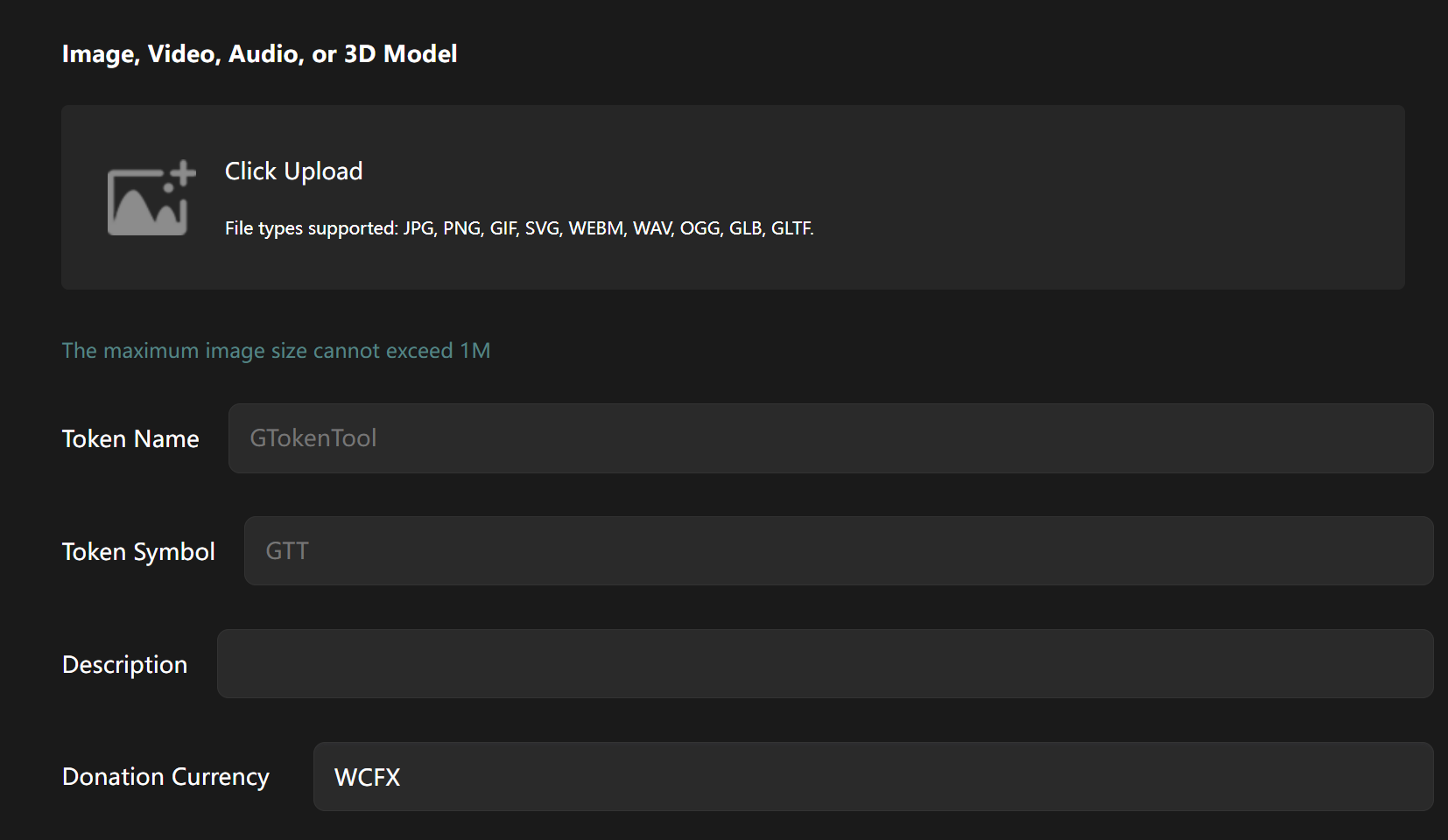
Upload Logo: Click the "Upload Image" button and select your image file. Ensure it's <1MB; compress if necessary. Example: Upload a cartoon cat picture.
Token Name: Enter the full name, e.g., "GTokenTool Meme Cat" (max 20 characters, letters & numbers).
Token Symbol: Enter the ticker symbol, e.g., "GMC" (3-8 characters, uppercase recommended).
Description: A short intro, max 200 characters.
Total Supply: Default is 100 million (can be customized, but 10^8 to 10^9 is recommended to avoid perceived inflation).
Step 3: Select Donation Currency
From the dropdown menu, select "BNB" (default). Other options include USDT, USD1, BUSD, DOGE, FIST.
Explanation: This is the currency used for the initial fundraising to create the liquidity pool. BNB is the most common and offers good liquidity.
Step 4: Add Contact Info (Optional)
Enter a Telegram group link or Twitter handle, e.g.,
https://t.me/grokmemecat.Purpose: Helps the community find your project and increases exposure.
Step 5: Import Wallet Private Keys
In the "Import Private Keys" text box, paste your private keys manually. One private key per line. Example:
YourPrivateKey1...YourPrivateKey2...Supports 1-50 addresses. Each address needs a small amount of BNB pre-funded for the buy-in.
SECURITY WARNING: Private key import should be for this operation only. Clear your clipboard afterward. Leaking a private key means losing access to the funds in that wallet!
Step 6: Set Buy-in Amount
For each imported address, you can set the buy-in amount (e.g., 0.05 BNB).
Supports batch setting: e.g., "0.01 BNB per address."
A total buy-in of 0.1 - 0.5 BNB is recommended to ensure 5-10% of tokens are in circulation at launch.
Step 7: Confirm & Create
Scroll down and double-check all the information is correct.
Click the blue "Create" button.
A MetaMask pop-up will appear for transaction confirmation. Check the gas fee (approx. 0.001 BNB) and click "Confirm."
Wait 10-60 seconds. The page should display "Creation Successful!" along with your token's contract address (e.g.,
0x123...abc).Click the address link to view details on BscScan: total supply, holders, etc.
Congratulations! Your Meme Token is now live on Four.meme, and liquidity has been automatically added on PancakeSwap. The bundle buy has been executed, and the specified addresses now hold the initial token distribution.
Conclusion
With Four.meme, you can turn a creative idea into an on-chain reality in just a few steps. Remember, the soul of a Meme Token lies in its community and humor – it's a cultural movement.