1. Overview of the SEPOLIA Network
1.1 What is SEPOLIA?
SEPOLIA is a crucial test network (Testnet) within the Ethereum ecosystem, designed specifically for developers to test smart contracts and decentralized applications (DApps) without consuming real ETH. As one of the Ethereum Foundation-supported testnets, SEPOLIA utilizes a Proof-of-Stake (PoS) consensus mechanism, closely mirroring the mainnet environment.
1.2 The Evolution of SEPOLIA
2017: The first test network, Ropsten, was launched
October 2022: SEPOLIA testnet officially launched, replacing Ropsten as the primary testnet
2023: Became one of the preferred test networks for Ethereum developers
Ongoing Updates: Continuously synchronized with Ethereum mainnet upgrades
1.3 SEPOLIA Token Value
As a test network, tokens (SEP) on SEPOLIA have no real market value. Developers can obtain them for free from faucets. Primary uses include:
Paying for Gas fees on the test network
Testing token transfers and smart contract interactions
Simulating real economic environments
1.4 Key SEPOLIA Events
Synchronized with Ethereum mainnet's "The Merge" upgrade in 2023
Regular network resets to maintain a clean testing environment
Default support by major tools like MetaMask and Infura
2. Preparations Before Creating a Token
2.1 Required Materials
Development Environment:
Node.js (recommended v16 or higher)
npm or yarn package manager
Code editor (e.g., VS Code)
Wallet Configuration:
MetaMask wallet (configured for SEPOLIA network)
SEPOLIA test ETH (obtained from faucets)
Development Tools:
Hardhat or Truffle framework (optional)
Solidity compiler
Ethers.js or Web3.js libraries
Network Access:
SEPOLIA RPC endpoint (available through services like Alchemy or Infura)
2.2 Basic Setup Steps
Install MetaMask and Add SEPOLIA Network:
Network Name: Sepolia Test Network
RPC URL: https://rpc.sepolia.org
Chain ID: 11155111
Currency Symbol: SEP
Obtain Test ETH:
Visit the official faucet: https://sepoliafaucet.com
Or use Alchemy's faucet: https://sepoliafaucet.com
Set Up Development Environment:
mkdir my-token-project && cd my-token-project
npm init -y
npm install --save-dev hardhat
npx hardhat
3. Brief Process for Creating Tokens on SEPOLIA
Choose a token standard (ERC-20, ERC-721, etc.)
Write the smart contract code
Compile the contract
Deploy to the SEPOLIA network
Verify the contract (optional)
Test token interactions
4. Detailed Methods for Creating Tokens on SEPOLIA
Method 1: Quick Deployment Using Remix IDE
Step 1: Visit https://remix.ethereum.org
Step 2: Create a new file (e.g., MyToken.sol) and write the contract:
// SPDX-License-Identifier: MIT
pragma solidity ^0.8.0;

import "@openzeppelin/contracts/token/ERC20/ERC20.sol";

contract MyToken is ERC20 {
    constructor(uint256 initialSupply) ERC20("MyToken", "MTK") {
        _mint(msg.sender, initialSupply);
    }
}
Step 3: Compile the contract
Switch to the "Solidity Compiler" tab
Select the correct compiler version (matching the pragma statement)
Click "Compile MyToken.sol"
Step 4: Deploy the contract
Switch to the "Deploy & Run Transactions" tab
Select "Injected Provider - MetaMask" as the environment
Ensure MetaMask is connected to the SEPOLIA network
Enter the initial supply (e.g., 1000000)
Click "Transact" and confirm the transaction
Method 2: Deployment Using Hardhat Framework
Step 1: Initialize the project
mkdir my-token && cd my-token
npm init -y
npm install --save-dev hardhat
npx hardhat
Step 2: Install dependencies
npm install @openzeppelin/contracts @nomicfoundation/hardhat-toolbox dotenv
Step 3: Configure hardhat.config.js
require("@nomicfoundation/hardhat-toolbox");
require("dotenv").config();

module.exports = {
  solidity: "0.8.20",
  networks: {
    sepolia: {
      url: process.env.SEPOLIA_RPC_URL,
      accounts: [process.env.PRIVATE_KEY]
    }
  }
};
Step 4: Create the contract file contracts/MyToken.sol
// SPDX-License-Identifier: MIT
pragma solidity ^0.8.20;

import "@openzeppelin/contracts/token/ERC20/ERC20.sol";

contract MyToken is ERC20 {
    constructor(uint256 initialSupply) ERC20("MyToken", "MTK") {
        _mint(msg.sender, initialSupply);
    }
}
Step 5: Create the deployment script scripts/deploy.js
async function main() {
  const initialSupply = ethers.parseUnits("1000000", 18);
  const myToken = await ethers.deployContract("MyToken", [initialSupply]);
  await myToken.waitForDeployment();
  console.log(`MyToken deployed to ${myToken.target}`);
}

main().catch((error) => {
  console.error(error);
  process.exitCode = 1;
});
Step 6: Deploy the contract
npx hardhat run scripts/deploy.js --network sepolia
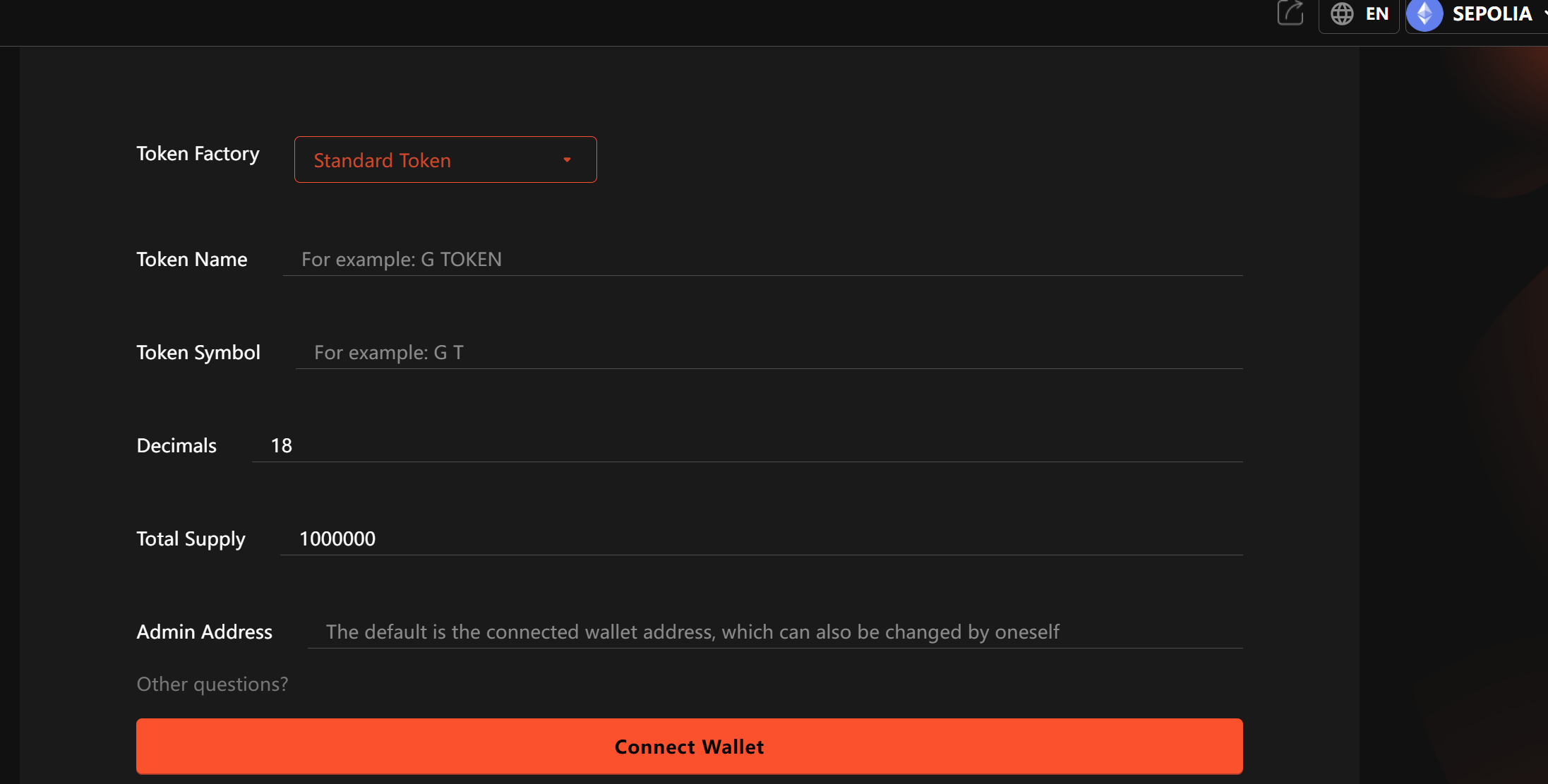
Method 3: Using GTokenTool Platforms
Step 1:Visit the official website of GTokenTool
Step 2: Create a new contract deployment proposal
Step 3: Select the ERC20 template and configure parameters:
Name: MyToken
Symbol: MTK
Initial Supply: 1000000
Step 4: Choose to deploy to the SEPOLIA network
Step 5: Review and execute the deployment
5. Examples of Creating Different Token Types
5.1 Creating an ERC-20 Token (Fungible Token)
// SPDX-License-Identifier: MIT
pragma solidity ^0.8.20;

import "@openzeppelin/contracts/token/ERC20/ERC20.sol";
import "@openzeppelin/contracts/token/ERC20/extensions/ERC20Burnable.sol";
import "@openzeppelin/contracts/access/Ownable.sol";

contract MyERC20 is ERC20, ERC20Burnable, Ownable {
    constructor(uint256 initialSupply)
        ERC20("MyERC20", "ME20")
        Ownable(msg.sender)
    {
        _mint(msg.sender, initialSupply);
    }
}
5.2 Creating an ERC-721 Token (NFT)
// SPDX-License-Identifier: MIT
pragma solidity ^0.8.20;

import "@openzeppelin/contracts/token/ERC721/ERC721.sol";
import "@openzeppelin/contracts/access/Ownable.sol";

contract MyNFT is ERC721, Ownable {
    uint256 private _nextTokenId;

    constructor()
        ERC721("MyNFT", "MNFT")
        Ownable(msg.sender)
    {}

    function safeMint(address to) public onlyOwner {
        uint256 tokenId = _nextTokenId++;
        _safeMint(to, tokenId);
    }
}
5.3 Creating an ERC-1155 Token (Multi-Token Standard)
// SPDX-License-Identifier: MIT
pragma solidity ^0.8.0;

import "@openzeppelin/contracts/token/ERC20/ERC20.sol";

contract MyToken is ERC20 {
    constructor(uint256 initialSupply) ERC20("MyToken", "MTK") {
        _mint(msg.sender, initialSupply);
    }
}0
6. Important Notes and FAQ
6.1 Key Considerations
Security Practices:
Never use mainnet private keys on testnets
Thoroughly test contracts before deployment
Use audited libraries (e.g., OpenZeppelin)
Gas Fees:
Although SEPOLIA uses test ETH, Gas consumption still matters
Complex contract deployments may require significant test ETH
Contract Verification:
Verify contract code on Etherscan after deployment
Verification requires submitting compiler settings and source code
Network Stability:
SEPOLIA may undergo periodic resets
Back up important test data
6.2 Frequently Asked Questions
Q1: Why is my transaction stuck in pending status on SEPOLIA?
A1: Possible reasons include:
Gas price set too low (try manually increasing Gas)
Network congestion (check SEPOLIA network status)
RPC node issues (try changing RPC endpoints)
Q2: How can I get more SEPOLIA test ETH?
A2: You can:
Wait for the faucet cooldown period (typically 24 hours)
Request assistance on community forums
Use multiple faucet services
Q3: What should I do if I get an "exceeds block gas limit" error when deploying?
A3: Solutions:
Optimize contract code to reduce constructor operations
Separate initialization logic into other functions
Deploy complex systems in batches
Q4: How do I verify my contract on Etherscan?
A4: Steps:
Locate your contract address
Click "Verify and Publish"
Select the correct compiler version and settings
Upload source code and verify
Q5: Can test tokens be transferred to the mainnet?
A5: No. SEPOLIA is an independent test environment—all tokens and transactions exist solely on the testnet and are completely isolated from the mainnet.
7. Conclusion
Before deploying to mainnet, developers should thoroughly test on SEPOLIA to ensure contract security and functionality. As the Ethereum ecosystem evolves, SEPOLIA will continue to serve as a vital developer tool, fostering blockchain innovation.