1. Introduction to OKX Wallet
What is OKX Wallet?
OKX Wallet is a decentralized digital asset wallet developed by OKX, supporting multi-chain asset management, including Ethereum, BSC, Polygon, OKT Chain (OKX's native blockchain), and other major networks. As a non-custodial wallet, users have full control over their private keys and assets.
Development Timeline
2018: Initial release alongside OKX Exchange
2020: Integrated DeFi ecosystem support
2021: Launched multi-chain compatibility
2022: Full support for OKT Chain ecosystem
2023: Introduced simplified smart contract interactions
Market Performance
OKX Wallet itself is a free tool, but the value of tokens created through it depends on the project. OKB, OKX’s native token, hit a low of ~$5 in 2021 and peaked above $70 in 2023, currently stabilizing between $40–$60 (as of 2023).
Key Events
2021: NFT marketplace integration
2022: "One-Click Token Creation" feature
2023: Account Abstraction (AA) wallet support
2. Prerequisites for Token Creation
Required Materials
OKX Wallet Account: Download the OKX app and set up a wallet
Native Tokens for Gas Fees: ETH (Ethereum), BNB (BSC), OKT (OKT Chain), etc.
Token Parameters:
Name (e.g., "MyToken")
Symbol (e.g., "MTK")
Total supply
Decimal places (typically 18)
Token distribution plan
Simplified Process
Install and configure OKX Wallet
Deposit enough gas tokens
Choose a token creation method
Enter token details
Confirm and pay gas fees
Deploy the smart contract
Verify successful creation
3. Detailed Creation Methods
Method 1: One-Click Token Creation via OKX Web3 Wallet
Step-by-Step Guide:
Open the OKX app and navigate to Web3 Wallet
Tap Discover → Tools → Token Creation
Select blockchain network (e.g., OKT Chain, Ethereum)
Enter token details:
Name
Symbol
Total supply
Decimals
(Optional) Advanced settings:
Mintable
Burnable
Transaction tax
Confirm gas fees and proceed
Wait for deployment (~1–3 minutes)
Receive token contract address
✅ Pros: No coding required, user-friendly
❌ Cons: Limited customization
Method 2: Manual Smart Contract Deployment
Step-by-Step Guide:
1.Prepare Contract Code:
// SPDX-License-Identifier: MIT
pragma solidity ^0.8.0;

import "@openzeppelin/contracts/token/ERC20/ERC20.sol";

contract MyToken is ERC20 {
    constructor(uint256 initialSupply) ERC20("MyToken", "MTK") {
        _mint(msg.sender, initialSupply);
    }
}
2.Compile Contract:
Use Remix IDE (remix.ethereum.org)
Or local tools like Hardhat/Truffle
3.Deploy Contract:
In OKX Wallet, go to Browser → Contract → Deploy
Upload ABI and bytecode
Set constructor parameters (e.g., initial supply)
Pay gas fees
4.Verify Contract (Recommended):
Submit source code to a block explorer
Add token logo/metadata
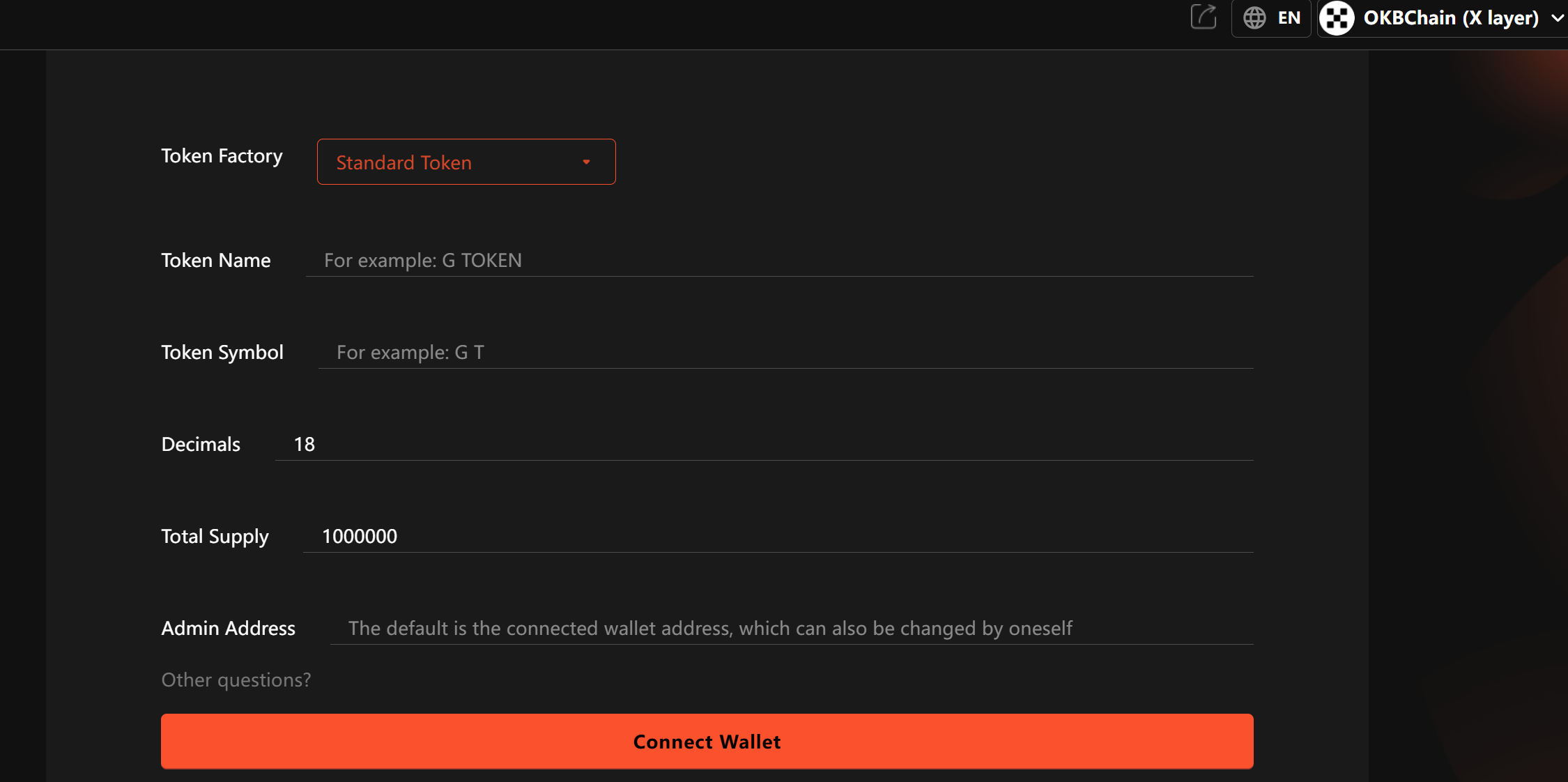
Method 3: GTokenTool Token Generators
Access trusted platforms via OKX Wallet:
Connect wallet and authorize
Enter token parameters
Pay platform + gas fees
Download contract files
4. Post-Creation Steps
Add Liquidity:
Use DEXs (Uniswap, SushiSwap, etc.)
Create a trading pair and provide liquidity
Marketing:
Build a website
Promote on social media
Apply for exchange listings
Community Growth:
Launch Telegram/Discord
Conduct airdrops
Design tokenomics
5. Key Considerations
Security Warnings
Never share private keys/seed phrases
Contract deployment is irreversible
Test on a testnet first
Compliance Risks
Research local crypto regulations
Some token features may classify as securities
Technical Tips
Set sufficient gas limits
Save contract address + transaction hash
Consider upgradable contracts
Tokenomics
Avoid excessive inflation
Define utility clearly
Ensure long-term sustainability
6. FAQs
Q1: How much does it cost to create a token?
A: Costs vary by network:
Ethereum: $50–$300 (gas fluctuations)
BSC: $5–$20
OKT Chain: $1–$5
Third-party platforms may charge extra fees
Q2: Can I create NFTs instead of fungible tokens?
A: Yes! Use ERC-721/ERC-1155 standards. OKX Wallet supports NFT creation.
Q3: What if token creation fails?
A: Check:
Gas balance
Network congestion
Contract errors
Gas fees are spent, but you can retry.
Q4: How do I display my token in OKX Wallet?
A: Manually add it:
Go to Assets → Add Token
Enter contract address
The wallet auto-detects details.
Q5: Can I add custom token features?
A: Yes! Examples:
Transaction taxes
Reward mechanisms
Governance functions
Requires custom smart contract coding.
7. Conclusion
OKX Wallet offers multiple token creation methods, catering to both beginners and developers. The one-click feature simplifies basic token launches, while manual coding allows full customization.
Regardless of your approach:
Understand that deployment is permanent
Test thoroughly (use testnets!)
Ensure compliance and sustainable tokenomics
With OKT Chain and OKX’s growing ecosystem, creating tokens is becoming more cost-efficient and accessible—an ideal environment for builders and innovators. 🚀