Introduction
The Solana blockchain has become a favored platform for crypto enthusiasts and developers due to its high throughput, low latency, and minimal cost. With the rise of DeFi, NFTs, and meme coins, creating your own token (SPL Token) on Solana has become a common entry-level project. Traditionally, this required writing Rust or JavaScript code and deploying smart contracts, which posed a high barrier for beginners. The good news is that visual tools like GTokenTool have simplified this process, allowing you to create a token in just minutes with a small amount of SOL.
Why Choose Solana and GTokenTool?
Solana's Advantages: Processes thousands of transactions per second, with gas fees as low as a few cents, making it ideal for high-frequency applications.
GTokenTool's Convenience: No coding required, user-friendly interface, supports both Chinese and English.
Target Audience: Beginners, project teams, meme coin creators.
Through this tutorial, you will learn how to create a token from scratch, including preparation, detailed steps, permission management, and common issue troubleshooting.
Prerequisites: Get Ready for a Smooth Launch
Having the following items ready before starting will prevent 90% of common errors. The Solana network has specific requirements for stability and wallet security, especially for Mainnet operations.
Solana Wallet
Recommended: Phantom Wallet (browser extension or mobile app). It's the most popular wallet in the Solana ecosystem and supports one-click connections to DApps.
Installation Guide: Visit the Phantom website (phantom.app), download the Chrome/Firefox extension or iOS/Android app. When creating a new wallet, back up the 12/24-word seed phrase and set a strong password.
Why Others Are Not Recommended: Avoid using Trust Wallet on mobile for this process as it doesn't support logo uploads. OKX Web3 Wallet is a potential alternative.
SOL Balance
Minimum Requirement: 0.13 SOL (covers gas and creation fees). Creating a token on Mainnet costs around 0.129 SOL, but it's wise to have a bit more for network congestion.
Getting SOL: Purchase SOL on exchanges like Binance or OKX and transfer it to your Phantom wallet.
Network Environment
VPN/Accelerator: Solana nodes can sometimes have regional restrictions. Using a VPN like ExpressVPN or Astrill ensures a stable connection. Avoid operating during peak hours (e.g., early morning UTC).
Browser: Use Chrome or Brave with Web3 support enabled.
Token Information Preparation
Logo: Square PNG/JPG image, size >200 pixels, file size ≤2MB. Use tools like Canva for design, reflecting your project's theme.
Token Details: Full Name (e.g., "GToken Utility Token"), Symbol (e.g., "GTT"), Description (100-200 word summary), Total Supply (calculated based on decimals).
Social Links: Website, Telegram, Twitter, Discord (optional, but helpful for project promotion).
Pro Tip: Draft your information on paper first to avoid mid-process changes. Before creating, decide if you want a "Vanity Address" (custom address, e.g., starting with "888" for memorability).
Warning: Back up your wallet seed phrase! Token creation involves signing transactions. Never share your private key. GTokenTool does not store your private key; all operations are performed locally.
Detailed Tutorial: Step-by-Step Guide to Creating Your Solana Token
Now, let's get to the core process. The entire operation is completed on the GTokenTool platform, which features a Chinese interface.
Step 1: Access the Platform and Connect Your Wallet
Open your browser and go to
https://sol.gtokentool.com/Token/createTokenClick the "Connect Wallet" button in the top right corner and select Phantom (or a compatible wallet).
Authorize the connection in the pop-up window and select the network:
Mainnet: Production environment for creating real tokens.
Devnet: Testnet for practice only (free, but tokens have no real value).
Your wallet will prompt for a signature. Confirm to establish a successful connection. The interface will display your wallet address and SOL balance.
Explanation: This step creates a secure bridge between the DApp and your wallet for transaction signing. The platform checks your balance automatically. If it's below 0.13 SOL, you'll be prompted to top up.
Common Error: If connection fails, refresh the page or switch RPC nodes (the platform has multiple built-in nodes).
Step 2: Fill in Basic Token Information and Upload Logo
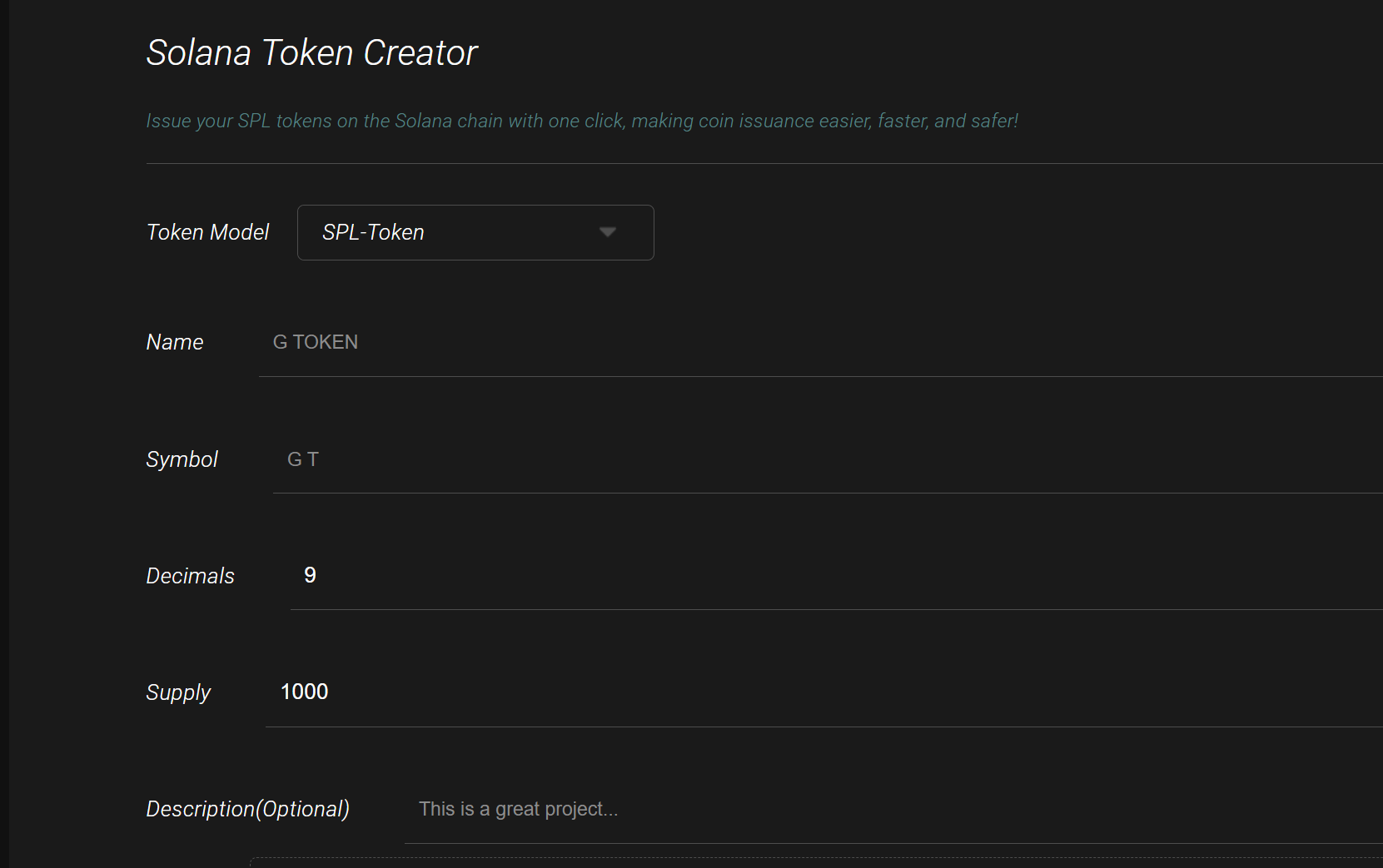
Launch Mode: Choose "Standard Mode" or "Vanity Address Mode" (Vanity requires extra computation, costs slightly more, but looks cooler).
Token Name: Enter the full name, e.g., "My Awesome Token". Supports mixed Chinese/English, max 32 characters.
Token Symbol: e.g., "MAT", max 10 characters, uppercase letters are preferred.
Decimals: The number of decimal places. SPL standard maximum is 9.
Example: 6 decimals are suitable for utility tokens (1 MAT = 1,000,000 lamports); 9 for high precision (e.g., stablecoins); 0 for NFTs.
Total Supply: The initial number of tokens to mint, constrained by decimals.
Example: With 9 decimals, the upper limit is 10 billion; with 6 decimals, it's 1 trillion. Enter a plain number, e.g., "1000000000".
Description: Optional. Briefly describe the token's purpose and vision in under 200 words (e.g., "MAT is the utility token for a decentralized social platform").
Logo Upload: Click the upload button and select your local image. The platform automatically uploads it to IPFS (free, decentralized storage).
Explanation: This information is written to the token's metadata (using the Metaplex standard) and stored on-chain. Decimals affect transfer precision (e.g., 6 decimals allows transfers of 0.000001 MAT). Total Supply is the initial amount minted by the Mint Authority; more can be minted later depending on permissions.
Pro Tip: Use a square logo with a transparent background. Preview it after upload; you can re-upload if unsatisfied. In Vanity mode, the platform generates multiple candidate addresses; choose a memorable one.
Warning: Excessively large total supply can cause overflow errors. Logos >2MB will fail to upload. New tokens might have a delayed logo display in Phantom (can take a few hours).
Step 3: Add Contact Information (Optional, Enhances Professionalism)
Click the "Add Contact Information" button to expand the form.
Website: Enter your project's website, e.g.,
https://gtokentool.com.Telegram: Enter your group link, e.g.,
t.me/GTokenTool.Twitter: e.g.,
@gtokentool.
Step 4: Configure Advanced Options (Permissions & Optimization)
Configure permissions carefully – this is crucial.
Permissions Settings:
Renounce Update Authority: Locks metadata (name, logo, etc., become unchangeable). Recommendation: Yes (enhances trust, but is irreversible).
Renounce Freeze Authority: Prevents freezing of user accounts. Recommendation: Yes (essential for decentralization).
Renounce Mint Authority: Fixes the total supply; no new tokens can be minted. Recommendation: Yes (prevents inflation, favored by investors).
Use Jito: Check this box to optimize transaction bundling, increasing success rates during congestion (free, optional).
Vanity Address: If you selected Vanity Address Mode, confirm the address here.
Explanation: Permissions are controlled by Mint/Freeze Authority. Renouncing means "burning" these authorities (an irreversible on-chain action), implemented using spl-token commands. Jito is an MEV tool on Solana that prioritizes transaction simulation.
Pro Tip: If planning to list on Raydium DEX, you must renounce Freeze and Mint Authority. Retaining Mint Authority suits projects with phased token releases.
Warning: Renounced permissions cannot be recovered! Mistakenly burning authority (e.g., Mint Authority) prevents future minting (a common issue with meme coins).
Step 5: Confirm and Create the Token
Review all information carefully and click "Confirm".
Your wallet will pop up with transaction details: Fee ≈ 0.129 SOL, covering account creation and metadata storage.
Click "Confirm" or "Approve" within your wallet to sign the transaction. Wait for confirmation (1-5 seconds).
The platform will display "Creation Successful" and show your token address (e.g., 7xKX...).
Explanation: The transaction invokes the Solana SPL Token Program to create the Mint Account and Metadata Account. The process is atomic, ensuring consistency.
Common Errors: Insufficient Gas? Top up your SOL. Network stuck? Enable Jito or switch VPN.
Step 6: View and Manage Your Token
On the Platform: Navigate to the "Manage Token" page and search for your token address. Supports subsequent edits (if permissions weren't renounced) and bulk transfers.
On-Chain Explorer: Copy the token address and paste it into Solscan.io (
https://solscan.io/token/[Your_Token_Address]). View supply, holders, and transaction history.Wallet Integration: Add the token to Phantom by searching for its address. View your balance and logo.
Post-Creation Steps:
Add Liquidity: Use GTokenTool's "Create Liquidity Pool" feature (
https://sol.gtokentool.com/liquidityManagement/CreatePool) to provide SOL + your token liquidity on Raydium.Create Market: Generate an OpenBook Market ID for DEX trading.
Promotion: Submit your token to CoinGecko/Birdeye to accelerate logo display.
Frequently Asked Questions & Troubleshooting
Logo not showing in Phantom?
New tokens need time to sync, or low TVL might be the cause.
Solution: Get listed on CoinGecko, or wait up to 24 hours. Check metadata on Solscan.
Regret renouncing authority?
It's irreversible! Plan carefully: Raydium requires renouncing Freeze/Mint Authority; metadata update authority is optional to renounce.
Can't mint more tokens?
If you renounced Mint Authority, the supply is fixed. Retaining the authority allows later minting (via
spl-token mintcommand).Vanity address generation is slow?
The platform needs a few seconds to compute; select from multiple candidate addresses.
Conclusion: From Creation to Ecosystem Integration
You have now mastered the core skill of creating a token on Solana. Thanks to GTokenTool, this process has been simplified from complex programming to a visual operation. Remember, creating the token is just the beginning: the next steps involve building a community, adding liquidity, and promoting your project. The Solana ecosystem is thriving, with future support for more innovations like Pump.fun-style meme launchpads. Explore other tools within GTokenTool (like bulk airdrops, market-making bots) to accelerate your project's growth.