Introduction
In the blockchain world, token burning is a common mechanism used to permanently remove tokens from circulation. This can impact a token's economic model, increase scarcity, or create deflationary effects. The Sui blockchain, a high-performance Layer 1 public chain built with the Move programming language, supports efficient smart contract execution and asset management. On Sui, burning tokens is relatively straightforward but involves connecting a wallet, signing transactions, and interacting with the network, requiring basic blockchain knowledge and caution.
This tutorial will guide you through the process of burning tokens on the Sui network, primarily using the online services of the GTokenTool one-click token issuance platform. This tool provides a user-friendly interface, helping developers or holders manage tokens easily without writing complex code.
Why Burn Tokens?
In many projects, burning is used to destroy unsold tokens, reduce circulating supply to support price stability, or as part of community governance. For example, some DeFi projects burn fee revenue to capture value. However, burning is irreversible; once executed, the tokens are permanently removed from your wallet and the network and cannot be recovered. This means you must carefully verify each step to avoid asset loss due to operational errors. Additionally, transactions on the Sui network require gas fees (paid in the native SUI token), so having sufficient SUI balance is crucial.
This tutorial is for operations on the Sui Mainnet. The entire process is expected to take only a few minutes, provided you have completed the necessary preparations. We will start from installing a wallet and proceed step-by-step through connecting the tool, selecting the token, entering the amount, and confirming the transaction.
Prerequisites
Before burning tokens, thorough preparation is essential to avoid interruptions or failures. Operations on the Sui network rely on a compatible wallet and sufficient network resources. Here are the detailed preparation steps.
First, install the Suiet wallet or the Sui Wallet browser extension. These are among the most commonly used wallet tools in the Sui ecosystem, supporting mainstream browsers like Chrome and Firefox. Suiet wallet is known for its clean interface and fast response, while Sui Wallet is maintained by Sui's official team, offering stronger integration. The installation process is very simple: visit your browser's extension store, search for "Suiet" or "Sui Wallet", click "Add", and follow the prompts to set up your seed phrase (mnemonic phrase). Remember, the seed phrase is your wallet's private key; back it up securely and never share it. After installation, create or import a wallet, and ensure you are switched to the Sui Mainnet. If you are new, you can refer to detailed installation guides: [Suiet Wallet Installation Guide] or [Sui Wallet Installation Guide]. These guides typically include screenshots for every step, from download to network verification.
If you prefer an alternative, OKX Web3 Wallet is also supported, especially suitable for mobile use. OKX Web3 Wallet offers a mobile app version for easy asset management on the go. However, please note the tutorial's specific warning: avoid using TP Wallet for such operations, as TP Wallet might not correctly transmit token logos or other metadata, leading to compatibility issues. Why choose these wallets? Sui's transaction signing mechanism requires wallets to support Sui-specific API calls; incompatible wallets may cause connection failures or transaction delays. During preparation, testing the wallet connection is a good practice: try connecting to a Sui DApp (like Sui Explorer) and check your balance.
Second, ensure your wallet has a sufficient SUI balance. The tutorial recommends preparing at least 2 SUI, as burning transactions require gas fees. Sui's gas fees are based on the computational complexity of the transaction, typically ranging from 0.1 to 0.5 SUI, but can be higher during network congestion. If the balance is insufficient, the transaction will not be broadcast, and you might even lose some gas as a penalty. How to get SUI? You can purchase it from exchanges (like Binance, OKX) and withdraw it to your wallet, or use a Sui faucet for practice on the Testnet (note: no free SUI on Mainnet). To check your balance, use your wallet's built-in tools or a Sui block explorer (like suivision.xyz), entering your address to see real-time data.
Furthermore, if you are using a mobile device, prioritize the OKX Web3 Wallet. Mobile operations for issuing or burning tokens emphasize convenience, but the smaller screen increases the risk of misclicks, so it's advisable to perform the operation in a quiet environment. The preparation phase overall emphasizes caution: virtual asset investments carry high risks with significant price volatility; only use funds you can afford to lose. Common mistakes during preparation include not switching the network (from Testnet to Mainnet), using an outdated wallet version, or insufficient browser permissions. Best practice is to simulate the entire process on the Sui Testnet first: install the wallet, claim test SUI, create a test token, and burn it. This helps you familiarize yourself with the interface without risking real assets.
After completing these preparations, you have the foundation to perform the burn operation. Remember, preparation can take up 50% of the total process time, but it directly determines the success rate of the operation.
Step-by-Step Guide
Now we move to the core operation: burning tokens using GTokenTool's online tool. The entire process is completed within the browser and requires no programming knowledge.
Access the SUI Burn Token page: https://sui.gtokentool.com/zh-CN/Token/burn
The page is designed simply, containing network selection, wallet connection buttons, and a token input area. Below is a detailed explanation of the four main steps.
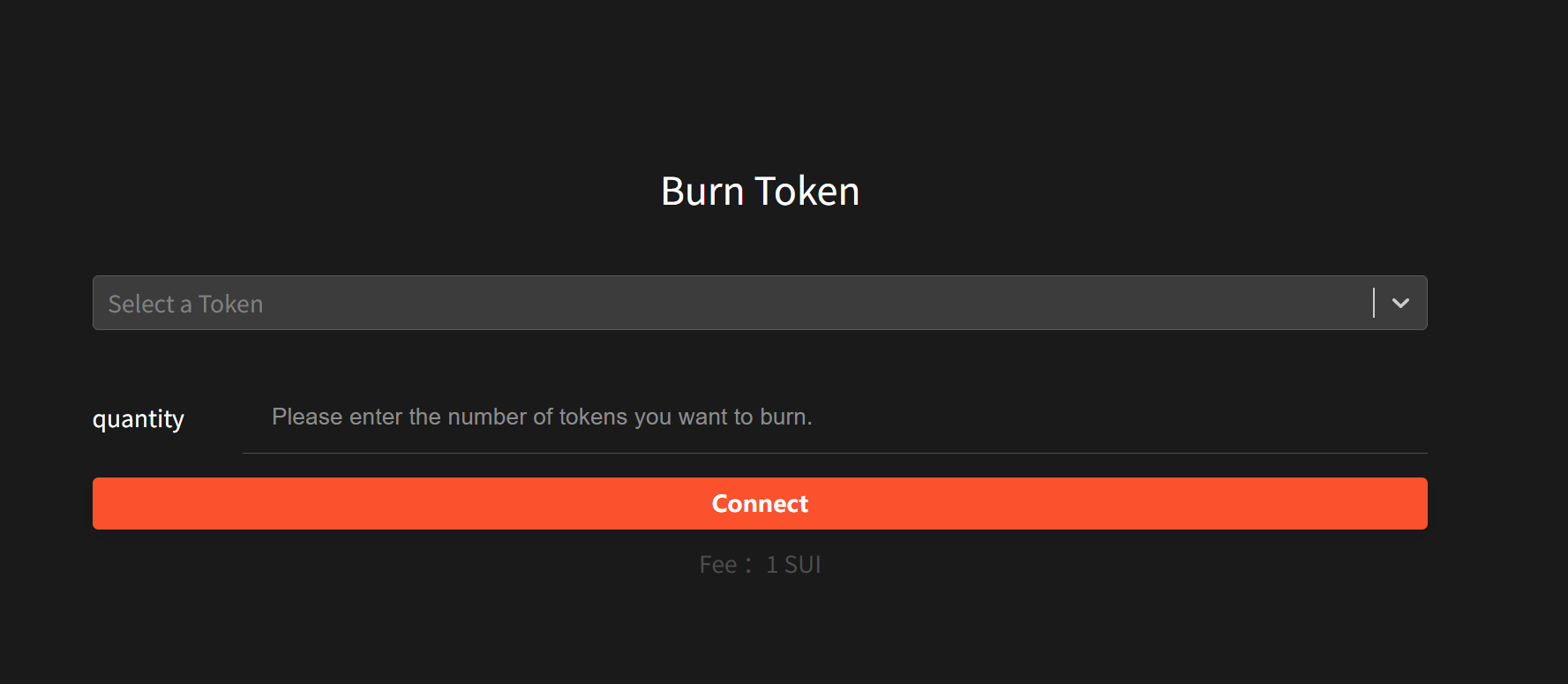
Step 1: Connect Your Wallet. After opening the page, select the "Main" network in the upper right corner. This is the Sui Mainnet, ensuring operations occur in the live environment. If you select the Testnet, the burn will be ineffective (for practice only). Next, click the "Connect Wallet" button and choose Suiet or another recommended wallet. Your wallet will pop up an authorization window; after confirmation, the tool will read your asset list. The key to this step is ensuring the wallet is unlocked and has permission to access the Sui network. If the connection fails, common reasons include the extension not being enabled or browser firewall blocking. Upon successful connection, the page will display your wallet address and balance, indicating readiness. Why emphasize the Mainnet? Because Testnet tokens have no value, but Mainnet operations involve real assets, requiring double verification of your identity.
Step 2: Select the Token. After connecting, a dropdown selection box will appear, listing the Sui-compatible tokens held in your wallet. These tokens might be ones you created previously or received from an exchange. Click the dropdown, browse, and select the token you wish to burn. If the expected token isn't listed, click the "Reload Tokens" button; this refreshes the asset sync and might resolve network delay issues. When selecting a token, carefully verify its contract address (usually displayed in the list) to avoid selecting an asset with a similar name. Sui tokens are based on an Object ID system where each token instance is a unique object; selecting the wrong one could lead to burning an unrelated asset. This step implicitly highlights the importance of asset verification: you can use Sui Explorer, input the contract address, and view the token's total supply and your holdings.
Step 3: Enter the Amount to Burn. Below the selected token, there is an input field. Type the number of tokens you wish to burn. This amount must be a positive number and cannot exceed your holding balance (the page will display the maximum available amount in real-time). For example, if you hold 1000 tokens, you can input 500 for a partial burn. Pay attention to the token's decimals: Sui supports high-precision decimals (e.g., up to 9 places), so entering a value like "100.5" is valid. After input, the page might estimate the gas fee, helping you confirm the total cost. Best practice is to first input a small test amount (e.g., 1 token), confirm everything works correctly, and then increase the quantity if desired. Because burning is irreversible, entering too much is a permanent mistake. This step emphasizes precision: type the amount manually to avoid copy-paste errors.
Step 4: Click "Burn" and Confirm. After entering the amount, click the "Burn" button. The system will generate a transaction request, and your wallet will pop up a confirmation window. Review the transaction details carefully, including the burn amount, gas fee, and destination address (usually the zero address, indicating destruction). Click confirm, and the transaction will be broadcast to the Sui network. Sui's consensus mechanism (based on Narwhal and Bullshark) ensures fast transaction confirmation, typically within seconds. Upon successful transaction, the page will display a Transaction Hash at the bottom; click it to jump to a Sui block explorer (like Sui Explorer) to view details such as block height and confirmation status. If the transaction fails, it might be due to insufficient gas or network issues; in this case, use the hash to query the error logs and retry after supplementing your SUI balance.
The entire execution process is concise and efficient, but be mindful of risks: network fluctuations might cause transaction delays, so operate on a stable Wi-Fi connection. If you encounter issues, like tokens not loading, refresh the page or reconnect your wallet. After success, your token's supply will decrease, which can be verified by checking the total circulating supply change on Sui Explorer.
Sui Token Burning FAQ
1. Preparation Phase FAQs
Q1: What is token burning, and why do it on Sui?
A: Token burning refers to permanently removing tokens from the circulating supply, typically by sending them to an inaccessible address (like the zero address). On the Sui blockchain, this can reduce the total supply, increase token scarcity, or be used for project governance (e.g., burning unsold tokens). Sui's Move language and Object model make burning operations efficient and secure, but they are irreversible. Compared to other chains like Ethereum, Sui has lower gas fees and faster processing speeds (often confirming in seconds). If your project involves DeFi or NFTs, burning can serve as a deflationary mechanism.
Q2: Which wallets are needed/supported for burning on Sui?
A: Suiet, Sui Wallet, or OKX Web3 Wallet are recommended. These wallets are compatible with Sui's APIs and signing mechanisms. Avoid using TP Wallet as it might not handle token metadata (like logos) correctly. During installation, ensure the browser extension is enabled and switched to Mainnet. Mobile users should prioritize OKX Web3 for easier mobile operation. If a wallet is unsupported, the connection tool will display an error.
Q3: What is the minimum SUI balance needed? Why?
A: It's recommended to prepare at least 2 SUI to cover gas fees. Sui's gas is calculated based on transaction complexity, typically 0.1-0.5 SUI, but can be higher during network congestion. If the balance is insufficient, the transaction will fail and may still deduct some gas. Obtain SUI by withdrawing from exchanges or using a faucet on the Testnet for practice. Check your balance using a Sui Explorer by entering your address.
Q4: What's the difference between Testnet and Mainnet? How to switch?
A: The Testnet is for simulating operations with no real-value risk; the Mainnet involves real assets. The GTokenTool page has a network selector, defaulting to Mainnet. When switching, ensure your wallet is synchronized (e.g., using the network dropdown in Suiet). Beginners should practice the entire process on the Testnet first to avoid losses on Mainnet.
Q5: What if wallet connection fails?
A: Check browser permissions (allow extension access), wallet version (update to latest), and network stability. Refresh the page or restart the browser. If it still fails, try another wallet. Common causes include VPN interference or browser extension conflicts.
2. Operation Process FAQs
Q6: How do I access the burning tool?
A: Directly open https://sui.gtokentool.com/zh-CN/Token/burn . The page supports Chinese; ensure you use an updated browser (like Chrome). If loading is slow, check your network or try a VPN (but ensure it doesn't interfere with the wallet).
Q7: After connecting the wallet, why doesn't the token list appear?
A: This could be due to network latency or asset synchronization issues. Click the "Reload Tokens" button to refresh. If it still doesn't appear, confirm you hold the token in your wallet and check the contract address. Sui assets are Object-based; ensure the token isn't an NFT or another type.
Q8: What should I note when entering the burn amount?
A: The amount must be less than or equal to your holding balance and supports decimals (e.g., 100.5). The page shows the maximum available; avoid exceeding it. It's recommended to burn in batches, testing with a small amount first. Input errors will be prompted, but you can modify them before confirmation.
Q9: After confirming the transaction, how long until I see results?
A: The Sui network typically confirms within seconds. After the transaction hash appears, click it to jump to Sui Explorer and check the status. If delayed, query the hash to see if it was broadcast successfully. After success, the total supply decreases, verifiable on the Explorer.
Q10: Can I burn someone else's tokens?
A: You can only burn tokens held in your own wallet. Burning is a one-way operation and doesn't require authorization from others.
3. Risks and Troubleshooting FAQs
Q11: What are the risks of burning?
A: The main risk is irreversibility: once burned, tokens cannot be recovered. Others include wasted gas fees (from failed transactions), selecting the wrong token, or network attacks. It's advised to back up your seed phrase and double-check inputs. Virtual assets are highly volatile; only use disposable funds.
Q12: If the transaction fails, what should I do?
A: Query the hash on Sui Explorer to view the error (e.g., "Insufficient Gas"). Add more SUI and retry, or check for network congestion.
Q13: After burning, how do I verify the supply change?
A: Use Sui Explorer, input the token's contract address, and check the "Total Supply" field. Changes update in near real-time. If unchanged, it might be due to delays or an unconfirmed transaction.
Q14: Any security tips?
A: Avoid public WiFi for operations; use a hardware wallet for enhanced security; never share your private key.
Q15: Will burning affect the token's price?
A: Possibly, but it depends on market conditions. Reducing supply can increase scarcity, but this is not guaranteed.
4. Advanced Topics FAQs
Q16: Is Sui's burning mechanism different from other chains?
A: Yes, Sui uses Object destruction rather than sending to a blackhole address, supporting more flexible asset management. Compared to Solana's SPL tokens, Sui's gas is more predictable.
Q17: After burning, how can a project notify the community?
A: Publish the transaction hash and supply change via Twitter or Telegram. Transparency helps build trust.
Conclusion
Through this tutorial, you have learned the complete process of burning tokens on Sui. From preparing your wallet and SUI balance to connecting the tool and executing the transaction, each step is designed to simplify the operation. However, always remember that blockchain operations are significant, and burning requires particular caution. In the future, the Sui ecosystem will continue to evolve, potentially offering more tools. It's recommended to practice often, learn from community resources, and prioritize security above all.