A batch token transfer tool (often called a Multisender or Batch Transfer Tool) is an essential piece of blockchain utility. It’s used for airdrops, payroll distribution, reward programs, and fund consolidation across multiple addresses. In Web3, whether you're a project team running a token airdrop or an individual investor managing multiple wallets, batch transfers are a frequent and core need. Doing them one by one manually is not only time‑consuming and labor‑intensive, but also burns a lot of gas.
GTokenTool's batch token transfer tool is built exactly to solve this pain point. It supports major EVM chains like ETH, BSC, Base, and Arbitrum, and can save you up to 90% on gas costs. This guide walks you through the entire process and key considerations.
1. Why Choose GTokenTool for Batch Token Transfers?
-
Lightning fast – Import addresses via CSV or paste them manually, and send to hundreds of addresses in one click.
-
Big savings – Smart contract optimization combines multiple transfers into a single transaction, cutting gas fees by up to 90% compared to sending one by one.
-
Multi‑chain support – Works flawlessly on all EVM‑compatible chains (e.g., BSC, Ethereum, Polygon, Arbitrum, Base, etc.).
-
Flexible distribution – Send the same amount to every address, or set a different amount for each address.
2. What to Prepare Before You Start
Before you begin, make sure:
-
Wallet installed – We recommend using the MetaMask browser extension on a PC for the smoothest experience.
-
Enough native tokens – Your wallet must hold sufficient native coins (e.g., BNB/ETH) to cover both the transfer amounts and gas fees.
-
Exchange address warning – If a receiving address is from a centralized exchange, confirm that the exchange supports contract transfers; otherwise, the funds may not arrive.
3. Step‑by‑Step: Batch Token Transfers in Three Steps
Step 1: Connect Your Wallet and Select Network
Go to the GTokenTool Batch Transfer page
Click "Connect Wallet" in the top‑right corner and confirm in your wallet extension.
Switch to the chain you want to use (e.g., if you're sending BSC tokens, set your wallet to BSC Mainnet). The page will automatically show the current chain name and your wallet address.
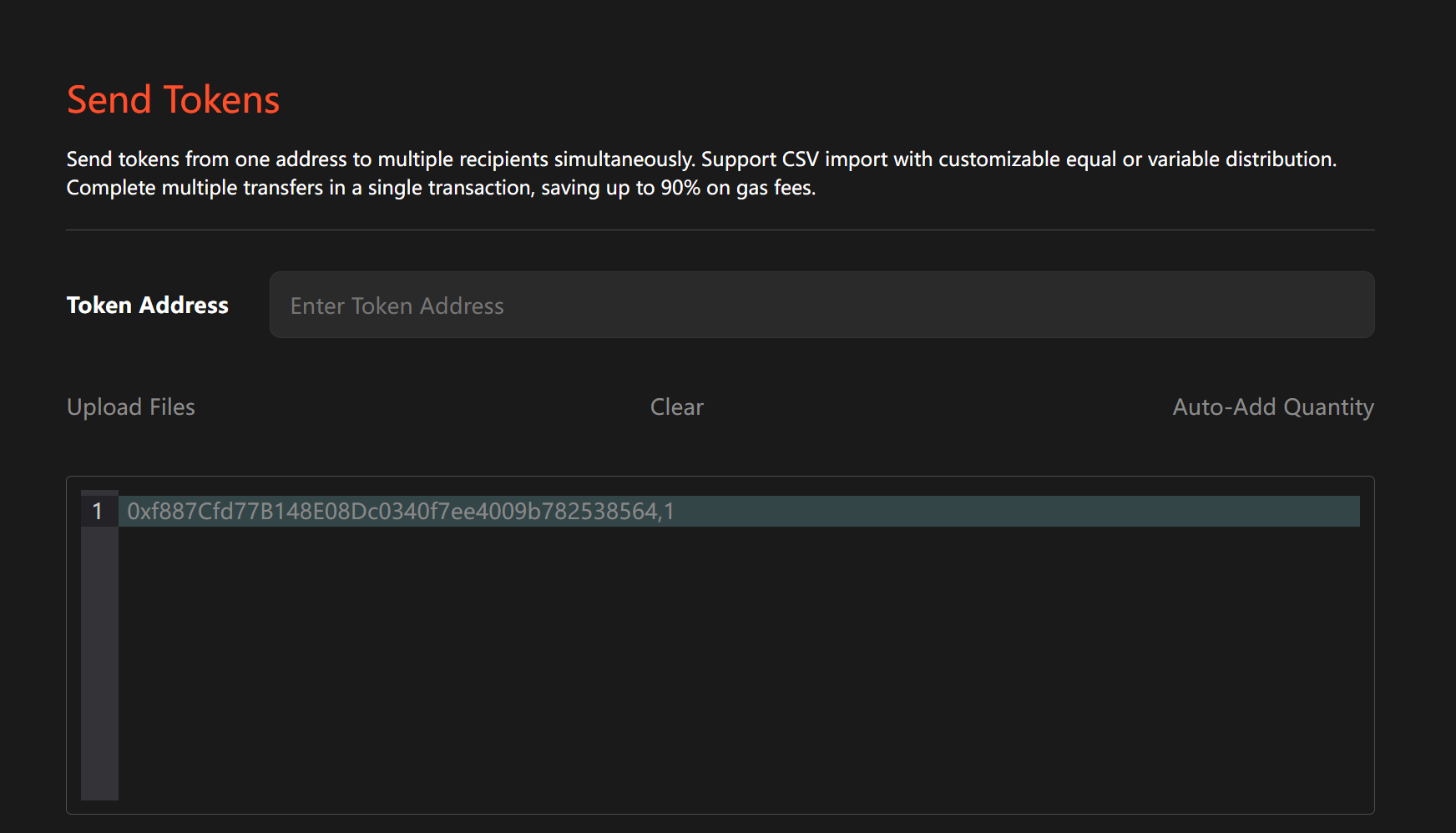
Step 2: Enter Transfer Details
Fill in the following information:
-
Token address
– To send the native coin (e.g., BNB), simply type "BNB" or select the corresponding option.
– To send a specific token, enter its smart contract address. -
Recipient list
Format:recipient_address,amount(use a comma, no spaces).
Example:0x13FC...2cD2,0.01
0x697F...B0B1,0.02
0xAb8d...1AA8,0.03
Tip: For many addresses, prepare two columns in Excel, save as CSV, then upload or paste directly.
Step 3: Confirm and Send
Click "Next" – the tool will check address formats and your balance.
Review the list and click "Send".
Confirm the gas fee in the MetaMask popup.
Wait for on‑chain confirmation. Once the transaction is finalized, you'll see the status on the page.
4. FAQ
Q: How much does a batch transfer cost?
A: The platform charges a very small service fee (roughly 0.01 BNB or equivalent per 200 addresses). Compared to the gas and time saved versus manual transfers, it’s extremely cost‑effective.
Q: What’s the maximum number of addresses per batch?
A: To ensure the transaction is successfully packed by blockchain nodes, we recommend no more than 100 addresses per batch. For larger lists, simply split them into multiple batches.
Q: Will I lose my money if a batch transfer fails?
A: No. If part of a transaction fails, the un‑sent amounts are automatically refunded to your wallet. Successfully sent portions cannot be reversed.
Q: Which chains are supported?
A: Almost all EVM chains. Just switch to the chain in your wallet, and the tool will automatically recognize the network.
5. Summary
GTokenTool's batch token transfer tool is one of the most stable and convenient airdrop assistants available today. Whether you're a project rewarding your community or an individual moving assets between wallets, it dramatically improves your efficiency.