GTokenTool is a powerful all-in-one token launch and quantitative trading platform in the cryptocurrency space. One of its most popular features is the "Quantitative Trading Bot." This trading bot is specifically designed for automated quantitative trading of tokens on Decentralized Exchanges (DEXs), supporting four core modes: Pumping, Dumping, Volume Trading, and High-Low Scalping. It helps project owners, market makers, and traders efficiently manage token market cap, liquidity, and trading depth.
The GTokenTool Quantitative Trading Bot supports multiple mainstream blockchains and various Swap versions, including:
Ethereum (Uniswap V2/V3)
BSC (PancakeSwap V2/V3, FOUR)
Arbitrum (Uniswap V2/V3)
Base (Uniswap V2/V3)
Polygon (QuickSwap V2/V3, Uniswap V2/V3)
All operations are completed entirely in the browser front-end. The platform does not store user private keys, offering high security. Below is a detailed, step-by-step guide to the complete operation of the GTokenTool Trading Bot.
Step 1: Access the Platform & Connect Wallet
Open your browser (Chrome + MetaMask plugin recommended) and go to the official trading bot page: https://rt.gtokentool.com/#/marketbot
Click "Connect Wallet" in the top right corner and select MetaMask to connect.
After a successful connection, the page will prompt for a one-time "Unlock Fee" (for non-members as follows):
BSC: 0.0001 BNB
ETH/Arbitrum/Base: ~0.00003 Native Token
Polygon: ~0.01 POL
If you are a member, it's completely free. For first-time users, it's recommended to get a membership first, as it significantly reduces fees for subsequent transfers, sell-offs, and other operations.
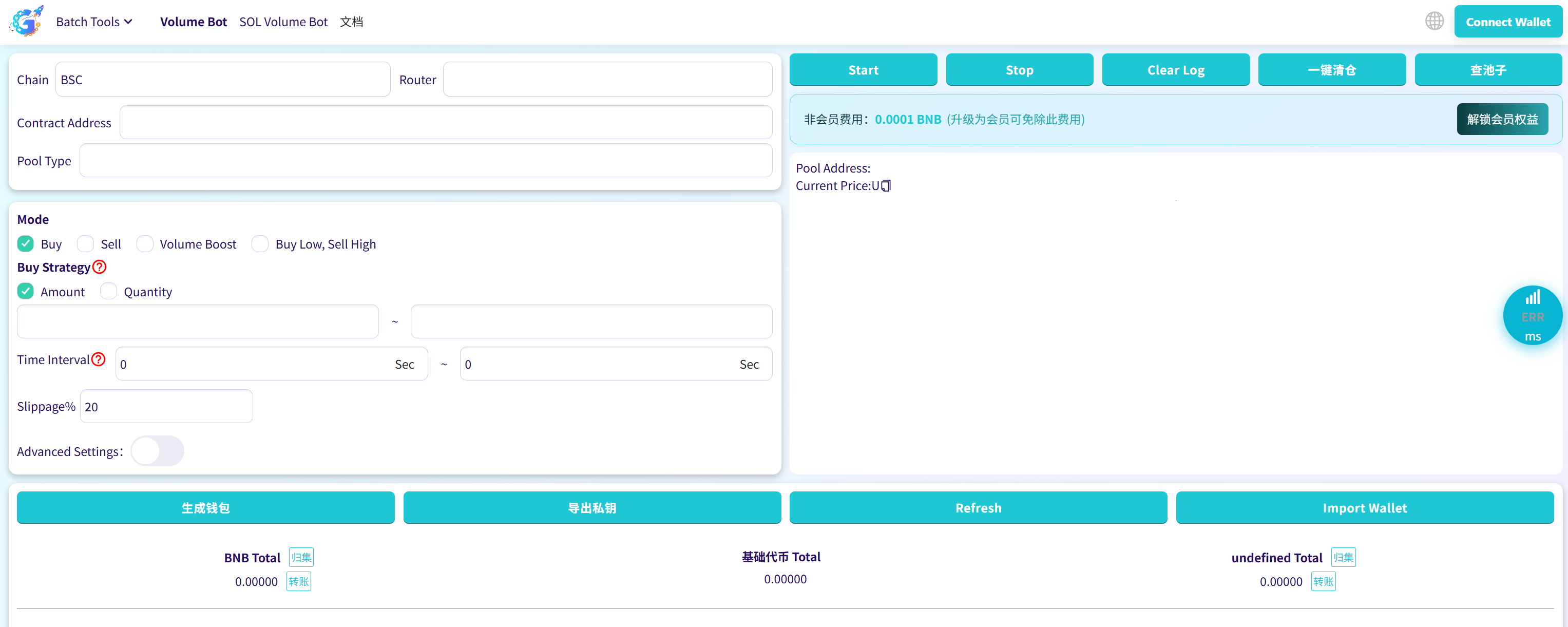
Important Reminder: When connecting your wallet, ensure the wallet network is switched to the blockchain you intend to use (e.g., BSC Mainnet). Otherwise, it might lead to loss of assets on the wrong chain!
Step 2: Find & Confirm Trading Pool
In the middle section of the page, select the Exchange (e.g., PancakeSwap V3).
Enter the token contract address you want to trade.
For V3 pools, you need to additionally select the Fee Tier (0.01%, 0.05%, 0.25%, 1%, etc.).
Click the "Find Pool" button.
The system will automatically read the pool information, including current price, liquidity, token symbol, etc. If it shows "Pool info correct," you can proceed. If there's an error, it's usually due to an incorrect address or the token not having a liquidity pool created yet. This step is crucial; if the pool is incorrect, all subsequent trades will fail.
Step 3: Import Trading Wallets (Core of Batch Operations)
The power of the GTokenTool bot lies in its support for importing dozens or even hundreds of wallets at once for true batch quantitative trading.
Click the "Import Wallets" button at the bottom of the page.
Paste wallet private keys, one per line. It's recommended not to exceed 100 at once to avoid browser lag.
Click "Import."
After successful import, the table will show for each wallet:
Native Token Balance (e.g., BNB, ETH)
Pool LP Token Balance (if any)
Target Token Balance
Pro Tips:
Before operating, always click the "Refresh" button to update the latest balances.
If you don't have many wallets, you can use the "Generate Wallets" feature to create them in bulk for free. (Note: Generating new wallets will overwrite currently imported ones, so back them up first!).
After generation, immediately click "Export Private Keys" to download and save them. They cannot be recovered if lost.
Step 4: Select Trading Mode & Set Parameters (The Core Part)
The GTokenTool bot offers four modes. Choose one to start automated trading.
Mode 1: Pump Mode (Most Common)
Used to rapidly increase the token price.
Buy Calculation Method: Choose "Amount" or "Quantity." If the same value is entered in both left and right fields, it buys a fixed amount/quantity each time. If a range is entered (e.g., 0.01~0.05 BNB), it buys a random amount within that range.
Time Interval: Default 8~15 seconds, customizable.
Slippage: Mandatory. Recommended 10%-99% (depends on liquidity).
Advanced Settings (Optional):
Wallet Usage Method: Sequential or Random.
Target Price: Set a target price higher than the current price; the bot stops automatically upon reaching it.
Wallets Trade Simultaneously: When enabled, allows "Multiple Wallets Buying Simultaneously" for very fast action (only supports "Amount" mode).
Execution Count, gasLimit, gasPrice, etc.
After Setup:
If "Wallets Trade Simultaneously" is enabled, first click "Approve," then click "One-Click Buy."
If not enabled, simply click the "Start" button at the bottom of the page.
Mode 2: Dump Mode
Used for rapid selling or liquidation. Parameters are largely symmetrical to Pump Mode.
Sell Calculation Method: Percentage (Recommended), Amount, or Quantity.
Target Price: Must be lower than the current price; stops upon reaching it.
Wallets Sell Simultaneously: Supported, very fast.
Operation flow is the same as Pump Mode: Approve → One-Click Sell, or just "Start."
Mode 3: Volume Trading Mode
Used to create the appearance of active trading and improve on-chain data metrics.
Core Parameters:
Buy Probability: e.g., entering 40% automatically sets Sell Probability to 60%.
Buy/Sell Calculation Method as above.
Price Limits: Set Min/Max prices; automatically pauses outside this range to prevent significant losses.
Note: This mode does not support simultaneous multi-wallet trading.
Suitable for projects needing to quickly generate millions or even billions in trading volume.
Mode 4: High-Low Scalping Mode (Smart Grid)
Automatically buys at low prices and sells at high prices, implementing "Buy Low, Sell High."
Core Parameters:
Automatically buys when the price is below the "Lowest Price" (provides support).
Automatically sells when the price is above the "Highest Price" (takes profit).
Buy/Sell amount can be fixed or a random range.
This mode is suitable for long-term hanging to maintain price stability and is often used for market making.
Step 5: Start Trading & Real-Time Monitoring
After all parameters are set, click the large green "Start" button at the very bottom of the page.
After a successful trade, each transaction will display its transaction hash in the log area on the right. Click the hash to jump to BscScan/Etherscan etc., to view details.
If a target price is set, the bot will automatically stop upon reaching it.
If no target price is set or if the multi-wallet simultaneous trading mode is used, you need to manually click the red "Stop" button to end.
It's recommended to click the "Refresh" button every few minutes to update wallet balances and the current price, avoiding repeated trades or insufficient balance due to network delays.
Step 6: Using Auxiliary Functions
Transfer (Batch Replenishment): Click the "Transfer" button next to the token balance to uniformly send native coin or target tokens from the connected main wallet to all small wallets.
Single Wallet Sell: The "Sell" button on the far right of the table allows you to liquidate the tokens of a specific wallet individually.
One-Click Sell-Off: Sells all target tokens in all wallets with one click, suitable for emergency liquidation.
Sweep: Collects all tokens from the small wallets into the main wallet with one click.
Precautions & Risk Warnings
Set Slippage Reasonably: For tokens with poor liquidity, use 99% slippage to avoid failed transactions.
Gas Fees: During bull markets, manually increase the gasPrice to avoid stuck transactions.
Do not import more than 100 wallets at once, as the browser might freeze or crash.
All transactions are real on-chain transactions and won't be identified as bot activity by DEXs, but users must still comply with their local laws and regulations.
Private Key Security: The platform runs client-side and does not save any private keys, but users must back up their keys securely.
Frequently Asked Questions (FAQ)
Q1: Wallet balances don't show after importing private keys. What do I do?
A: 99% of the time, you haven't clicked the "Refresh" button in the top right, or the wallet network is incorrect (e.g., you're on BSC chain but your wallet is on ETH). Switch network → Refresh → Refresh pool info again.
Q2: Why is there no response after clicking "Start"?
A: Three common reasons:
1. You didn't "Approve" the target token first, especially in Pump/Dump modes.
2. Slippage is set too low (for illiquid tokens, set it to 99%).
3. Gas Price is too low, causing a stuck transaction. During high congestion, manually raise Gas Price to 10-20 gwei or higher.
Q3: Can I use this on a mobile phone?
A: Yes, but using a computer is much more convenient.
Q4: Is the membership worth it? How much does it cost?
A: Is it worth it? If you plan to work with 10+ projects or do market making long-term, it pays for itself in about 3 days – because subsequent batch transfers, sweeps, and sell-offs are completely free, saving 0.02-0.05 BNB per operation.
Q5: Can the DEX detect the bot as volume trading and ban the pool?
A: No. All GTokenTool transactions are real, on-chain, multi-signature, multi-address transactions, no different from you manually trading wallet by wallet. Uniswap, PancakeSwap, etc., cannot detect "bot behavior." It has been running stably for 4 years with zero records of pool bans.
Q6: What's the maximum number of wallets per pool?
A: Theoretically unlimited; tested successfully with 800 wallets simultaneously on a single pool. However, due to browser performance limits, it's recommended not to exceed 150 at once, or Chrome might freeze/crash.
Q7: Will I lose money in Volume Trading mode?
A: Under normal operation, generally not.
Q8: Can you make money with the High-Low Scalping mode?
A: Yes, and it's potentially the most profitable of the four modes. Real test case: A Base chain Meme in Oct 2025 oscillated between $0.0008~0.0012. Using 50 wallets with High-Low Scalping yielded a 47% net profit in 7 days. The key is setting a reasonable "Highest" and "Lowest" price range – don't be greedy.
Q9: Why do I keep getting "TransferHelper: TRANSFER_FROM_FAILED" when selling?
A: You haven't approved the token spending limit. You must click "Approve" or the Approve button in "One-Click Sell" before dumping.
Q10: Can I use Trust Wallet or OKX Web3 Wallet?
A: Yes, but MetaMask is the most stable. Trust Wallet batch signing sometimes has too many pop-ups causing interruptions. OKX Web3 currently has imperfect support for V3 pools. MetaMask is recommended.
Q11: How do I quickly collect all tokens from the small wallets to the main wallet after a pump?
A: Click the "Sweep" button at the bottom of the page → Select the token or native coin to sweep → Confirm → All funds arrive in the main wallet in seconds, completely free (for members).
Q12: Can I run two modes simultaneously, like pumping while volume trading?
A: Yes! Open multiple browser tabs or multiple Chrome windows, import different batches of wallets into each window. Run Pump mode in one and Volume Trading in another. They won't interfere.
Q13: The pool liquidity is too low; the price jumps 50% with a small buy. What to do?
A: Reduce the buy amount per transaction (e.g., 0.003~0.008 BNB), increase the interval to 20-40 seconds, and enable "Random Wallet Order." This achieves a slow, steady pump that is less likely to scare off retail traders.
Q14: The bot stopped suddenly but didn't reach the target price. What happened?
A: Most likely, a small wallet ran out of Gas or token balance. Click "Refresh," check the logs, and click the last failed hash to see the reason – usually insufficient balance. Top up the Gas or tokens and continue.
Q15: Can it run 24/7? Do I need to keep my computer on?
A: It can, but keeping your computer on constantly isn't recommended. Consider using a cloud server (e.g., Tencent Cloud Lighthouse 2-core 4G) + Chrome Remote Desktop; it can run for weeks without issue. Or run headless Chrome directly on a VPS.
Q16: I'm operating on Arbitrum/Base. Why are the fees so high?
A: Because you aren't a member. Non-members pay a 0.00003~0.0001 native token unlock fee per batch operation. After getting a membership, fees on these chains are nearly zero.
Q17: What's the fastest way to dump all tokens immediately after a pump?
A: Pre-set the mode to "Dump" → Select Sell method as "Percentage 100%" → Enable "Wallets Trade Simultaneously" → One-Click Sell. Tested: 50 wallets selling simultaneously liquidates everything in 3-8 seconds.
Q18: Can I use one wallet to repeatedly generate new wallets for volume trading?
A: Not recommended. Generating too many addresses from the same seed in a short time can be flagged by on-chain analysis tools as a "sybil attack," potentially affecting the project's audit for major exchange listings. Use different seeds.
Q19: Are there better market cap tools than GTokenTool in 2025?
A: Currently, no. Unibot, Maestro, Banana Gun, etc., are primarily spot/futures trading bots. None match GTokenTool's level of integration for "hundreds of wallets, batch, real on-chain buy/sell/volume/grid" operations. It remains the absolute king.
Summary
The GTokenTool Quantitative Trading Bot has practically lowered the barrier to cryptocurrency quantitative trading to its minimum: no coding, no servers, no complex grid strategies. With just a browser + MetaMask, you can achieve institutional-level batch pumping, dumping, volume trading, and high-low scalping operations within minutes. Whether for a new project rushing up market cap rankings or an established project maintaining price stability, this tool is arguably the most powerful "market cap management tool" available today.
By mastering the six steps above, you can easily manage hundreds of wallets and wield significant influence on DEXs. It's recommended for beginners to practice repeatedly on the BSC Testnet before moving to Mainnet for real operations. Have fun, and may your market cap multiply.