Overview
SUI One-Click Token Creation refers to a simplified method for quickly creating and deploying tokens on the SUI network through the GTokenTool platform. As the native cryptocurrency of the SUI Network, the SUI token launched alongside the SUI mainnet on May 3, 2023, quickly gaining market attention. The tool developed by GTokenTool allows users to issue MEME coins or other token types on the SUI chain with a single click, without needing to write any code. This enables more people to easily participate in the SUI ecosystem. This approach streamlines the complex processes of traditional token development, allowing everyday users to launch their own token projects quickly.
Key Features
SUI One-Click Token Creation offers the following main features:
No-Code Development: Users operate through a graphical interface; no programming knowledge is required.
Simple yet Strict Parameter Settings:
Token Name and Symbol do not support Chinese characters or special symbols.
Decimal precision and total supply are linked (e.g., with 9 decimals, the supply cannot exceed 10 billion).
Logo image must be smaller than 100KB and is recommended to be 256x256 pixels.
One-Click Deployment: Simply connect your wallet, input parameters, and confirm the transaction to complete deployment.
Strong Wallet Compatibility: Supports Suiet Wallet, SuiWallet browser extension, and OKX Web3 Wallet. OKX Web3 Wallet is recommended for mobile users (TP Wallet does not support Logo upload).
Designed for Mainnet: Optimized specifically for the SUI Mainnet, ensuring compatibility and security.
Purpose & Use Cases
The primary purposes of SUI One-Click Token Creation include:
Lowering Barrier to Ecosystem Participation: Helps users quickly create MEME coins or other tokens to join the SUI network's crypto ecosystem, fostering community growth and project innovation.
Token Management and Expansion: After creation, users can view transaction details on a SUI block explorer and display the token logo in their wallet. The process supports subsequent functions like transfers, verification, and controlled minting.
Project Development Support: Suitable for both developers and regular users building projects within the SUI ecosystem, expanding the network's application scenarios into areas like gaming, finance, and social media.
Advantages
Compared to traditional token development, SUI One-Click Token Creation offers significant advantages:
Efficiency and Speed: The entire token creation process takes only minutes, avoiding the tedious steps of writing Move code, making it ideal for the fast-moving SUI market.
Low Barrier to Entry: No specialized skills are needed, allowing anyone to participate and lowering the entry threshold for the SUI network.
Security and Reliability: Adheres to the security patterns of the Move language, supports wallet integration, and allows explorer verification, ensuring a stable deployment process.
Controllable Cost: Requires preparing a minimum of approximately 11 SUI for Gas fees to avoid failure risks, keeping overall costs low.
Step-by-Step Guide
Follow these detailed steps for SUI One-Click Token Creation after preparing the necessary tools.
Prerequisites
Install the Suiet Wallet or SuiWallet browser extension, or use the OKX Web3 Wallet.
Ensure your wallet holds at least 11 SUI for Gas fees; otherwise, creation might fail.
Mobile users are recommended to use the OKX Web3 Wallet (TP Wallet cannot upload Logos).
Token Creation Process
Connect Your SUI Wallet:
Visit GTokenTool's SUI token creation page: https://sui.gtokentool.com/Token/createToken.
Select "Mainnet" in the top right corner and connect your wallet (e.g., Suiet).
Once successfully connected, the page will display your wallet address.
Enter Token Parameters:
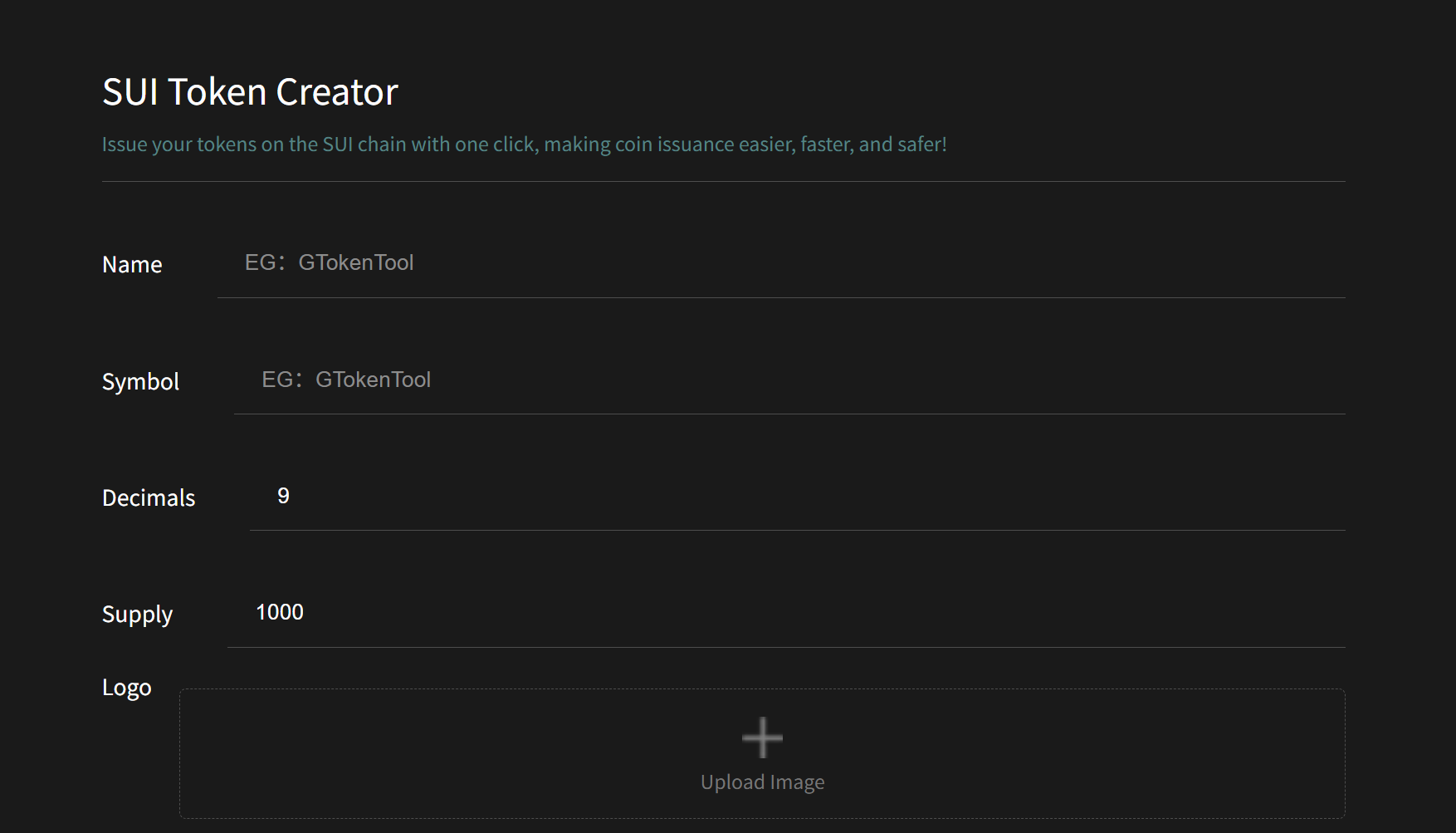
Token Name: Maximum 32 characters. No Chinese characters or special symbols.
Token Symbol: 2-8 characters. No Chinese characters or special symbols.
Decimals: Default is 9 (affects the maximum supply limit).
Total Supply: Subject to limits based on the decimal setting (e.g., with 9 decimals, supply cannot exceed 10 billion).
Logo: Upload a square image under 100KB, ideally 256x256 pixels.
Description (Optional): Does not support Chinese characters.
Click "Create Token":
After verifying all parameters are correct, click the button.
A wallet authorization window will pop up. Confirm and pay the Gas fee.
The appearance of a token contract address hash on the page indicates successful token creation.
Verify Your Token:
Click the transaction hash to open a SUI explorer like https://suiscan.xyz to view transaction and token details.
Open your wallet to check if the token logo is displayed correctly.
FAQ
Here are answers to common questions to help troubleshoot issues during the creation process.
How can I verify my token after deployment?
Use a SUI Explorer like Suiscan or Suivision to look up the transaction hash or module address. CLI users can check metadata using thesui client object <ID>command.Why can't I transfer my token?
Potential reasons include: the recipient's wallet hasn't registered the token type, insufficient Gas fees in SUI, or incorrect permissions (e.g.,public_transferfunction not authorized during creation). Check wallet settings and token permissions.How can I restrict further minting of the token?
TheTreasuryCapobject must be stored securely within a module or controlled address. Only allow specific, authorized addresses to call themintfunction, ensuring you retain control over the supply.How do SUI tokens differ from EVM chain tokens (like Ethereum)?
SUI tokens are native objects on the SUI blockchain and don't require pre-compiled contracts like on Ethereum. However, they must follow Move's security patterns, such as explicit ownership and permission controls.
Summary
SUI One-Click Token Creation, provided by the GTokenTool platform, offers users an efficient, low-barrier method for token deployment, fostering rapid growth within the SUI ecosystem. Its simplicity, practical applications, and clear advantages make it an ideal tool for launching cryptocurrency projects.
GTokenTool is the most comprehensive one click coin issuance tool, supporting multiple public chains such as TON, SOL, BSC, etc. Function: Create tokens, market value management, batch airdrops, token pre-sales、 IDO、 Lock, pledge mining, etc. Provide a visual interface that allows users to quickly create, deploy, and manage their own cryptocurrencies without writing code.