The One-Click Sell feature on LetsBonk.fun is a tool on the GTokenTool platform designed to help users quickly and efficiently sell tokens in bulk on the Solana blockchain. This feature utilizes Jito’s bundled transaction technology to optimize transaction speed and success rates. Below is a brief overview and step-by-step guide for using this feature.
Feature Overview
-
Purpose: Provides a fast and convenient way to sell tokens, ideal for users who need to manage multiple wallet addresses simultaneously.
-
Technology: Uses Jito’s bundling technology to batch transactions, reducing network congestion and improving success rates.
-
Supported Wallets: Up to 29 wallet addresses can be processed in a single operation.
-
Fees: All service fees are paid by the first imported wallet address. Refer to the platform for real-time fee details.
-
Use Cases: Suitable for project teams, traders, or institutions handling token liquidation, liquidity management, and more.
Step-by-Step Guide
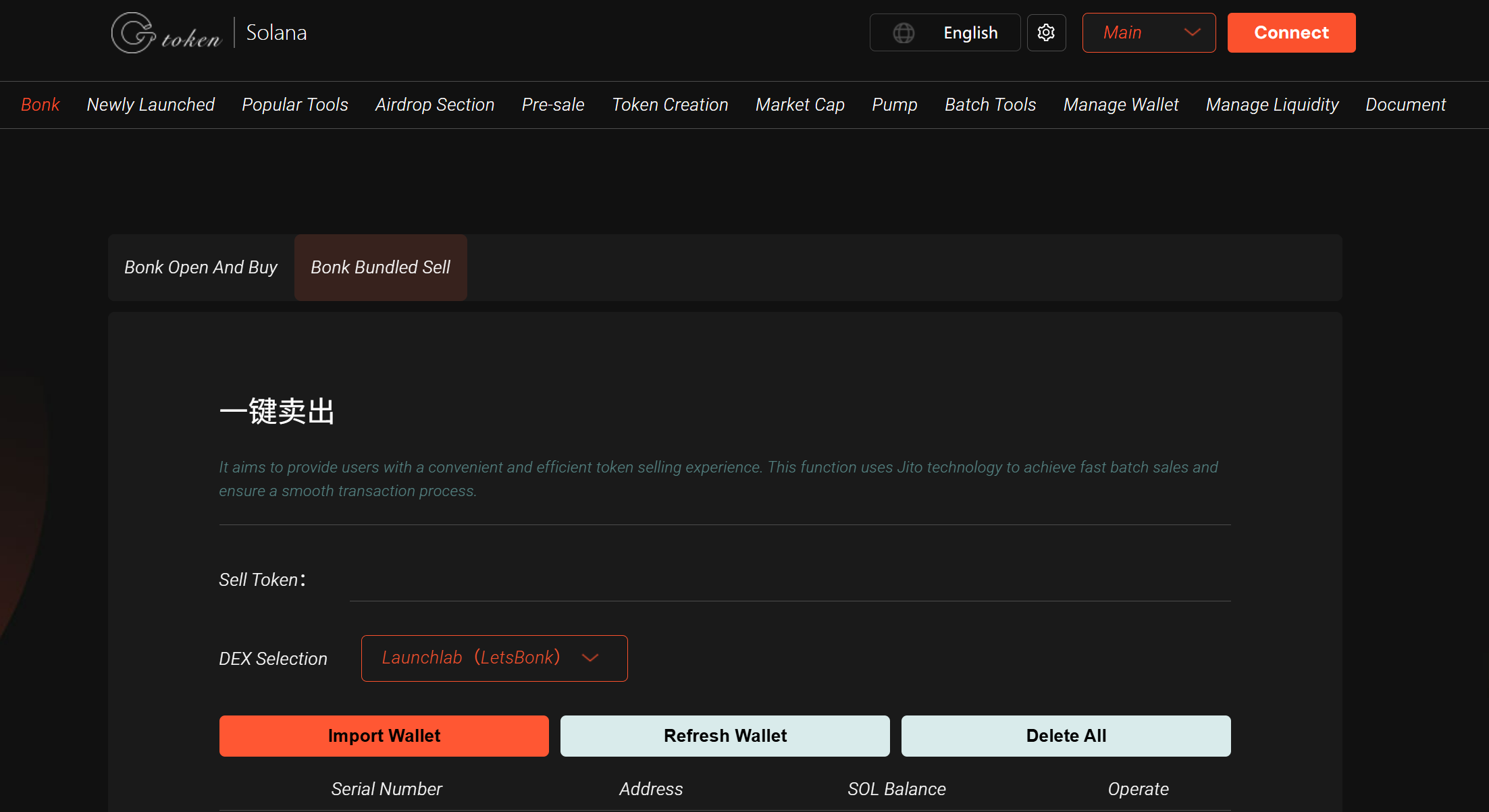
1. Access the Platform
-
Open the link: https://sol.gtokentool.com/zh-CN/LetsBonk/Sell
-
Ensure a stable internet connection.
-
Recommended network: Solana Mainnet (mainnet) or Devnet (for testing purposes).
2. Connect Your Wallet
-
Click "Select Wallet" in the top-right corner.
-
Choose a supported Solana wallet (e.g., Phantom, Solflare) and authorize the connection.
-
Ensure the wallet has sufficient SOL (recommended at least 0.03 SOL) to cover gas fees.
3. Import Wallet Addresses
-
You can import up to 29 wallet addresses (via private keys or wallet connection).
-
The first imported wallet will pay all service fees, so ensure it has enough SOL (recommended 20% more than the estimated cost).
4. Set Sell Parameters
-
Token Address: Enter the Mint Address of the token you want to sell (findable on Solscan or Pump.fun).
-
Sell Amount: Specify the quantity or percentage to sell per wallet.
-
Slippage: Adjust based on market volatility (e.g., 0% or higher). If the v3 pool fails, try the v2 pool or increase slippage.
-
Additional Options: Choose whether to sell all tokens or retain a partial balance.
5. Confirm & Execute
-
Double-check all wallet addresses and sell settings.
-
Click "Sell Now" (or similar button). A wallet pop-up will appear for transaction confirmation.
-
After confirmation, Jito’s bundling system will process the batch transactions.
-
Track transaction status on Solscan: https://solscan.io.
Important Notes
-
Network Conditions: Due to Jito nodes, RPC nodes, and network variability, transactions may occasionally fail. Failed transactions do not incur fees—retry with a different RPC node or increase the tip (recommended +0.001 SOL per attempt).
-
Token Pool Version: If a token is listed in both v2 and v3 liquidity pools, the system prioritizes v3. If it fails, switch to v2 (note potential price differences).
-
Security: The platform claims private keys are processed client-side (not stored on servers), but for safety:
-
Use a dedicated trading wallet, not your main wallet.
-
Avoid sharing private keys on untrusted devices/networks.
-
Image Upload Issues: If uploading token metadata (e.g., logos), supported formats: PNG, JPG, GIF (max 2MB). If uploads fail, try refreshing or switching networks.
FAQs
Q: What if my transaction fails?
-
Check if your wallet has enough SOL for gas + tips.
-
Try switching RPC nodes or increasing the tip amount. Failed transactions do not charge fees.
Q: How do I confirm a successful sale?
-
Track transactions on Solscan: Enter the token Mint Address or transaction hash.
Q: How are service fees calculated?
-
Fees vary dynamically—check the platform for real-time updates or join the official Telegram group: https://t.me/GToken_EN.
Additional Tips
-
Test First: If new to the platform, try a Devnet (testnet) transaction before using Mainnet.
-
Security: Only trade on trusted devices/networks—never expose private keys unnecessarily.
-
Market Awareness: Before selling, check token liquidity and price trends to set optimal slippage and avoid losses.
For further assistance, visit the official GTokenTool community or support channels. Happy trading! 🚀