As a blockchain veteran, I understand that bulk transferring NFTs might seem daunting for beginners. Don't worry—this guide will walk you through the process in the simplest way possible.
1. Preparation
Before starting your bulk transfer, make sure you have the following ready:
Crypto Wallet: Recommended: MetaMask (Fox Wallet)
Sufficient ETH/Gas Fees: For covering network transaction costs
NFT Contract Address: The smart contract address of the NFTs you're transferring
Recipient Address List: Organized in an Excel or TXT file
2. Choosing a Bulk Transfer Tool
Here are some common methods for bulk transfers:
Method 1: Using a Professional Bulk Transfer Tool
Recommended Tools:
GTokenTool Sender
Steps:
Visit the tool’s official website and connect your wallet.
Select the "Bulk Transfer" function.
Upload a CSV file containing recipient addresses and corresponding Token IDs.
Review transaction details.
Sign and send the transaction.
Method 2: Using a Smart Contract
If you have some coding knowledge, you can write your own script:
const bulkTransfer = async (contract, recipients, tokenIds) => {
  for(let i = 0; i < recipients.length; i++) {
    await contract.transferFrom(yourAddress, recipients[i], tokenIds[i]);
  }
}
3. Step-by-Step Guide (Using GTokenTool Sender as an Example)
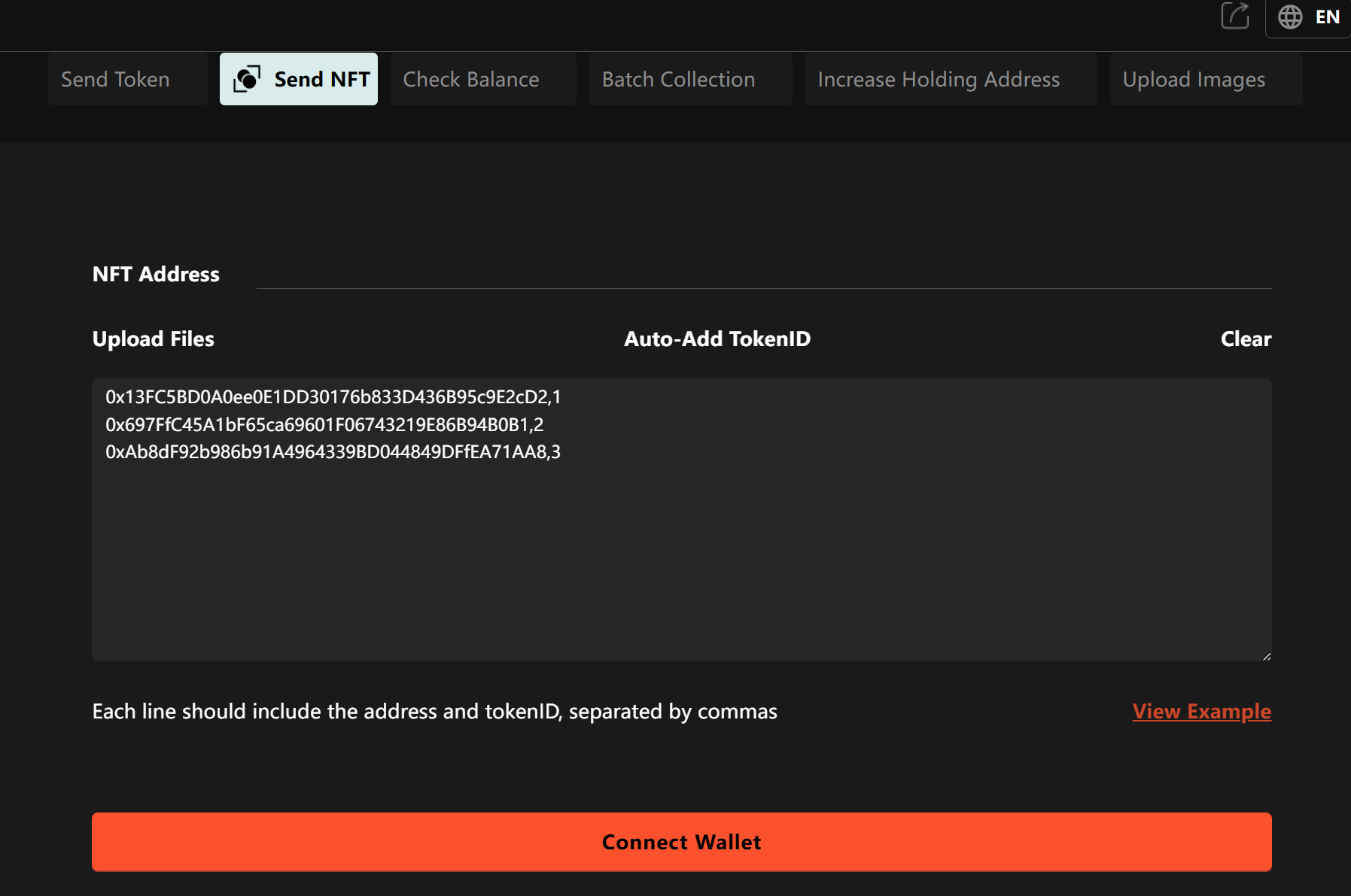
Access the Website: Open https://gtokentool.com/sendernft
Connect Wallet: Click "Connect Wallet" and select your wallet (e.g., MetaMask).
Select Contract: Enter your NFT contract address.
Upload List:
Download the CSV template.
Fill in the format: First column = recipient address, Second column = Token ID.
Upload the completed file.
Set Parameters:
Gas Limit: Default is fine.
Gas Price: Adjust based on network congestion.
Preview Transaction: Verify transfer details.
Confirm & Send: Your wallet will prompt for confirmation—review before approving.
Wait for Completion: Track the transaction status on Etherscan.
4. Important Notes & FAQs
Security Reminders:
Never share your private key.
Only use reputable tools—watch out for phishing sites.
Test with a small transfer first.
Common Mistakes:
Incorrect address format (ensure it starts with
0xand is 42 characters).Token ID mismatch.
5. Summary
Bulk transferring NFTs isn’t as complicated as it seems. The key steps are:
Organize recipient addresses and corresponding Token IDs.
Choose the right transfer tool.
Double-check each transaction.
Budget enough Gas fees.
For beginners, I recommend:
Testing with 2-3 NFTs first.
Practicing with built-in features on platforms like OpenSea.
Using professional bulk tools only after getting comfortable.
Remember: Blockchain transactions are irreversible—always verify details before proceeding. Now that you’ve mastered bulk NFT transfers, go manage your digital assets efficiently!