Solana Token-2022: The Ultimate Guide to Creating Tax Tokens with Transfer Fees
As a high-performance, low-cost blockchain platform, Solana has gained widespread attention for its rapid transaction processing and thriving ecosystem. Creating tokens on Solana has long been a popular choice for developers and projects, and with the launch of Token-2022 (Token Extensions), token functionality has been significantly enhanced. This guide will explore what Solana Token-2022 is, its unique features, and how to use it to create tax tokens with built-in transfer fees.
1. What is Solana Token-2022?
Token-2022 (officially called Token Extensions Program, Program ID: `TokenzQdBNbLqP5VEhdkAS6EPFLC1PHnBqCXEpPxuEb`) is an upgraded version of Solana’s original Token Program (Program ID: `TokenkegQfeZyiNwAJbNbGKPFXCWuBvf9Ss623VQ5DA`). It introduces advanced customization options, enabling developers to build tokens with enhanced functionality.
Key Differences from the Original Token Program
✅ Backward-Compatible & Extensible – Fully supports legacy token features while adding new "Extensions" for advanced use cases.
✅ Native Metadata Support – Token details (name, symbol, logo) can be embedded directly into the Mint Account, eliminating the need for separate storage.
✅ New Features – Includes transfer fees (tax), confidential transfers, non-transferable tokens, and more.
Core Concepts
- Mint Account: Defines a token’s properties (total supply, mint authority).
- Token Account: Tracks individual token balances.
- Extensions: Modular add-ons that enable custom behaviors (e.g., taxes, privacy).
Why Token-2022?
Solana’s ecosystem demands greater flexibility. For example, the original Token Program couldn’t natively enforce transaction fees, but Token-2022’s Transfer Fee Extension solves this—making it ideal for tax tokens, loyalty points, and regulatory-compliant assets.
2. What is a Solana Tax Token?
A Tax Token is a special type of token built on Token-2022 that automatically deducts a percentage fee (e.g., 2%) on every transfer. These fees can fund development, reward holders, or burn tokens to reduce supply.
How Tax Tokens Work
- Transfer Fee: A fixed % (e.g., 2%) is withheld during transactions. (Sending 1,000 tokens deducts 20, delivering 980.)
- Fee Storage: Unlike Ethereum, fees are temporarily **locked in the sender’s account** until withdrawn by a designated authority.
- Max Fee Cap: Limits fees per transaction to prevent excessive charges on large transfers.
Use Cases
💰 Project Treasury – Fees fund development/marketing.
🔥 Deflationary Mechanism – Burn fees to increase scarcity.
🎁 Holder Rewards – Distribute fees to long-term stakers.
3. How to Create a Tax Token Using Token-2022
This step-by-step guide uses GTokenTool, a no-code platform for Solana token creation.
Prerequisites
- A Solana wallet (Phantom/Solflare) with ≥ 0.15 SOL for fees.
- Access to [GTokenTool’s Tax Token Creator](https://sol.gtokentool.com/en).
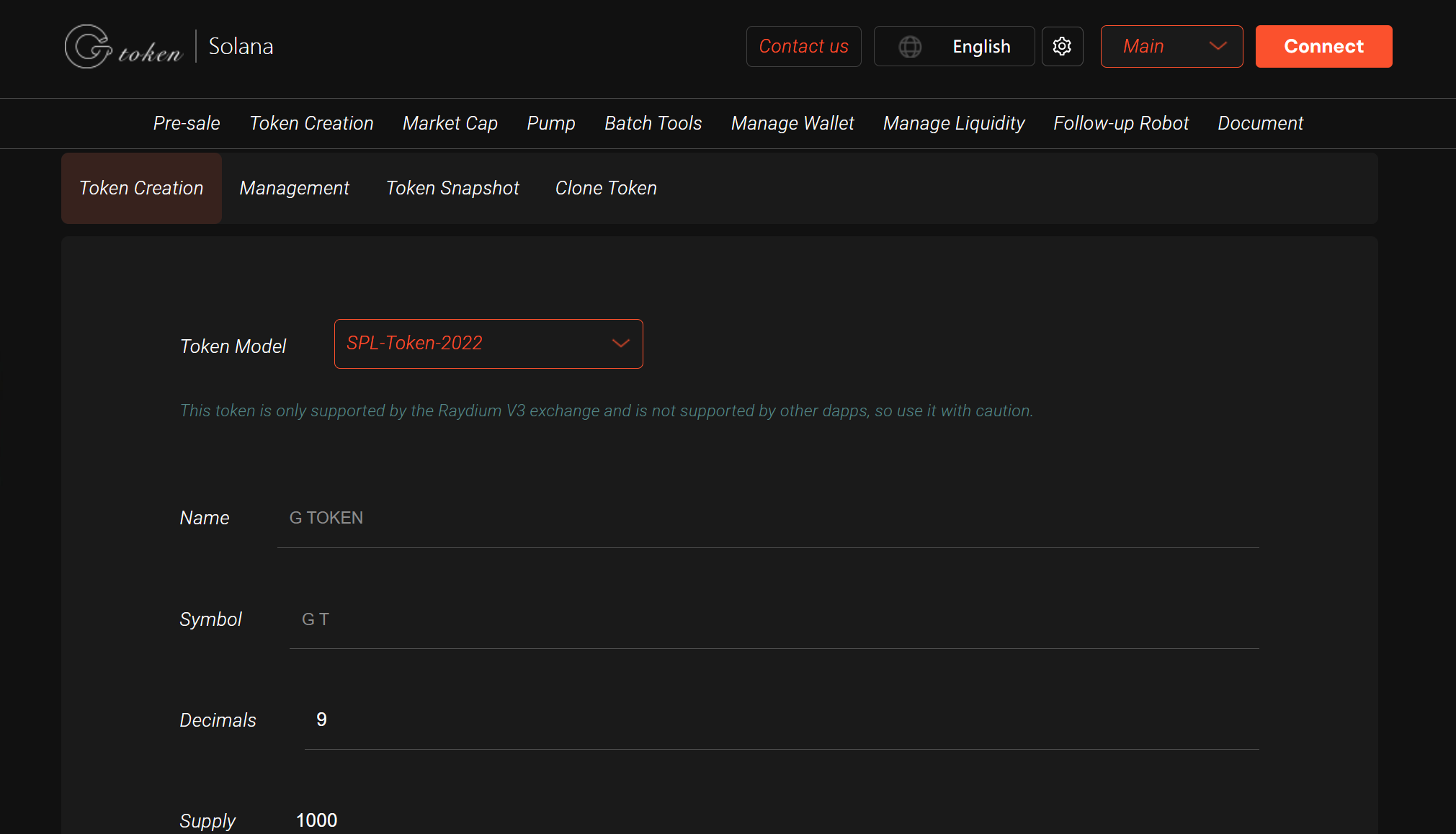
Step 1: Create Your Tax Token
1️⃣ Connect Wallet
- Visit GTokenTool, click "Connect Wallet", and link your Phantom/Solflare.
- Ensure you’re on Solana Mainnet.
2️⃣ Enter Token Details
- Name: (e.g., "MyTaxToken")
- Symbol: (e.g., "MTT")
- Total Supply: (e.g., 1,000,000)
- Decimals: (6 or 9 recommended)
- Transfer Fee: (e.g., 200 = 2%)
- Max Fee: (e.g., 1000 tokens per tx)
- Upload Logo: (200x200 PNG preferred)
- Permissions: Choose whether to renounce mint/freeze authority.
3️⃣ Confirm & Deploy
- Click "Create Token" and approve the transaction (~0.1-0.15 SOL fee).
- Copy your new token’s Mint Address (contract ID).
Step 2: Verify & Manage
🔍 Check on Solana Explorer: Paste your Mint Address [here](https://explorer.solana.com).
➕ Add to Wallet: Manually import the token using its Mint Address in Phantom.
Step 3: Withdraw Collected Fees
- Navigate to GTokenTool’s Fee Dashboard.
- Connect the wallet set as the "Withdraw Authority" during creation.
- Click Withdraw to claim accumulated fees.
4. Advantages & Considerations
Why Use Tax Tokens?
✔ Flexible Economics – Adjustable tax rates and caps.
✔ Ecosystem Support – Compatible with Raydium, Jupiter, and major wallets.
✔ Low-Cost – Far cheaper than Ethereum alternatives.
Potential Challenges
⚠ Authority Management – Losing the fee-withdrawal key means locked taxes.
⚠ Community Perception – High taxes may deter traders.
⚠ Legacy Tooling – Some older dApps may not yet support Token-2022.
5. Conclusion
Solana’s Token-2022 unlocks unprecedented token customization, with Tax Tokens being just one powerful example. Whether for funding projects, incentivizing holders, or enforcing deflationary mechanics, this upgrade empowers developers and founders like never before.
With no-code tools like GTokenTool, creating a professional-grade Tax Token takes minutes—no coding required. Ready to launch yours?
Start now at GTokenTool and harness the full potential of Solana Token-2022!🚀