Why Create Liquidity Pool on Solana?
Creating a liquidity pool for SPL Tokens enables them to be traded, thereby giving them value.
GTokenTool has integrated Raydium, the largest decentralized exchange on the Solana blockchain. Through GTokenTool, you can create liquidity pools, allowing their tokens to be traded on platforms like Raydium and Jupiter.
Prerequisites
Raydium AMM Pool Requirement: Ensure you have obtained the OpenBook market ID if create Raydium AMM pool
Sufficient SOL Balance: After allocating SOL for the pool, make sure your wallet has at least 0.6 SOL remaining
Wallet Setup: Install and set up a wallet plugin such as Phantom or OKX Web3 Wallet.
Create Raydium Liquidity Pool Steps
Open the GTokenTool website:https://sol.gtokentool.com/en/liquidityManagement/CreatePool
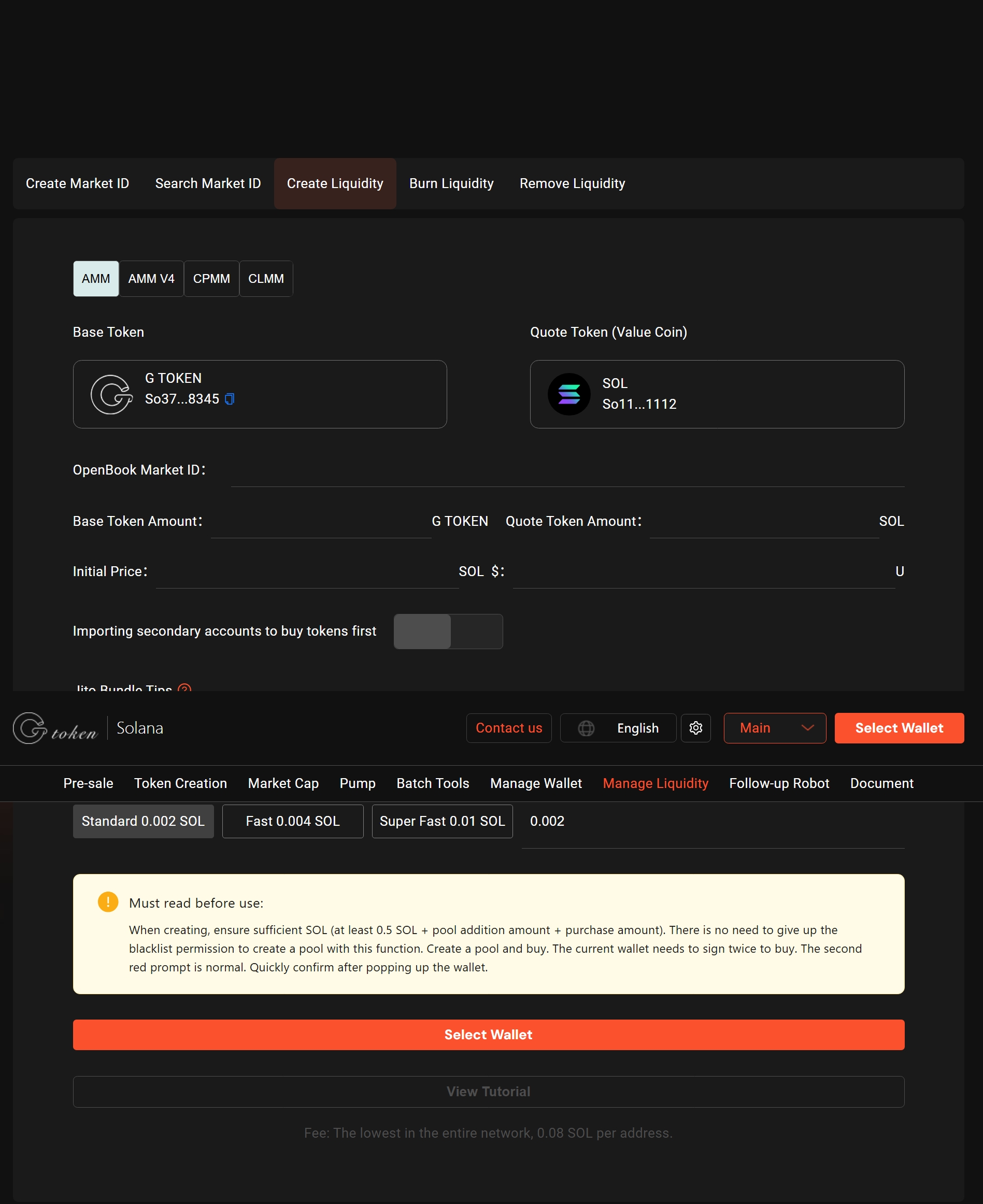
Connect your Phantom Wallet
Enter OpenBook Market ID
Select Base Token and Quote Token
Enter the number of tokens to be added to the pool
Selct the trading start time
Click on "Create Now",Confirm in your wallet and pay the fee
Solana Liquidity Pool Creation Tutorial
1、Open GTokenTool and connect your wallet
First, you need to open the GTokenTool token creation page via this link: https://sol.gtokentool.com/en/liquidityManagement/createMarket and click "Connect Wallet" in the top-right corner.
Or you can find the Solana liquidity page through the navigation bar of the GTokenTool official website:
Once your wallet address appears in the top-right corner, it means your wallet is successfully connected.
Next, we can choose to create either a Raydium Legacy AMM V4 pool or a Raydium CPMM pool. The differences between the two are as follows:
Cost Difference:
AMM V4 pool creation costs approximately 0.6 SOL.
CPMM pool creation costs approximately 0.3 SOL.
Requirement Difference:
AMM V4 requires an OpenBook market ID.
CPMM does not require a market ID.
Stability Difference:
AMM V4 pools are well-tested and more stable.
CPMM is relatively new and less stable.
Support Difference:
AMM V4 pools are widely supported by trading bots and wallets.
CPMM pools may have limited support.
Token 2022 Compatibility:
AMM V4 does not support Token 2022 tokens.
CPMM supports Token 2022 tokens.
2. How to create Raydium AMM V4 liquidity pool?
AMM V4 is Raydium's time-tested liquidity protocol. Apart from being expensive, it has almost no disadvantages. Next, I will explain in detail how to create AMM V4 liquidity.
In the first step, we directly open the Raydium AMM liquidity creation page, select "Raydium -- AMM OpenBook ID", and enter a series of parameters
OpenBook ID: If you already have a OpenBook market ID, you can directly input the ID and click "Check."If you don't have one yet, you can create it here: https://solana.GTokenTool.org/en/market.
Base Token: This is the token you have already created. No manual input is required, as the system will automatically query the token using openbook ID.
Quote Token: This is the paired token, such as SOL, USDT, or USDC. No manual input is required, as the system will automatically query the token using openbook ID.
Add Base Token Amount: Specify the amount of your basic token you wish to add to the liquidity pool (no specific limit is required)
Add Quote Token Amount:Specify the amount of the paired token you wish to add to the liquidity pool (no specific limit is required)
Estimated Launch Price: Adding 100 tokens + 100 USDT will result in an initial listing price of 1 USDT per token.Adding 100 tokens + 1 SOL will result in an initial listing price of 0.01 SOL per token.Assuming the price of SOL is 260 USDT, the initial listing price would be 2.6 USDT per token.
Estimated LP Received:Based on the quantity and ratio of tokens you add to the pool, the amount of LP tokens you will receive is determined. LP tokens are issued by Raydium and serve as proof of your liquidity contribution. If the LP tokens are destroyed or transferred, you will no longer be able to remove your liquidity.
Start Time
Now: The liquidity pool will be live and tradable as soon as it's created.
Custom Time: Set a specific launch time (based on your local timezone).For example, in Singapore, the timezone is UTC+8.In Dubai, the timezone is UTC+4.
Bundle Purchase: Coming soon, please stay tuned
After entering the amounts and confirming they are correct, click the "Create Now" button. Phantom wallet confirmation prompt will appear (if you receive a notification that the amount is too high, it may be due to insufficient SOL balance)
Wait a few seconds, and if you receive a transaction success message, it means the liquidity pool has been successfully created.
At this point, the entire Raydium AMM V4 liquidity pool has been created, and you can then go to Solana Swap for trading.
3. How to create Raydium CPMM liquidity pool?
Raydium CPMM is the latest standard AMM pool introduced by Raydium, supporting Token 2022 and no longer requiring an OpenBook market ID. Compared to the Legacy AMM v4 pool, CPMM pools are simpler and more cost-effective to create.
Next, GTokenTool will provide a detailed demonstration on how to create CPMM liquidity pool.
Select Token
In the first step, we directly open the Raydium AMM liquidity creation page, select "Raydium CPMM", and enter a series of parameters
Base Token: The token you have created.
Quote Token: The paired token, such as SOL or USDC.
After we select the base token and the quote token, click the Check Balance button
Next, you need to enter the number of tokens to be added to the pool, as well as some other parameters
Base Token: Selections were already completed in the previous step.
Quote Token: Selections were already completed in the previous step.
Add Base Token Amount: Specify the amount of your basic token you wish to add to the liquidity pool (no specific limit is required)
Add Quote Token Amount:Specify the amount of the paired token you wish to add to the liquidity pool (no specific limit is required)
Estimated Launch Price: Adding 100 tokens + 100 USDT will result in an initial listing price of 1 USDT per token.Adding 100 tokens + 1 SOL will result in an initial listing price of 0.01 SOL per token.Assuming the price of SOL is 260 USDT, the initial listing price would be 2.6 USDT per token.
Estimated LP Received:Based on the quantity and ratio of tokens you add to the pool, the amount of LP tokens you will receive is determined. LP tokens are issued by Raydium and serve as proof of your liquidity contribution. If the LP tokens are destroyed or transferred, you will no longer be able to remove your liquidity.
Start Time
Now: The liquidity pool will be live and tradable as soon as it's created.
Custom Time: Set a specific launch time (based on your local timezone).For example, in Singapore, the timezone is UTC+8.In Dubai, the timezone is UTC+4.
Bundle Purchase: Coming soon, please stay tuned
After confirming that the information is correct, you click the Create Now button, and the wallet will pop up for confirmation
Once you confirm the transaction in your wallet, the liquidity pool creation process will be completed.