What is Solana?
Solana is a high-performance blockchain platform founded in 2017 by Anatoly Yakovenko to address scalability challenges in blockchain technology. It features an innovative consensus mechanism called Proof of History (PoH) combined with Proof of Stake (PoS), enabling lightning-fast transaction speeds (theoretically up to 65,000 TPS) with extremely low fees (typically under $0.01 per transaction).
Solana's Development Timeline
2017: Project launch and whitepaper release
March 2020: Mainnet beta launch
2021: Exponential growth as Ethereum's primary competitor
2022: Network outages and subsequent improvements
2023-Present: Enhanced stability and ecosystem expansion
SOL Token Price History
Solana's native token SOL has experienced significant volatility:
2020 launch price: ~$0.95
November 2021 ATH: ~$260
2022 bear market low: ~$8
2023-2024 recovery: 50−200 range
Notable Solana Events
DeFi Summer 2021: Explosive growth of DeFi projects
NFT Boom: Emergence as #2 NFT platform after Ethereum
Network Outages: 2021-2022 stability challenges
FTX Collapse Impact: Temporary setback due to FTX/Alameda ties
2023 Renaissance: Developer activity resurgence
Part 2: Prerequisites for Creating Solana Tokens
Technical Requirements
Node.js (v16+ recommended)
Solana CLI Tools
Solana Wallet (Phantom, Solflare, or CLI wallet)
SOL tokens (for transaction fees)
Code Editor (VS Code recommended)
Knowledge Requirements
Basic Rust or JavaScript knowledge
Command line proficiency
Understanding of Solana's account model and token standards (SPL tokens)
Financial Requirements
Token creation itself costs little (~0.02-0.05 SOL), but you'll need:
Transaction fee funds (recommend minimum 0.1 SOL)
Account rent deposits (~0.002 SOL per account)
Part 3: Token Creation Process Overview
Setup Development Environment
Install necessary tools
Configure Solana CLI
Create Wallet
Generate keypair
Obtain testnet/mainnet SOL
Create Token
Use CLI or programmatic methods
Set token metadata
Distribute Tokens
Create associated token accounts
Mint initial supply
Verify Token
Check blockchain explorer
Test transfer functionality
Part 4: Detailed Creation Methods
Method 1: Using Solana CLI
Step 1: Install and Configure Tools
sh -c "$(curl -sSfL https://release.solana.com/stable/install)"solana config set --url devnet
solana-keygen new
solana airdrop 1
Step 2: Create Token
spl-token create-token
Returns Token ID (e.g., 3BZ3...)
Step 3: Create Token Account
spl-token create-account <TOKEN_ID>
Step 4: Mint Tokens
spl-token mint <TOKEN_ID> <AMOUNT>
Step 5: Disable Minting (Optional)
spl-token authorize <TOKEN_ID> mint --disable
Method 2: Using JavaScript/TypeScript SDK
Install Dependencies
npm install @solana/web3.js @solana/spl-token
Sample Code
const {
  Connection, clusterApiUrl, Keypair, PublicKey,
  Token, Transaction, sendAndConfirmTransaction} = require('@solana/web3.js');const { TokenInstructions } = require('@solana/spl-token');(async () => {
  const connection = new Connection(clusterApiUrl('devnet'));
  const payer = Keypair.fromSecretKey(Uint8Array.from([/*Private key*/]));

  const token = await Token.createMint(
    connection,
    payer,
    payer.publicKey,
    null,
    9,
    TokenInstructions.TOKEN_PROGRAM_ID
  );

  console.log('Token created:', token.publicKey.toString());

  const associatedAccount = await token.createAssociatedTokenAccount(
    payer.publicKey  );

  await token.mintTo(
    associatedAccount,
    payer,
    [],
    1000000000
  );

  console.log('Tokens minted!');})();
Method 3: Using Rust (Advanced)
Environment Setup
rustup updatecargo install spl-token-cli
Sample Code
use solana_program::{
    account_info::{next_account_info, AccountInfo},
    entrypoint,
    entrypoint::ProgramResult,
    pubkey::Pubkey,
    msg,
    program_error::ProgramError,};use spl_token::instruction::{initialize_mint, mint_to};use spl_token::state::Mint;entrypoint!(process_instruction);fn process_instruction(
    program_id: &Pubkey,
    accounts: &[AccountInfo],
    instruction_data: &[u8],) -> ProgramResult {
    let account_info_iter = &mut accounts.iter();

    let mint_account = next_account_info(account_info_iter)?;
    let mint_authority = next_account_info(account_info_iter)?;
    let payer = next_account_info(account_info_iter)?;

    let init_ix = initialize_mint(
        &spl_token::id(),
        mint_account.key,
        mint_authority.key,
        None,
        9,
    )?;

    solana_program::program::invoke(
        &init_ix,
        &[
            mint_account.clone(),
            mint_authority.clone(),
            payer.clone(),
        ],
    )?;

    msg!("Token mint initialized successfully!");
    Ok(())}
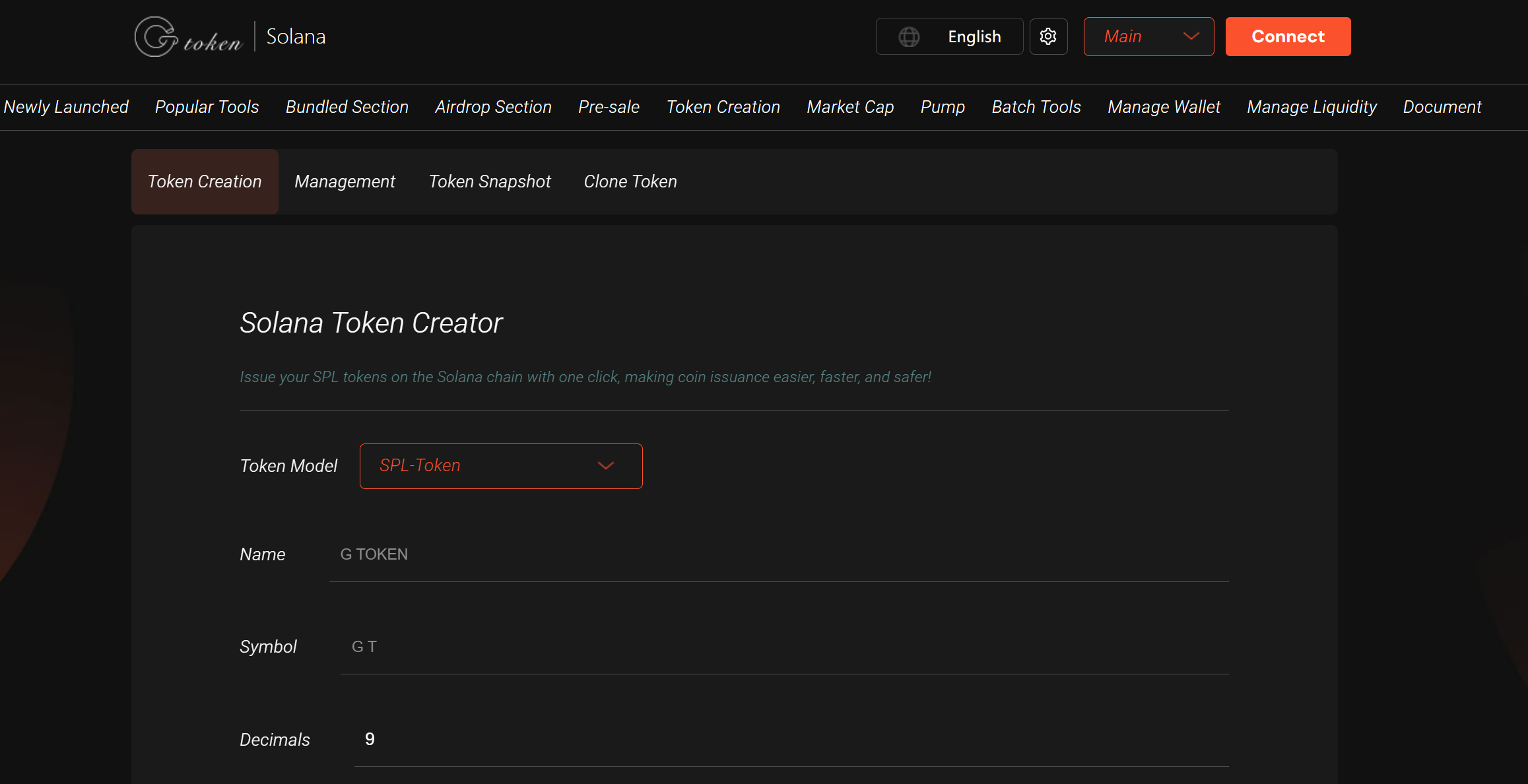
Method 4: GTokenTool No-Code Solutions
Solana Token Creator
Visit: https://sol.gtokentool.com
Connect wallet
Enter token details
Pay fees and create
Part 5: Post-Creation Actions
Verify Token
Check token ID on Solscan
Verify supply and holders
Add Metadata
spl-token update <TOKEN_ID> --name "MyToken" --symbol "MTK"
Distribute Tokens
spl-token create-token0
Part 6: Summary & Best Practices
Method Comparison
| Method | Difficulty | Flexibility | Use Case |
|---|---|---|---|
| CLI | Easy | Low | Quick testing |
| JS SDK | Medium | High | Programmatic control |
| Rust | Hard | Maximum | Custom logic |
| GTokenTool | Easiest | Minimal | Non-technical users |
Best Practices
Security
Safeguard mint authority keys
Consider disabling minting
Use multisig for important operations
Token Design
Set appropriate decimals (6-9 typically)
Plan tokenomics in advance
Consider compliance features
Cost Optimization
Use devnet/testnet for development
Batch operations
Estimate rent costs
User Experience
Provide clear documentation
Add token icons/metadata
Establish initial liquidity (e.g., Raydium)
FAQ
Q: How much SOL is needed to create a token?
A: ~0.02-0.05 SOL base cost, depending on network conditions.
Q: Can token properties be modified after creation?
A: Some metadata can change, but core properties like token ID and decimals are immutable.
Q: How to make tokens visible in wallets?
A: Submit metadata to Solana Token List for wallet recognition.
Q: Is token creation permissioned?
A: Solana doesn't require approval, but exchanges may have listing requirements.
This comprehensive guide equips you with multiple approaches to token creation on Solana. Whether you're a developer or project founder, Solana offers versatile tools for digital asset issuance. Remember that token creation is just the beginning - liquidity provisioning, community building, and application integration are equally crucial for success in Solana's evolving ecosystem,GTokenTool provides numerous tools specifically for Solana project parties to assist in operations, such as solana creating liquidity Solana market value robots, Solana batch airdrops, and other tools.