Introduction to the OKB Chain
The OKB Chain (OKX Chain, Chain ID: 196) is a high-performance, decentralized public chain developed by the OKX Blockchain Foundation. It aims to provide efficient and low-cost solutions for digital asset transactions and blockchain applications. Built on the Cosmos SDK, the OKB Chain supports cross-chain interoperability and high-throughput transactions, making it particularly suitable for decentralized finance (DeFi), NFT trading, and other blockchain ecosystem applications. OKB is the native token of the OKX ecosystem, used for paying transaction fees, participating in governance, and enjoying trading discounts, among other functions. The OKB Chain is recognized for its fast confirmation times, low transaction fees, and ecosystem integration capabilities.
What Are Batch Transfers?
Batch transfers refer to the process of sending tokens or assets to multiple addresses in a single transaction on a blockchain network. Unlike sending transactions one by one, batch transfers distribute tokens to multiple recipients through a single transaction, simplifying the process and optimizing costs. On the OKB Chain, batch transfers are commonly used in the following scenarios:
Token Airdrops: Projects distribute tokens to community users to promote their initiatives.
Bulk Payments: Sending rewards, salaries, or dividends to multiple users or partners.
NFT Distribution: Distributing NFT assets to multiple holders in bulk.
Ecosystem Incentives: Providing token rewards to users within an ecosystem.
Why Use Batch Transfers?
Batch transfers on the OKB Chain offer the following advantages:
Time Savings: Compared to sending transactions individually, batch transfers complete multiple transfers at once, significantly reducing operational time.
Cost Reduction: By consolidating multiple transfers into a single transaction, gas fees on the chain are reduced, making it especially economical on low-fee networks like the OKB Chain.
Efficient Management: Simplifies large-scale token distribution for projects or organizations, minimizing human errors.
Improved User Experience: Recipients receive assets quickly, making it ideal for airdrops or reward distributions.
Support for Diverse Needs: Suitable for distributing tokens, NFTs, or other assets, catering to various blockchain application scenarios.
Batch Transfer Process
Below is the process for performing batch transfers on the OKB Chain using the GTokenTool platform:
Preparation:
Wallet Connection: Connect a wallet supporting the OKB Chain (e.g., OKX Wallet, TokenPocket) to the GTokenTool platform. Ensure the wallet has sufficient OKB to cover gas fees.
Token Preparation: Ensure the account holds enough tokens (e.g., OKB or other tokens on the OKB Chain) for the transfers.
Recipient Address Collection: Prepare a list of recipient addresses and corresponding amounts, typically imported in CSV or Excel format. Example format:
textAddress,Amount 0x123...,100 0x456...,50
Access the GTokenTool Platform:
Open the link: https://www.gtokentool.com/sendertoken?chainId=196
Select the OKB Chain (Chain ID: 196) as the target network.
Log in and connect your wallet, ensuring the network is switched to the OKB Chain.
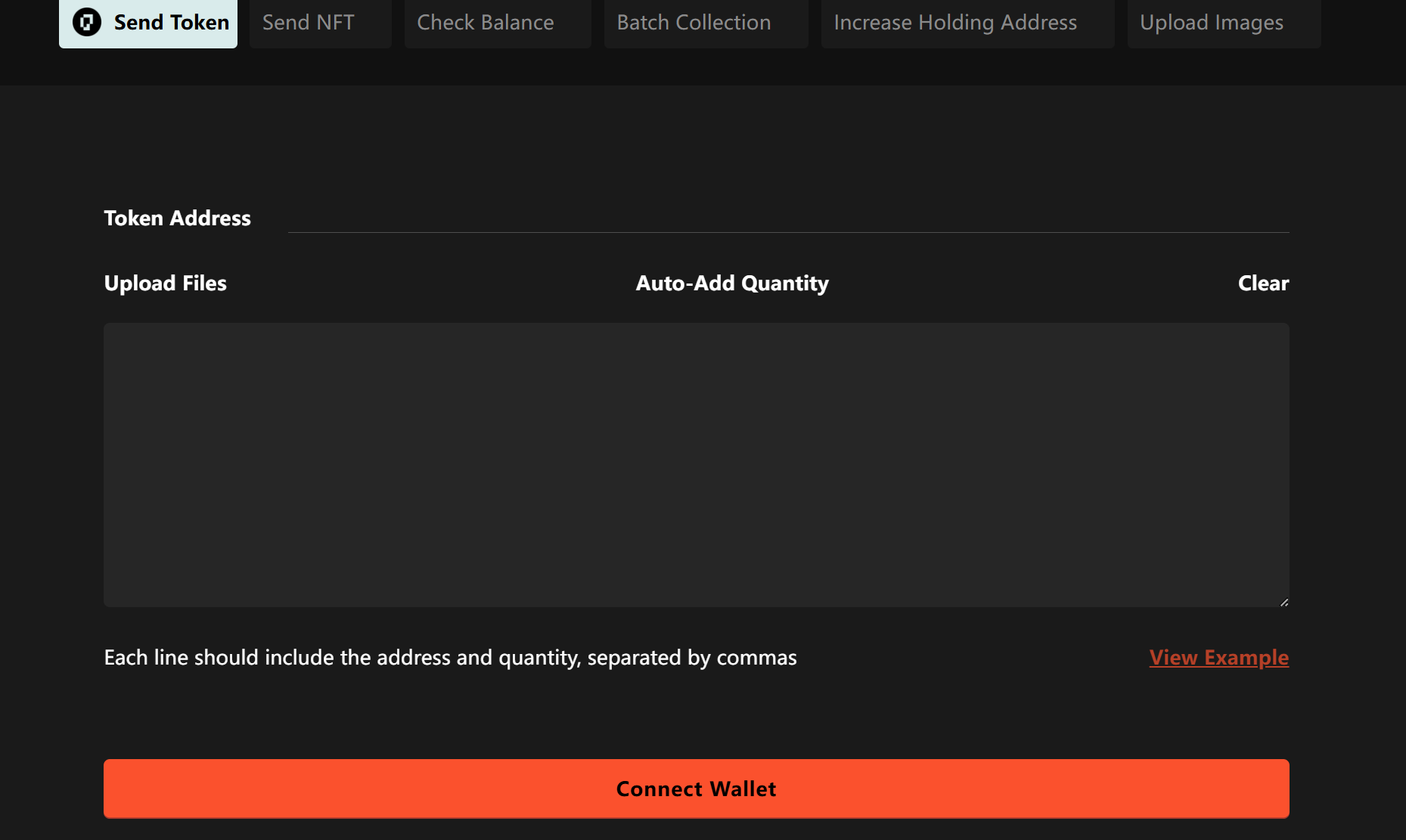
Upload Transfer Data:
Select the "Batch Transfer" function on the GTokenTool interface.
Upload the file containing recipient addresses and amounts, or manually enter the addresses and amounts.
Verify the data format to ensure addresses are valid and amounts are correct.
Configure Transaction Parameters:
Select the type of token to transfer (e.g., OKB or a custom token).
Set the gas price and gas limit (the platform typically provides recommended values for cost optimization).
Preview the transfer details to confirm the total amount and recipient addresses are accurate.
Confirm and Send the Transaction:
Click the "Send" button, and the platform will generate a batch transfer transaction.
Confirm the transaction using your wallet and pay the gas fees on the OKB Chain.
Wait for the transaction to be confirmed on the chain, which usually takes a few seconds to minutes on the OKB Chain.
Check Transaction Status:
View the transaction status on GTokenTool or an OKB Chain explorer (e.g., OKX Explorer).
Ensure all recipient addresses have received the tokens correctly.
Record and Archive:
Download the transaction records and save the transfer details for future reference.
Frequently Asked Questions
Are batch transfers secure?
Using trusted platforms like GTokenTool and official wallets ensures security.
What is the minimum amount for batch transfers?
There is no strict minimum amount on the OKB Chain, but ensure the account has enough OKB to cover gas fees.
Can I perform batch transfers for NFTs?
Yes, GTokenTool supports batch transfers of NFTs on the OKB Chain, with a process similar to token transfers.
What if a transfer fails?
Check wallet balance, gas settings, or network connection. If the failure is due to an incorrect address, the funds typically remain in the sender’s account, but the transaction must be reinitiated.
How are fees calculated for batch transfers?
Fees primarily consist of gas fees on the OKB Chain, depending on transaction complexity and network congestion.
Conclusion
The OKB Chain, as an efficient and low-cost blockchain platform, provides an ideal environment for batch transfers. By consolidating multiple transactions into a single operation, batch transfers significantly save time and gas fees, making them particularly suitable for airdrops, reward distributions, and NFT distributions. Using tools like GTokenTool, the batch transfer process is straightforward and intuitive, requiring only a few steps from data preparation to transaction completion. Whether for projects or individual users, batch transfers enhance efficiency, reduce costs, and maintain security and reliability. Users are advised to choose trusted platforms, carefully verify data, and ensure correct wallet and network settings for the best experience.