As blockchain technology evolves, Layer 2 solutions like Arbitrum have become the go-to choice for developers and projects due to their high speed and low cost. If you're looking to launch your own token on the Arbitrum network, it's now simpler than ever. This article provides a comprehensive breakdown of the process, benefits, and FAQs for creating a token on Arbitrum, including a look at an efficient creation tool.
Part 1: Arbitrum and Token Creation - The Basics
1. What is Arbitrum?
Arbitrum is a leading Ethereum Layer 2 scaling solution. It uses "Optimistic Rollup" technology to move most complex computation and transaction processing off-chain, then batches the results and posts them to the Ethereum Mainnet for final security confirmation. This means it inherits Ethereum's top-tier security while achieving much faster transaction speeds and extremely low gas fees.
2. Why Create a Token on Arbitrum?
Compared to creating a token directly on the Ethereum Mainnet (Layer 1), launching on Arbitrum offers significant advantages:
-
Extremely Low Gas Fees: This is the biggest draw. Deploying a token on Ethereum can cost hundreds or even thousands of dollars, while on Arbitrum, the cost is typically just a few dollars to tens of dollars, dramatically lowering the barrier to entry for startups and individuals.
-
High-Speed Transactions: Arbitrum's transaction processing speed (TPS) is far greater than Ethereum's, with near-instant confirmations, providing a smooth user experience.
-
Ethereum-Level Security: Arbitrum's security is anchored by the Ethereum Mainnet, meaning your token benefits from the same robust security.
-
Thriving Ecosystem: Arbitrum has a massive and growing DeFi, NFT, and GameFi ecosystem. Your token can be easily listed on major DEXs like Uniswap and SushiSwap and interact with other protocols.
3. The Token Creation Tool: GTokenTool Token Factory
For those who aren't comfortable with smart contract programming, using a token generator is the best approach. The GTokenTool Token Factory is a user-friendly platform designed for networks like Arbitrum. It simplifies the entire process—you don't need to write a single line of code. You just fill in the parameters via a graphical interface to deploy your token.
Part 2: Step-by-Step Guide to Creating a Token on Arbitrum (Using GTokenTool)
Before you start, make sure you have the following ready:
-
A Crypto Wallet: Like MetaMask, Coinbase Wallet, etc.
-
A Small Amount of ETH for Gas: You need to switch your wallet's network to "Arbitrum One" and have some ETH in it to pay for transaction fees.
Here is your step-by-step guide using GTokenTool:
-
Access the Tool and Connect Your Wallet
-
Open your browser and go to https://gtokentool.com/tokenfactory?chainId=42161.
-
Click the "Connect Wallet" button on the page.
-
Select your wallet (e.g., MetaMask) from the pop-up window and authorize the connection.
-
Select Your Token Type
-
ERC-20: The standard for fungible tokens (like BTC or ETH). Use this for governance tokens, utility tokens, or any token where each unit is identical.
-
ERC-404: An experimental hybrid standard that combines features of ERC-20 and ERC-721, enabling "fractionalized NFTs."
-
The tool will typically offer two main token standards:
-
For this guide, we'll use the most common type: ERC-20.
-
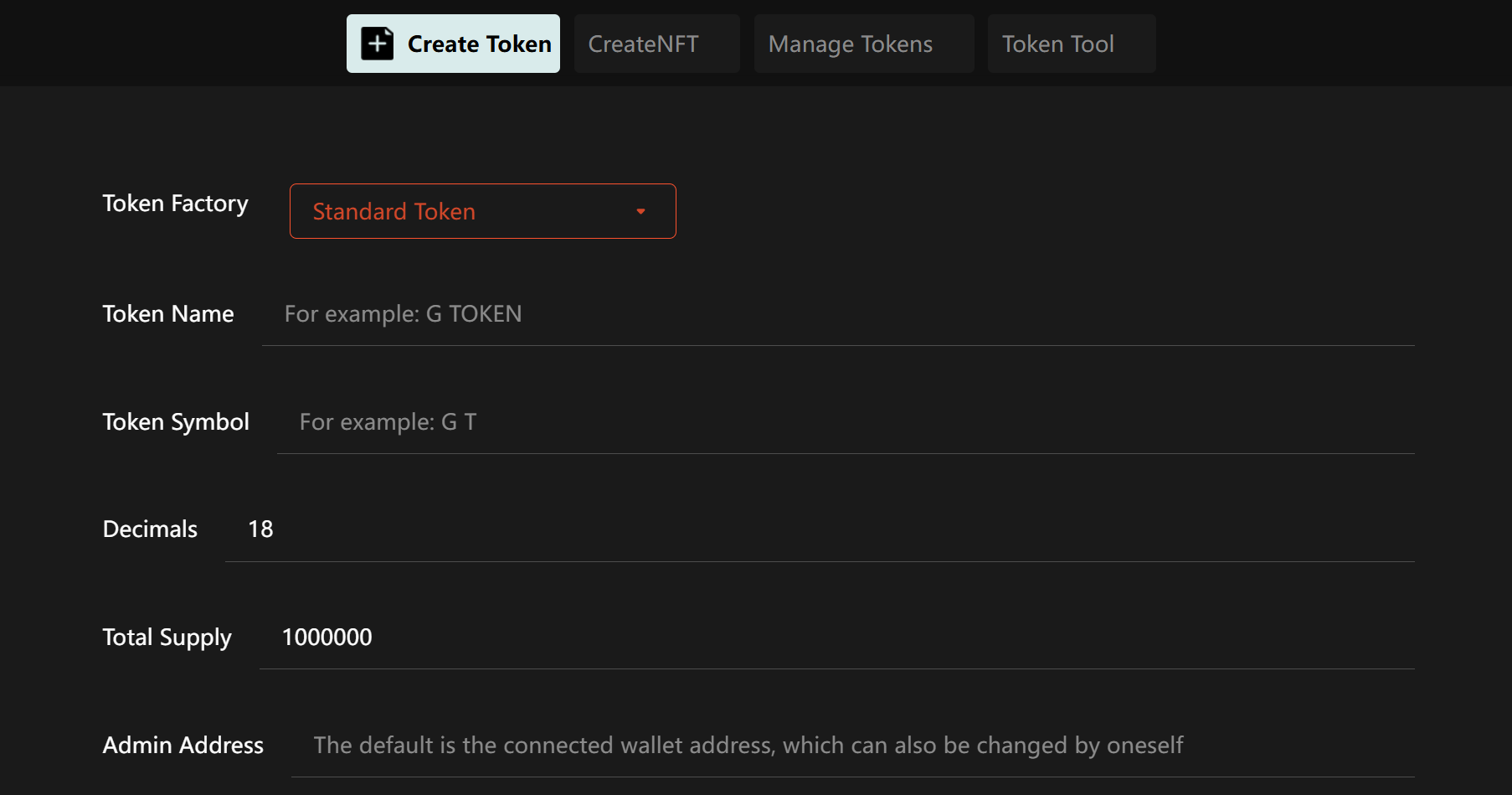
Enter Your Token's Parameters
This is the most critical step. Fill in the details carefully: -
Token Name: The official name of your token (e.g., My Arbitrum Token).
-
Token Symbol: The ticker symbol, usually 3-5 uppercase letters (e.g., MAT).
-
Total Supply: The total number of tokens you want to issue (e.g., 1,000,000,000). Pay attention to decimals; 100 million is
100000000. -
Decimals: This determines how divisible your token is. It's common to set this to 18 (like ETH), meaning one token can be divided into 10^18 smaller units.
-
Advanced Features (Optional)
-
Some tools offer advanced options, like automatically adding liquidity for your token upon creation or setting up transaction taxes. GTokenTool may provide these; configure them as needed.
-
Create the Token
-
Double-check that all the information you entered is correct. Once deployed on the blockchain, most parameters are immutable and cannot be changed.
-
Click the "Create Token" or "Deploy Contract" button.
-
Your wallet (like MetaMask) will pop up with a transaction confirmation window showing the estimated gas fee. Verify the details and click "Confirm" to submit the transaction.
-
Wait for Confirmation and You're Done!
-
Thanks to Arbitrum's speed, the transaction will usually confirm within seconds to a minute.
-
Upon success, the tool will display a transaction hash and your token's contract address. Be sure to save this contract address securely—it's your token's unique identifier on the blockchain.
Part 3: Frequently Asked Questions (FAQ)
Q1: After creation, how do I distribute the tokens to others?
A: You can use your wallet's "Send" function to transfer tokens to other wallet addresses. The recipients will first need to "import" your token into their wallet using its contract address (in MetaMask, this is done via "Import Token").
Q2: How do I get my token listed on an exchange?
A: Creating the token is just the first step. To make it tradable, you need to create a trading pair and provide initial liquidity on a Decentralized Exchange (DEX) like Uniswap or SushiSwap, which are already deployed on Arbitrum. This is a separate process that requires capital (your token and ETH).
Q3: Is it safe to create a token on Arbitrum?
A: The Arbitrum network itself is secure. The primary safety concern is the tool you use. Reputable tools like GTokenTool typically use audited, standard contract code, making them relatively safe. However, always ensure you are using the official website link and be wary of phishing sites.
Part 4: Conclusion
Creating a token on Arbitrum is an efficient and economical choice. It leverages the advantages of Layer 2 technology to overcome the high costs and slow speeds of the Ethereum Mainnet. With no-code platforms like the GTokenTool Token Factory, even users without a technical background can deploy their own token in just a few minutes.
However, it's crucial to remember that creating a token is just the beginning. A successful token requires a solid project idea, a clear use case, an active community, and a solid plan for listing and liquidity. Make sure you do your homework and have a full plan before you hit the "Create" button.
We hope this guide helps you launch your token on Arbitrum successfully