Metis, an Ethereum Layer 2 network using Optimistic Rollups, can be added to MetaMask through ChainList or manual entry.
It offers low-cost, scalable transactions and supports EVM-compatible dApps, staking, and a growing ecosystem of DeFi protocols.
Can I Add Metis to MetaMask?
Yes, you can add Metis to MetaMask. It is an Ethereum Layer 2 network that uses Optimistic Rollups and a decentralized sequencer system to provide scalability, low costs, and secure transactions. To connect, go to MetaMask settings, select "Add Network," and enter Metis' network name, chain ID, and RPC URL.
How to Add Metis to MetaMask
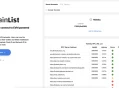
You can connect Metis to MetaMask by using ChainList, a trusted tool that provides verified details for EVM-compatible blockchains. Here’s how to do it:
Visit ChainList: Open the ChainList app and connect your MetaMask wallet.
Search for Metis: Type "Metis" into the search bar.
Add Network: Select Metis from the search results and click "Add to MetaMask."
Confirm in MetaMask: Approve the prompts in MetaMask to finalize the setup.

Metis RPC and Chain ID
To manually add Metis to MetaMask without ChainList, configure the network settings directly using these verified details from the Metis documentation:
Network Name: Metis Andromeda Mainnet
RPC URL: https://andromeda.Metis.io/?owner=1088
Chain ID: 1088
Currency Symbol: METIS
Block Explorer URL: https://andromeda-explorer.metis.io
Once added, you can securely access Metis' Layer 2 ecosystem and decentralized apps.
About Metis
Metis is an Ethereum Layer 2 scaling solution leveraging Optimistic Rollups and decentralized sequencers for high throughput, low-cost transactions, and secure anchoring on Ethereum Layer 1.
Fully EVM-compatible, it supports dApps, cross-chain interoperability, and community-led governance via METIS token staking, combining scalability, fault tolerance, and decentralization for Web3.

Bottom Line
Adding Metis to MetaMask gives you direct access to its Layer 2 network for faster, cheaper transactions and decentralized applications.
You can connect securely by either using ChainList or entering the verified network details manually, ensuring full integration with Metis’ infrastructure for Web3 use.