1. Overview of OKB Chain (OKT Chain)
OKB Chain, commonly referred to as OKT Chain (Chain ID: 196), is a blockchain network developed by OKX (formerly OKEx). It aims to provide an efficient and scalable solution for digital asset trading and decentralized applications (DApps). Below are the key features of OKT Chain:
Technical Architecture:
OKT Chain is a high-performance blockchain built on the Cosmos SDK, utilizing the Tendermint consensus mechanism for fast transaction confirmation and low latency.
It is a Layer-1 blockchain independent of Ethereum but compatible with the Ethereum Virtual Machine (EVM), supporting EVM-based smart contract development.
OKT Chain focuses on DeFi, NFTs, cross-chain bridges, and other applications, offering high throughput and low transaction fees.
Token Mechanism:
OKT is the native token of OKT Chain, used for paying gas fees, governance voting, and staking.
OKB is the utility token of the OKX ecosystem, primarily used for trading fee discounts, staking rewards, and participation in Jumpstart events. It can also be bridged to OKT Chain via OKX Bridge.
Ecosystem Advantages:
OKT Chain supports cross-chain interoperability, enabling compatibility with major blockchains like Ethereum and Binance Smart Chain (BSC).
OKX’s large user base provides extensive ecosystem support for OKT Chain, covering DeFi, NFTs, GameFi, and more.
Public data indicates that OKT Chain offers low transaction fees, making it ideal for high-frequency trading and token issuance.
Chain ID & Network:
The network with Chain ID 196 is the OKT Chain mainnet, designed for decentralized applications within the OKX ecosystem.
Developers can interact with OKT Chain using OKX tools (e.g., OKX Wallet) to deploy smart contracts or create tokens.
2. GTokenTool
GTokenTool is a one-click token issuance platform that simplifies the creation and management of blockchain tokens, supporting multiple public chains, including OKT Chain (Chain ID: 196). Below are its core features:
Platform Features:
One-Click Token Creation: No coding required—users can quickly generate tokens via a web interface, suitable for beginners and professionals.
Multi-Chain Support: Compatible with OKT Chain, Solana, Ethereum (ETH), Binance Smart Chain (BSC), TON, and other major blockchains.
Customizable Parameters: Allows setting token name, symbol, total supply, tax mechanisms (e.g., marketing fees, transaction taxes), lock-up periods, and staking rewards.
Additional Services: Supports market-making, batch airdrops, token presales (IDOs), NFT minting, and more to meet diverse project needs.
User Experience:
User-Friendly: An intuitive interface lets users input token parameters, connect a wallet (e.g., OKX Wallet or MetaMask), and complete deployment in minutes.
Community & Support: GTokenTool has an active community and professional customer service for technical assistance.
Security: The platform claims to use secure smart contract templates and allows custom permissions to mitigate risks.
Compatibility with OKT Chain:
GTokenTool supports OKT Chain (Chain ID: 196), enabling users to create standard tokens (e.g., ERC-20-like tokens on the EVM-compatible chain).
Users can connect via OKX Wallet and pay gas fees in OKT to deploy tokens.
3. Token Creation Process on OKB Chain
Here’s a step-by-step guide to creating a token on OKT Chain using GTokenTool:
Step 1: Preparation
Device: Use a computer or mobile device with a wallet supporting OKT Chain (e.g., OKX Wallet or MetaMask).
Network Configuration: Add OKT Chain Mainnet to your wallet:
Network Name: OKT Chain Mainnet
RPC URL:
https://exchainrpc.okex.orgChain ID: 196
Currency Symbol: OKT
Funds: Ensure your wallet has enough OKT for gas fees (usually minimal).
Access Platform: Visit GTokenTool’s website: https://www.gtokentool.com/tokenfactory?chainId=196
Step 2: Connect Wallet
On GTokenTool’s Token Factory page, click "Connect Wallet."
Choose OKX Wallet or MetaMask, then switch to the OKT Chain network (Chain ID: 196).
Authorize the connection and ensure your wallet is unlocked.
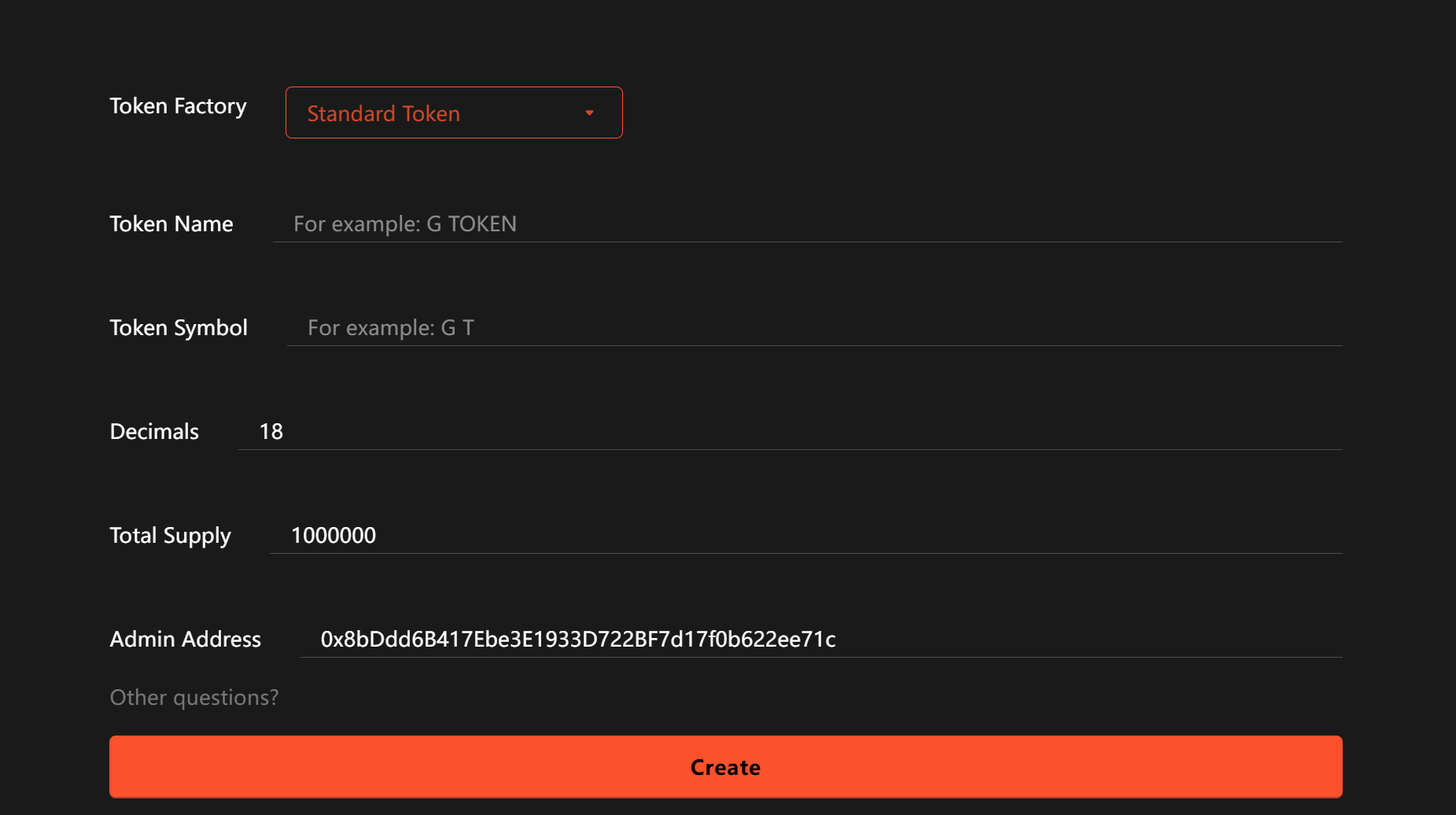
Step 3: Configure Token Parameters
Basic Info:
Token Name: Full name (e.g., "My Token").
Token Symbol: Short name (e.g., "MTK").
Total Supply: Total tokens to issue (e.g., 100,000,000).
Decimals: Typically set to 18 (Ethereum standard).
Advanced Settings (Optional):
Tax Mechanism: Set transaction taxes (e.g., 2% for marketing).
Lock-Up: Define vesting periods (e.g., 6 months).
Permissions: Enable/disable functions like minting or burning.
Review all settings before proceeding.
Step 4: Deploy Token
Click "Create Token." GTokenTool will generate the smart contract.
Confirm transaction details, including gas fees (paid in OKT).
Sign the transaction in your wallet. Deployment usually completes in seconds.
Upon success, the platform will display the token’s contract address.
Step 5: Verification & Management
Verify Contract: Submit the contract address to an OKT Chain explorer (e.g., OKLink) for transparency.
Manage Token: Use GTokenTool’s dashboard for airdrops, burns, or lock-ups.
Add Liquidity: List the token on OKX DEX or other OKT Chain-supported DEXs (e.g., create an MTK/OKT pair).
Step 6: Promotion
Use GTokenTool’s market-making tools to monitor price and volume.
Launch airdrops or IDOs to attract users.
Promote the token within the OKX ecosystem (e.g., via OKX Jumpstart).
4. Key Considerations
Wallet Security: Never share private keys or seed phrases.
Token Parameters: Double-check supply and tax settings to avoid errors.
Gas Fees: Ensure sufficient OKT for transactions.
5. FAQs
Q: What roles do OKB and OKT play in token creation?
A: OKT is used for gas fees on OKT Chain, while OKB is OKX’s utility token (for trading discounts, staking, etc.). Only OKT is needed for deployment.
Q: Can I create tokens with special features?
A: Yes! GTokenTool supports custom taxes, lock-ups, burns, etc. For complex functions, consult their docs or support team.
Q: How to promote my token on OKT Chain?
A: Add liquidity on OKX DEX, join OKX Jumpstart, run airdrops, or market on social media. GTokenTool’s analytics tools can help track performance.
6. Conclusion
Using GTokenTool to create tokens on OKT Chain (Chain ID: 196) is a fast and user-friendly process, ideal for developers and projects entering the blockchain space. OKT Chain’s high speed, EVM compatibility, and OKX ecosystem support provide a robust foundation, while GTokenTool’s one-click issuance and multi-chain features lower technical barriers for all users.